
What this is for
Email ROI is the metric that justifies the channel. "Open rates are up" is interesting; "every dollar spent on email returns $42" is the conversation you have with your finance team. This guide shows the actual math, the AcelleMail data that feeds it, and the costs people forget to count.
The formula
ROI = (Revenue from email − Cost of email) / Cost of email × 100
Multiply by 100 to express as a percentage. 300% ROI means every $1 spent returned $3 in profit. −50% ROI means every $1 spent lost 50¢.
Revenue — pull from your store, not from AcelleMail
AcelleMail tells you how many clicks happened. Your e-commerce store / CRM tells you how many of those clicks converted into purchases. The reliable path:
- Tag every email link with UTMs (UTM Parameters article)
- Your store records
utm_campaignon every order (Shopify, WooCommerce, Stripe, etc. all support this natively or via plugin) - Filter orders by the campaign's UTM to get revenue attributable to that campaign
Without UTMs, you cannot reliably attribute revenue to specific campaigns — "email referrals" in Google Analytics is too coarse. Set up UTMs first.
Attribution windows — pick one and stick
Same campaign drives revenue over time. You need a rule for when to "stop" counting.
| Window | What it captures | Best for |
|---|---|---|
| Click → 1 hour | Direct, immediate purchases | Flash sales |
| Click → 24 hours | Same-day conversions including comparison shopping | Most consumer campaigns |
| Click → 7 days | Considered purchases, multi-touch | B2B / high-ticket |
| Click → 30 days | Full LTV influence | Long-cycle products |
For most consumer emails, 24-hour attribution is the right default. For B2B / SaaS, 7-day. Pick a window per industry and apply it consistently — comparing 24-hour ROI on one campaign to 30-day ROI on another is misleading.
Cost — the components people forget
Email feels "free" because there's no per-email cost (unlike paid ads). But there's a real cost stack:
| Cost component | Typical range | Why people miss it |
|---|---|---|
| AcelleMail subscription / hosting | $20-200/month | Fixed cost, but real |
| Sending server fees (SES, SendGrid, etc.) | $0.10-1.00 per 1,000 emails | Variable, ignored if low |
| Design time (template + email creation) | 2-8 hours per campaign × hourly rate | "Internal" so feels free |
| Copy / strategy time | 1-4 hours per campaign | Same |
| List management (segmentation, cleaning) | 2-5 hours/month | Spread across all campaigns |
| Image / asset purchase | $0-100 per campaign | Often ignored if reusing stock |
| Tooling (verification service, deliverability monitoring) | $0-500/month | Subscription that "just runs" |
A campaign's fully-loaded cost — not just the send fee — is what you divide revenue by.
A worked example
| Item | Cost |
|---|---|
| Pro-rated AcelleMail subscription (1 campaign out of 4 monthly) | $25 |
| Sending fees: 10,000 emails × $0.30/1k | $3 |
| Designer's time: 4 hours × $50 | $200 |
| Copywriter's time: 2 hours × $60 | $120 |
| Total cost | $348 |
Campaign drove $2,800 revenue (40 orders × $70 avg, attributed via UTM utm_campaign=spring_sale_2026 filter in store).
ROI = ($2,800 − $348) / $348 × 100
    = $2,452 / $348 × 100
    = 705%
Each $1 returned $7.05. Strong campaign.
Reading AcelleMail's numbers in context
AcelleMail's campaign report doesn't show revenue — that's intentional (it doesn't know what each subscriber did at your store). But it gives you the clicks that feed the calculation:
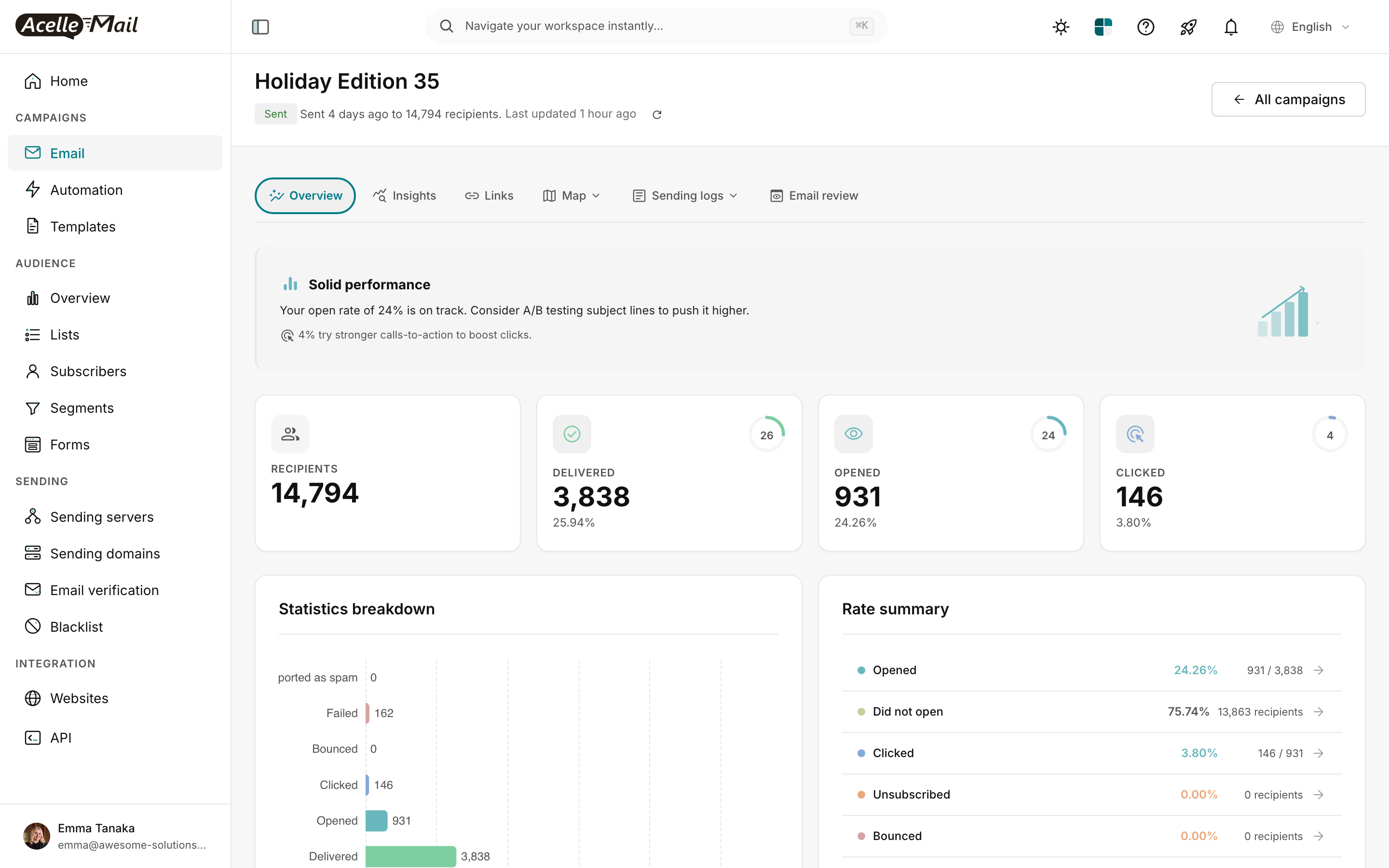
(Screenshot from Read the Campaign Report.)
The flow:
- AcelleMail says: 146 unique clicks across X UTM-tagged URLs
- Your store says: 12 orders had
utm_campaign=spring_sale_2026in the last 24 hours, totalling $840 - You compute: ROI = ($840 − $52 cost) / $52 × 100 = 1,515%
Cross-checking: 146 clicks → 12 orders = 8.2% click-to-order conversion rate. That's healthy (typical 3-15% for warmed audiences). If you see <1%, something's off — bad landing page, mismatch between subject promise and offer, etc.
Per-campaign vs per-subscriber-per-year
Two ways to look at email ROI:
| View | When to use | Calculation |
|---|---|---|
| Per-campaign ROI | Evaluate a single send | Revenue from this campaign / Cost of this campaign |
| Per-subscriber-per-year (RPY) | Evaluate the whole program | Total annual revenue / Subscribers on list |
A subscriber whose lifetime value (LTV) is $500/year contributes — across all the campaigns they receive — that $500. If your list is 10,000 subscribers and your annual email revenue is $1,200,000, your RPY = $120/subscriber/year.
| RPY | Diagnosis |
|---|---|
| $50-100 | Solid B2C program |
| $100-300 | Strong; doing many things right |
| $300-1,000+ | Best-in-class (high-LTV products, well-targeted lists) |
| <$25 | Either low-LTV product OR list is mostly inactive — run re-engagement |
Per-campaign ROI tells you which campaigns to repeat. RPY tells you whether the entire email program is worth investing in.
Hidden non-revenue value
ROI is one number, but email drives outcomes that don't show up as direct revenue:
| Hidden value | How to estimate |
|---|---|
| Brand recall / re-purchases | RPY captures some of this |
| Customer support deflection ("How do I…?" emails answered preemptively) | Survey CSAT post-campaign |
| Referrals generated by satisfied subscribers | Track refer-a-friend codes |
| Reduced churn (subscribers who stayed because the email reminded them you exist) | A/B test sending vs not sending for a quarter |
Include these qualitatively when defending the email budget — "ROI is 700% direct, plus reduced churn by 12%".
Improving ROI
Three buckets of improvement, ranked by leverage:
| Bucket | Impact | Effort |
|---|---|---|
| Reduce send cost | Low — already cheap | Switch to cheaper sending server only if usage is heavy |
| Increase conversion rate | High — better targeting, copy, offer | Focused A/B testing |
| Increase list quality | Highest — better subscribers → higher RPY | List hygiene + reduced churn |
Don't optimise cost first. Email is one of the cheapest marketing channels by far. The leverage is in conversion + list quality.
Common issues
| What you see | What to do |
|---|---|
| Reported revenue doesn't match what store thinks | Attribution window mismatch. Confirm both sides use the same window. |
| ROI looks great but business isn't growing | You're cannibalising organic / direct traffic (same customers would have bought without email). Run a holdout test: don't email 10% of the audience, compare conversion rates. |
| AcelleMail says 200 clicks, store says only 50 referrals | Most likely UTMs got stripped somewhere (browser tab restore, social-share rewrites). Audit step-by-step using UTM Parameters article §5. |
| ROI calculation says 4,000% (suspiciously high) | You probably under-counted costs. Add design + copy hours; recompute. |
| ROI looks negative — should we stop emailing? | NO — at least not based on one campaign. Look at trailing 3-month avg + RPY before pulling the plug. |
A weekly / monthly review template
For a sustainable email program, run this review on a Friday afternoon:
| Question | Where to look |
|---|---|
| What was last week's per-campaign ROI? | Store's UTM-filtered revenue / cost |
| What's our 3-month average ROI? | Same, rolling |
| What's our current RPY? | Annual revenue / subscriber count |
| Which campaign type drove the highest ROI? | Cross-reference with category tags |
| Which subscribers have we never converted? | Re-engagement article candidates |
Related articles
- Read the Campaign Report: AcelleMail Analytics Tour
- Setting Up UTM Parameters for Campaign Tracking
- Open Rates in the Age of Apple MPP
- Re-engagement Campaigns: Win Back Inactive Subscribers
3 bình luận