
What this is for
Every campaign you send generates a report with 6 tabs and a dozen numbers. Most of the time you only need 4 of those numbers — but knowing where the other 8 live (and why they matter) is the difference between "the campaign worked" and "the campaign got opens but no clicks, here's the fix."
This is the orientation tour: where every metric in the AcelleMail campaign report lives, what good looks like, and what to do when a number's off.
Open the report
After a campaign sends, click its name from the Campaigns index. You land on the Overview tab, which is the right place to start for every campaign.
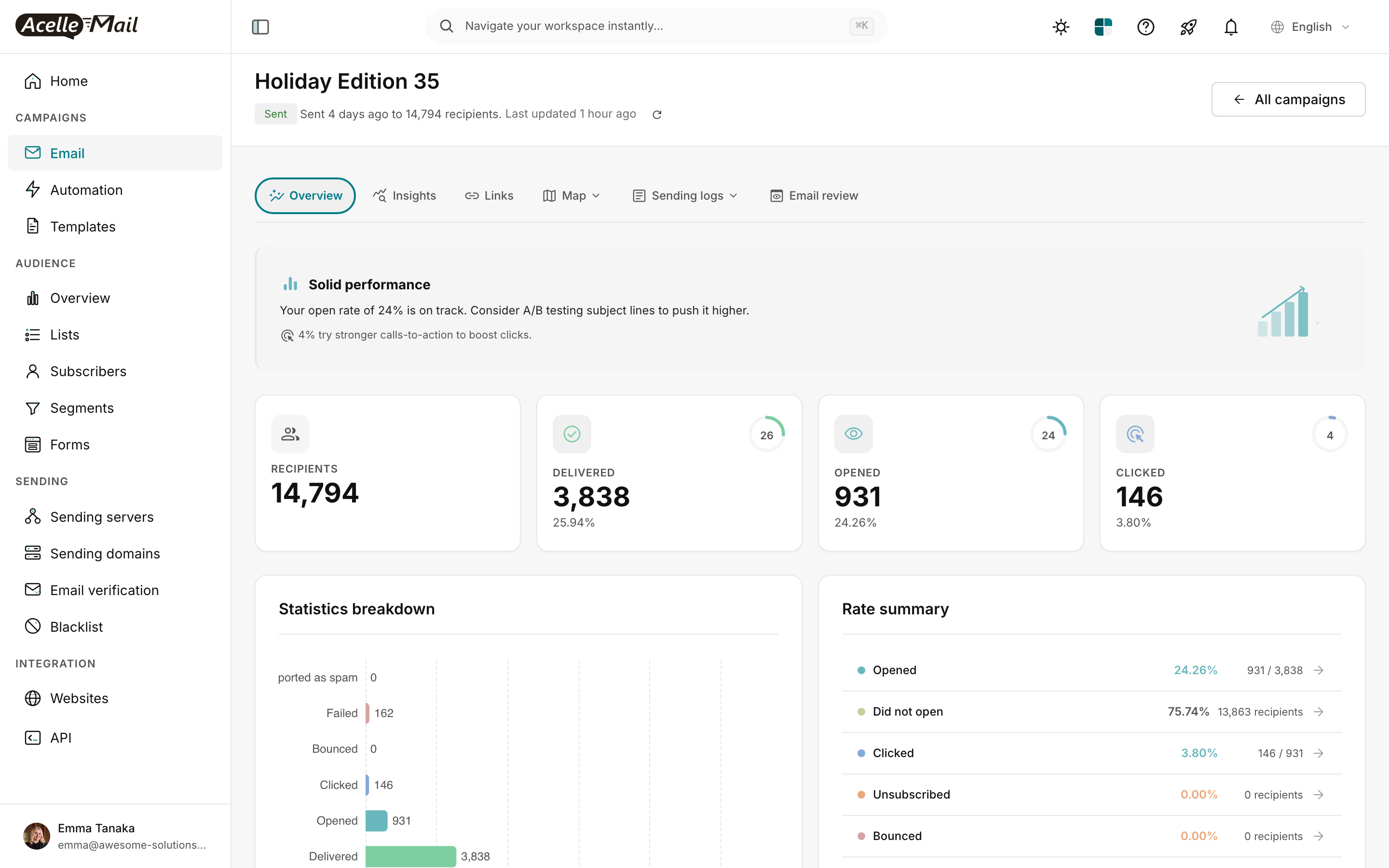
The 6 tabs in this report:
| Tab | What's there |
|---|---|
| Overview | The 4 headline numbers + statistics breakdown + rate summary — read this first |
| Insights | AI-generated analysis ("subject worked but CTA underperformed") |
| Links | Per-link click breakdown — which CTA actually drove the clicks |
| Map | Geographic distribution of opens and clicks |
| Sending logs | Per-recipient delivery status (sent / failed / bounced) |
| Email review | The actual email HTML as subscribers received it |
Most decisions are made from Overview + Links. Use the others to drill down.
The 4 headline numbers (Overview tab)
The stat cards are the order metrics matter in. Read them left-to-right.
1. RECIPIENTS
The size of the audience the campaign was sent to. Pulled from your list + segment + any exclusions.
Use this to sanity-check the next number. If you sent to 15,000 but only 3,800 are "delivered," something's wrong with delivery (not engagement).
2. DELIVERED
How many emails actually reached an inbox (subscriber's mail server accepted the message). The percentage shown — "3,838 (25.94%)" — is delivered as a share of recipients.
| Delivered % | Diagnosis |
|---|---|
| >97% | Excellent — list is clean, sender reputation healthy |
| 92-97% | Normal — a small portion bounces on every list |
| 80-92% | Warning — your list is going stale OR you've hit a deliverability problem |
| <80% | Crisis — STOP sending, run list hygiene, check sending domain auth |
Why "Holiday Edition 35" shows 25.94% delivered? Because it was sent to 14,794 recipients but only 3,838 are "delivered" — the rest are still being processed, or it's a partial send. For a finished campaign you'd expect 92%+. Always read the campaign's "Last updated" timestamp to know if numbers are final.
3. OPENED
Unique opens — how many recipients triggered AcelleMail's open-tracking pixel by loading images. The percentage is opens as a share of delivered (not recipients).
| Open rate | Status |
|---|---|
| >30% | Excellent — strong subject line + relevant audience |
| 20-30% | Good — solid program |
| 15-20% | Average — room to improve subject + sender name |
| <15% | Poor — audit subject, sender reputation, list freshness |
Caveat: Apple Mail Privacy Protection inflates this number for ~30-45% of subscribers. See Open rates in the age of Apple MPP. For most modern lists, the "real" open rate is 30-50% lower than what the dashboard shows.
4. CLICKED
Unique clicks — recipients who clicked at least one link in the email. The most reliable engagement signal because it requires real human action (not just image-loading).
| Click rate (CTR) | Status |
|---|---|
| >5% | Excellent — content + CTA pulling together |
| 2-5% | Good — typical for well-targeted lists |
| 1-2% | Average — CTAs probably need work |
| <1% | Poor — content or audience mismatch |
Click rate is the metric to optimise most heavily. It's the proxy for "did this campaign cause action?"
The Rate summary (Overview tab right side)
The right-side panel restates the headline numbers as percentages with absolute counts in parentheses:
| Row | What it means |
|---|---|
| Opened | Same as Opened stat card — share of delivered who loaded images |
| Did not open | The complement — recipients who delivered but never opened |
| Clicked | Same as Clicked stat card — share of opens (not delivered!) who clicked |
| Unsubscribed | Share of delivered who unsubscribed from this campaign |
| Bounced | Share of recipients whose delivery failed |
Two important nuances:
- The Clicked row shows clicks as % of opens (the click-to-open rate / CTOR), not % of recipients. CTOR is a better measure of content quality than CTR because it isolates content from subject-line effect.
- The Unsubscribed and Bounced rows are absolute — anything above 0.5% on either is a warning.
Healthy targets:
| Row | Healthy | Warning |
|---|---|---|
| Opened (as % delivered) | 20-40% | <15% |
| Clicked (CTOR — % of opens) | 10-25% | <5% |
| Unsubscribed | <0.5% | >1% |
| Bounced | <2% | >5% |
Statistics breakdown chart (Overview tab left side)
The bar chart breaks every status into absolute counts:
- Delivered — top bar, largest
- Opened — middle, smaller (subset of delivered)
- Clicked — small (subset of opened)
- Bounced / Failed / Reported as spam — bottom rows, should all be near zero
The bars give you a visual sanity check: opens should be 20-40% of delivered; clicks should be 5-20% of opens. Anything dramatically off says something's wrong upstream.
The "Insight banner" — AcelleMail's quick read
Above the stat cards, AcelleMail shows a one-line insight banner. In the screenshot above:
"Solid performance — Your open rate of 24% is on track. Consider A/B testing subject lines to push it higher."
The banner pulls from the actual numbers and recommends the highest-leverage next action:
| Banner verdict | Typical recommendation |
|---|---|
| Strong engagement | "Try stronger CTAs to lift clicks" |
| Solid performance | "A/B test subject lines" |
| Mixed results | "Audit list hygiene OR re-segment audience" |
| Underperformed | "Run re-engagement first, then re-send to remaining" |
It's not a substitute for thinking, but for a quick read at the top of the report it's accurate.
When to drill into each other tab
| If you want to know... | Open this tab |
|---|---|
| "Which CTA worked best?" | Links — per-link clicks ranked |
| "Where geographically did opens/clicks come from?" | Map |
| "Did the email actually get delivered to my own inbox?" | Sending logs (search your email) |
| "What did the email look like in the wild?" | Email review |
| "Should I follow up on this campaign?" | Insights (read AcelleMail's analysis) |
Each tab has its own deep-dive article — start with Overview, drill in only when a specific number raises a question.
What good looks like overall
A "healthy" campaign report (well-built audience, decent content, no deliverability issues):
| Metric | Healthy benchmark |
|---|---|
| Delivered | >97% of recipients |
| Open rate | 20-30% (or higher; inflated by MPP) |
| Click rate | 2-5% of delivered |
| Click-to-open rate (CTOR) | 10-15% |
| Unsubscribe rate | <0.5% |
| Bounce rate | <2% |
| Spam complaint rate | <0.1% |
Hit these consistently and your sender reputation stays healthy, which keeps your inbox placement strong, which compounds across every future campaign.
When numbers are bad — what to do
| Symptom | Likely cause | Fix |
|---|---|---|
| Low delivered % | List hygiene problem OR sending-domain auth issue | Run list hygiene; audit SPF/DKIM on your sending domain |
| Low open rate (and not just MPP) | Weak subject, wrong send time, sender-name issue | A/B test the subject line + from name |
| High open / low CTR | Subject promised something content didn't deliver, OR CTA is buried | Re-write body to lead with the promised value; bigger / brighter button |
| High bounce rate | Old list, imports without verification, OR sending-server problem | Run email verification on the list before next send |
| High unsubscribe rate | Frequency too high, content irrelevant, OR list bought rather than opted-in | Reduce cadence, segment, or run re-engagement |
| High spam-complaint rate | Buying lists is the #1 cause — even one purchased segment poisons the whole list | Immediately suppress the offending segment; future sends slow-warm only |
Common questions
| Question | Answer |
|---|---|
| Why does the dashboard show 14,794 recipients but only 3,838 delivered? | Either the campaign is mid-send (read the "Last updated" timestamp), OR there's a deliverability problem. Re-check in 1 hour. |
| My open rate suddenly dropped from 30% to 15% — what happened? | Most commonly: sender reputation took a hit (a recent bad send), OR a major ISP changed how they count opens (this happens). Check the previous 3 campaigns' rates to spot the trend. |
| Why is CTR ≠ Clicked-card-percentage? | CTR can be calculated as clicks / delivered OR clicks / opens (CTOR). AcelleMail's Clicked stat card uses clicks / delivered. The Rate summary "Clicked" row uses clicks / opens. They're both valid — just know which is which. |
| The "Opened" map shows 931 opens but the stat card says 931. Where's the discrepancy I'd expect? | No discrepancy here — both reflect unique opens. The map plots their geographic locations; the card counts them. |
Related articles
- Understanding Email Open Rates in the Age of Apple MPP
- Click Map Analysis: Optimise Your Email Layout
- Setting Up UTM Parameters for Campaign Tracking
- Email ROI Calculation
3 bình luận