What this is for#
Containerised AcelleMail trades a small ergonomic cost (you have to think about volumes, image rebuilds, and patch flows) for two big wins: parity between dev and prod environments, and clean rollback by image tag rather than by manual file restoration.
The fundamental trick: AcelleMail wasn't built container-first. The patch-upgrade flow assumes file mutations on the live filesystem (the /upgrade/run-file API replaces files in /var/www/acellemail in place). In Docker, this means the AcelleMail code lives in a named volume, not baked into the image — otherwise every patch would be wiped on the next docker compose up.
This guide ships a production-ready stack — a custom Dockerfile (so the wizard System Check passes), a docker-compose.yml, and the operational recipes for patches, scaling, logs, and backups.
👉 Bare-metal alternative: Install AcelleMail on Ubuntu 24.04 LTS — simpler if you're not already operating Docker.
Step 1 — Custom Dockerfile (the wizard fix)#
The stock php:8.3-fpm image ships with only the bare PHP core — no imap, no sqlite3, no mailparse, no gd, no intl, no redis client. The AcelleMail install wizard's System Check hard-fails on any of those.
Save as php/Dockerfile:
FROM php:8.3-fpm AS base

# System libs needed by the PHP extensions below
RUN apt-get update && apt-get install -y --no-install-recommends \
        libpng-dev libjpeg62-turbo-dev libfreetype6-dev \
        libicu-dev libonig-dev libxml2-dev libzip-dev \
        libc-client-dev libkrb5-dev libsqlite3-dev libgmp-dev \
        zlib1g-dev libssl-dev pkg-config \
    && rm -rf /var/lib/apt/lists/*

# imap needs --with-imap-ssl=yes
RUN docker-php-ext-configure imap --with-kerberos --with-imap-ssl \
 && docker-php-ext-configure gd --with-freetype --with-jpeg \
 && docker-php-ext-install -j$(nproc) \
        pdo_mysql mysqli mbstring xml curl zip gd intl \
        imap gmp bcmath pdo_sqlite exif

# PECL extensions
RUN pecl install redis mailparse \
 && docker-php-ext-enable redis mailparse

# AcelleMail-specific php.ini tweaks (workload, not OS)
RUN { \
        echo 'memory_limit = 512M'; \
        echo 'upload_max_filesize = 300M'; \
        echo 'post_max_size = 300M'; \
        echo 'max_execution_time = 300'; \
    } > /usr/local/etc/php/conf.d/zz-acellemail.ini

# Composer (used during /upgrade/run-file patches)
RUN curl -fsSL https://getcomposer.org/installer | php -- --install-dir=/usr/local/bin --filename=composer

# Cron, supervisor, useful utilities
RUN apt-get update && apt-get install -y --no-install-recommends \
        cron supervisor unzip \
    && rm -rf /var/lib/apt/lists/*

WORKDIR /var/www/acellemail
This image takes ~6 minutes to build first time, ~30 seconds with the apt + pecl layers cached. Tag it acellemail/php:8.3-fpm and push to your private registry, or build locally with docker compose build app worker scheduler.
Why not serversideup/php or webdevops/php-fpm? Both are excellent third-party images that include most of these extensions. The reason to roll your own is supply chain control — every byte in this Dockerfile is from PHP upstream or Debian main. Pin to specific versions if you're regulated.
Step 2 — The compose file#
Save as /srv/acellemail/docker-compose.yml:
name: acellemail
services:
  app:
    build:
      context: .
      dockerfile: php/Dockerfile
    image: acellemail/php:8.3-fpm
    restart: unless-stopped
    working_dir: /var/www/acellemail
    volumes:
      - acellemail_code:/var/www/acellemail
    depends_on: [mysql, redis]
    networks: [internal]

  nginx:
    image: nginx:1.27-alpine
    restart: unless-stopped
    ports: ["80:80", "443:443"]
    volumes:
      - acellemail_code:/var/www/acellemail:ro
      - ./nginx/acellemail.conf:/etc/nginx/conf.d/default.conf:ro
      - ./certbot/conf:/etc/letsencrypt:ro
      - ./certbot/www:/var/www/certbot:ro
    depends_on: [app]
    networks: [internal, edge]

  mysql:
    image: mysql:8.0
    restart: unless-stopped
    environment:
      MYSQL_DATABASE: acellemail
      MYSQL_USER: acellemail
      MYSQL_PASSWORD_FILE: /run/secrets/mysql_pw
      MYSQL_ROOT_PASSWORD_FILE: /run/secrets/mysql_root_pw
    volumes:
      - mysql_data:/var/lib/mysql
    secrets: [mysql_pw, mysql_root_pw]
    command: --character-set-server=utf8mb4 --collation-server=utf8mb4_unicode_ci
    networks: [internal]

  redis:
    image: redis:7-alpine
    restart: unless-stopped
    volumes: [redis_data:/data]
    networks: [internal]

  worker:
    image: acellemail/php:8.3-fpm
    restart: unless-stopped
    working_dir: /var/www/acellemail
    command: ["php", "artisan", "queue:work", "--sleep=3", "--tries=3", "--max-time=3600"]
    volumes:
      - acellemail_code:/var/www/acellemail
    depends_on: [mysql, redis]
    deploy: { replicas: 2 }
    networks: [internal]

  scheduler:
    image: acellemail/php:8.3-fpm
    restart: unless-stopped
    working_dir: /var/www/acellemail
    entrypoint: ["sh", "-c"]
    command: ["while :; do php artisan schedule:run; sleep 60; done"]
    volumes:
      - acellemail_code:/var/www/acellemail
    depends_on: [mysql, redis]
    networks: [internal]

volumes: { acellemail_code: {}, mysql_data: {}, redis_data: {} }
networks: { internal: {}, edge: {} }
secrets:
  mysql_pw: { file: ./secrets/mysql_pw.txt }
  mysql_root_pw: { file: ./secrets/mysql_root_pw.txt }
Each design decision is a battle scar:
- Code lives in a named volume.
acellemail_code is shared read-write with app + worker + scheduler, read-only with nginx. The first docker compose up populates the volume from the unzipped install bundle (Step 3); patches mutate it in place.
- Workers and scheduler are separate services. Mixing the queue worker into the FPM container is tempting and broken — when FPM restarts (image upgrade, OOM) the worker also dies, in-flight jobs become orphaned, and the scheduler stops firing. Separate services restart independently.
- Two worker replicas. Same Small-tier sizing as bare-metal. Bump to 4 at Medium tier.
- MySQL secrets via files, not env vars. Compose has supported file-backed secrets for years; using them is one less audit-log entry showing the password in plain text.
- Nginx mounts code read-only. If PHP-FPM is compromised it can write the volume, but the public-facing nginx cannot.
The nginx config at nginx/acellemail.conf:
server {
    listen 80;
    server_name mail.example.com;
    root /var/www/acellemail/public;
    index index.php;
    client_max_body_size 300M;

    location / { try_files $uri $uri/ /index.php?$query_string; }
    location ~ \.php$ {
        fastcgi_pass app:9000;
        fastcgi_index index.php;
        fastcgi_param SCRIPT_FILENAME $document_root$fastcgi_script_name;
        include fastcgi_params;
        fastcgi_read_timeout 300;
    }
    location ~ /\.(?!well-known).* { deny all; }

    # Certbot HTTP-01 challenge
    location /.well-known/acme-challenge/ { root /var/www/certbot; }
}
Step 3 — Initial install (one-time)#
mkdir -p /srv/acellemail/{php,nginx,certbot/conf,certbot/www,secrets}
cd /srv/acellemail

# Drop in the Dockerfile, compose file, and nginx config from Steps 1-2

# Generate MySQL secrets
openssl rand -base64 32 > secrets/mysql_root_pw.txt
openssl rand -base64 32 > secrets/mysql_pw.txt
chmod 600 secrets/*.txt

# Build the custom PHP image
docker compose build app worker scheduler

# Bring up MySQL + Redis first, wait for healthy
docker compose up -d mysql redis
sleep 15

# Populate the code volume from the install zip
# (download acellemail-latest.zip from CodeCanyon to /srv/acellemail/ first)
docker run --rm -v acellemail_code:/dst -v $PWD:/src alpine \
  sh -c 'cd /dst && unzip -q /src/acellemail-latest.zip && chown -R 33:33 .'

# Bring up the rest
docker compose up -d
chown -R 33:33 is the critical one-time fix. The php:8.3-fpm image runs as UID 33 (www-data); without that ownership, AcelleMail can't write logs or cached views and the web installer loops forever.
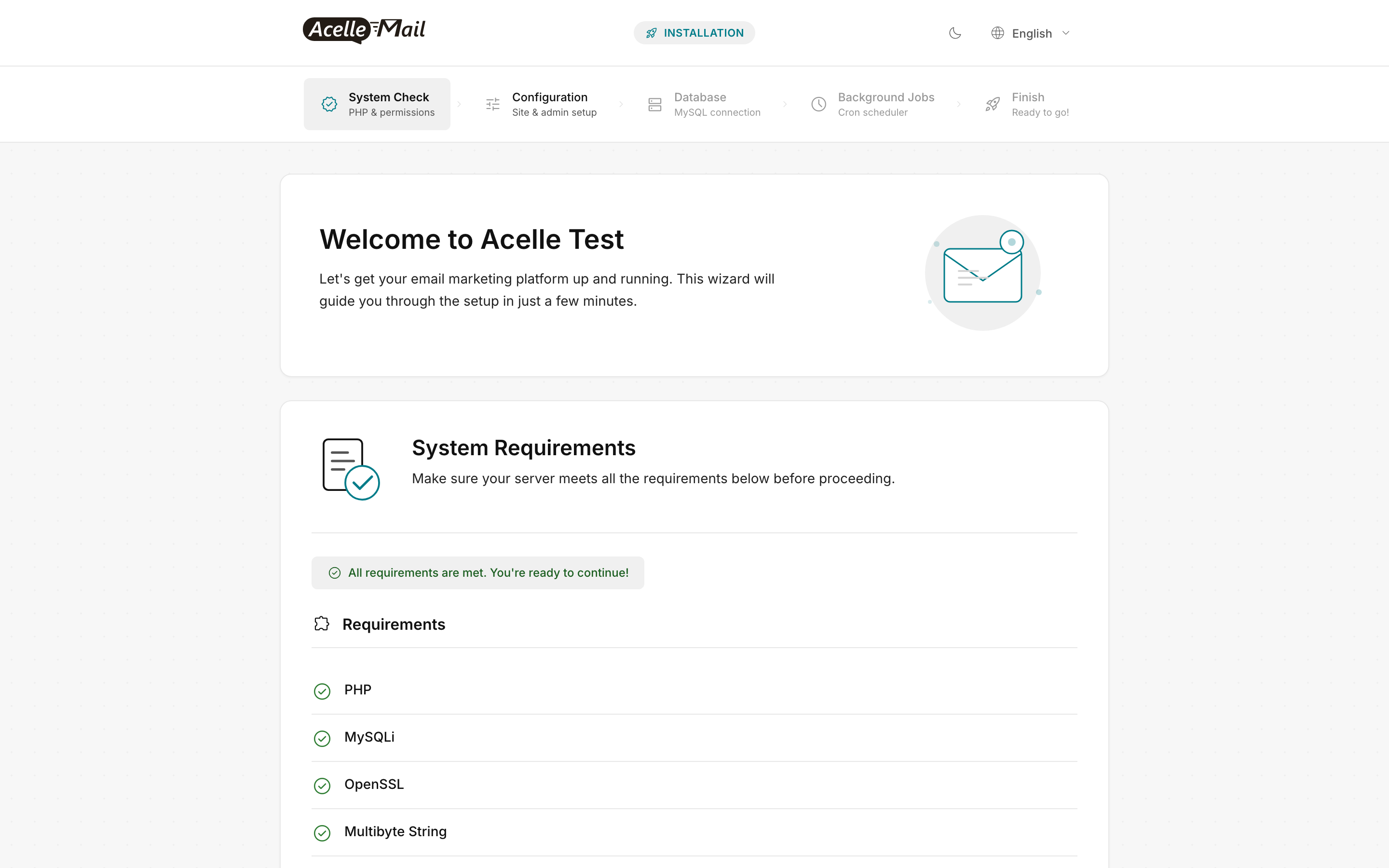
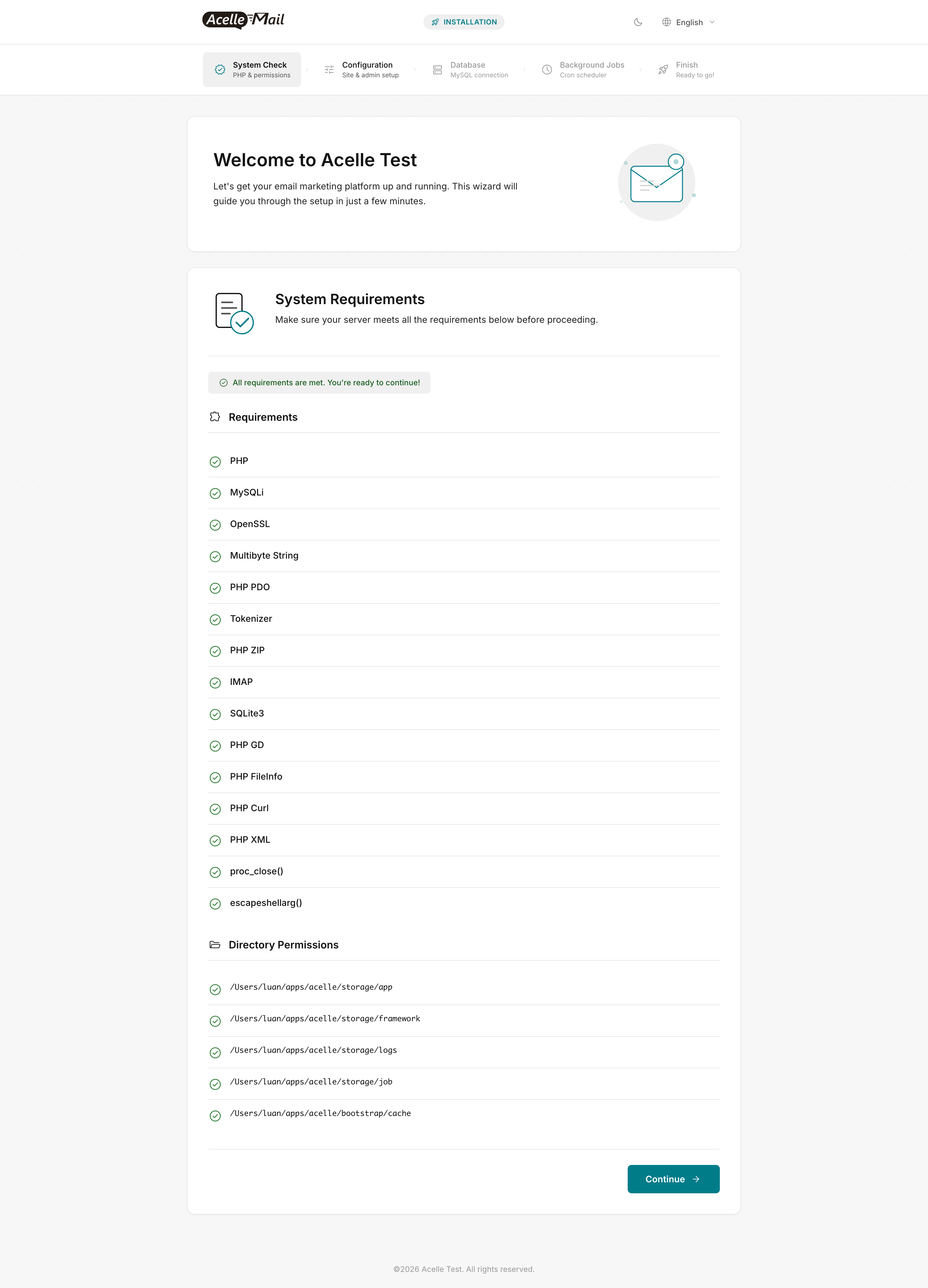
Now browse to http://mail.example.com/install and run the wizard. With the custom Dockerfile from Step 1, all System Check rows should be green on the first try:
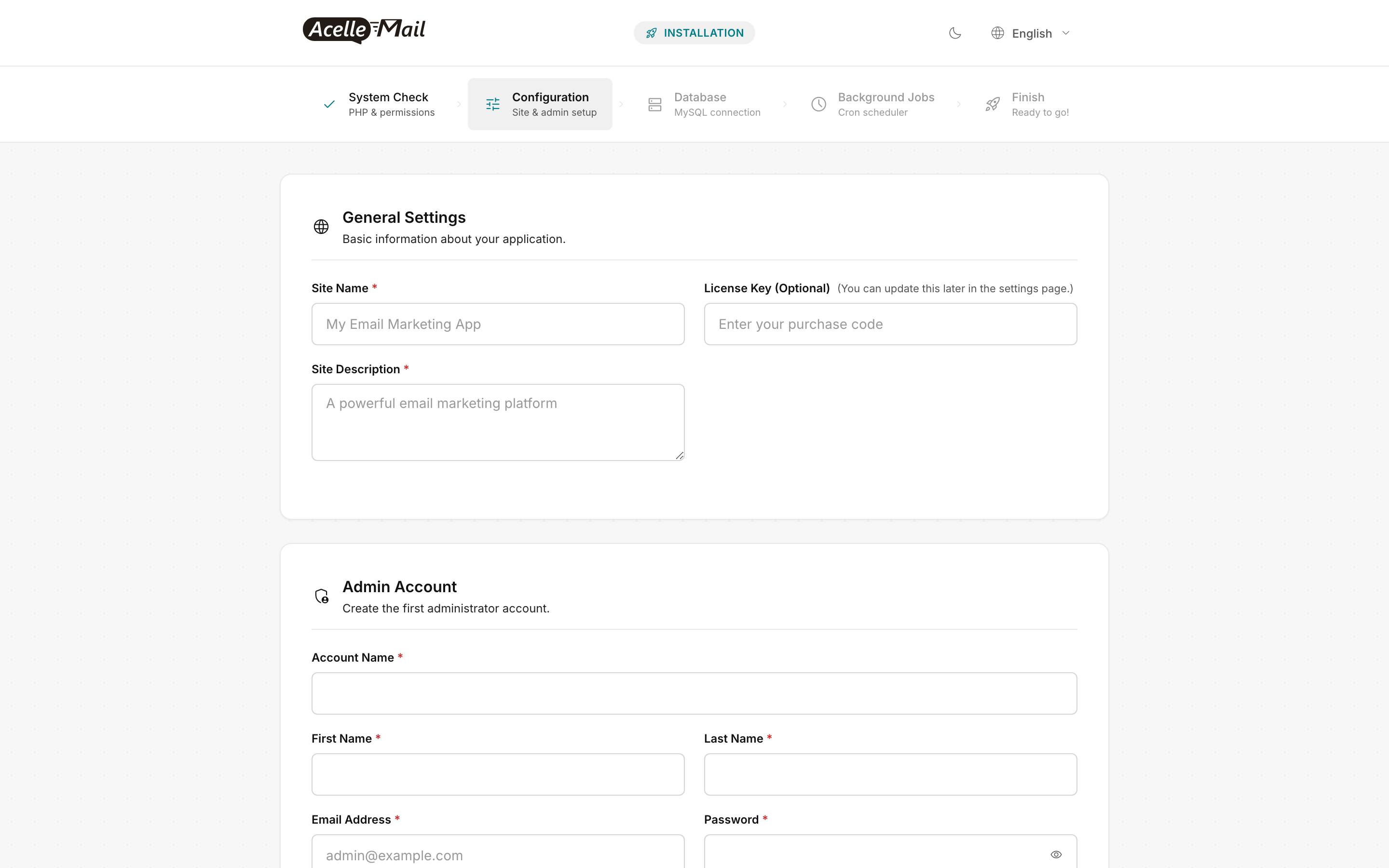
For the Database step, use mysql as the host (the compose service name), acellemail as the database + user, and the contents of secrets/mysql_pw.txt as the password.
Step 4 — Add HTTPS#
Run certbot in a one-shot container against the running nginx:
docker run --rm -it \
  -v /srv/acellemail/certbot/conf:/etc/letsencrypt \
  -v /srv/acellemail/certbot/www:/var/www/certbot \
  certbot/certbot certonly --webroot -w /var/www/certbot \
  -d mail.example.com --email you@example.com --agree-tos --non-interactive
Add the HTTPS server block to nginx/acellemail.conf (mirror the HTTP block, listen on 443 with ssl_certificate paths under /etc/letsencrypt/live/mail.example.com/) and force-redirect HTTP. Reload:
docker compose exec nginx nginx -s reload
Weekly renewal cron on the host:
0 3 * * 0 docker run --rm -v /srv/acellemail/certbot/conf:/etc/letsencrypt \
  -v /srv/acellemail/certbot/www:/var/www/certbot certbot/certbot renew --quiet \
  && docker compose -f /srv/acellemail/docker-compose.yml exec nginx nginx -s reload
Step 5 — Patch upgrade workflow (the Docker quirk)#
API mode is the cleaner choice with Docker — it writes to the named volume and the change is live without a container rebuild. From any host with curl:
TOKEN="..."   # your AcelleMail API token
HOST="https://mail.example.com"
curl --max-time 900 -X POST "$HOST/api/v1/upgrade/run-file" \
  -H "Authorization: Bearer $TOKEN" \
  -F "patch=@/path/to/patch-latest.bin"

# Finalize from inside the app container so cache + migrations refresh
docker compose exec app php artisan migrate --force
docker compose exec app php artisan view:clear
docker compose exec app php artisan config:clear
docker compose restart app worker scheduler
The Acelle support handbook documents this restart requirement explicitly: opcache + Laravel's cached config will hold the old code path until the PHP process restarts. Always restart app, worker, scheduler together after any patch — partial restarts cause hard-to-debug version-mismatch behaviour.
Step 6 — Scaling#
- Vertical: bump the host's CPU + RAM and increase
deploy.replicas on worker (4 at Medium, 8 at Large). Workers are stateless from each other's perspective — Laravel's queue driver (database or Redis) handles coordination.
- Horizontal app: running multiple
app replicas against the same code volume works for stateless requests (the admin UI, REST API) but Laravel session storage assumes a single writer by default — configure Redis-backed sessions in .env (SESSION_DRIVER=redis) before scaling app beyond 1 replica.
- Database: at Medium tier and above, extract MySQL to a managed instance (RDS, DigitalOcean Managed DB, Hetzner Cloud DB). Update the
DB_HOST in .env and remove the mysql service from the compose file.
Logging#
Container stdout/stderr is captured by Docker's logging driver. For production, configure local driver with rotation at minimum — add to every service:
logging:
  driver: local
  options: { max-size: "20m", max-file: "5" }
For centralized logging, swap to loki, gelf, or push to a vector/fluentbit sidecar. Loki + Grafana is a popular self-hosted option; Datadog / Logtail / Better Stack are managed SaaS alternatives.
Backups#
# Daily MySQL dump (host cron)
0 2 * * * docker compose -f /srv/acellemail/docker-compose.yml exec -T mysql \
  mysqldump --single-transaction --routines acellemail \
  | gzip > /srv/backups/acellemail-$(date +\%F).sql.gz

# Weekly volume snapshot (host cron)
0 3 * * 0 docker run --rm -v acellemail_code:/data -v /srv/backups:/backup \
  alpine tar czf /backup/acellemail_code-$(date +\%F).tar.gz -C /data .
Rotate retention with a separate find ... -mtime +30 -delete daily cleanup. For offsite copies, push the backup dir to S3 / Backblaze B2 / Wasabi using rclone sync or the storage provider's CLI.
Common issues#
| What you see |
Likely cause |
Fix |
Wizard System Check red on IMAP or any other extension |
Using stock php:8.3-fpm instead of the custom Dockerfile |
Rebuild with docker compose build app worker scheduler --no-cache and re-up |
Wizard System Check red on a storage/... permission row |
Volume was populated as root, not UID 33 |
Re-run the chown -R 33:33 from Step 3 |
| Web installer keeps showing the welcome step after submitting |
The installed marker file can't be written |
docker compose exec app ls -la storage/app/installed — should be writable by UID 33 |
docker compose exec app php artisan ... says "could not find driver" |
Custom image build failed silently on a PECL extension |
Rebuild from scratch: docker compose build --no-cache app && docker compose up -d |
| MySQL container exits immediately |
Stale mysql_data volume from a previous root password |
docker compose down -v (deletes data!) then recreate, OR mount the old data and run mysql_upgrade |
| Patch upgrade leaves the wrong PHP version showing in admin |
Forgot to restart all 3 PHP services after patch |
docker compose restart app worker scheduler |
| Workers stop processing jobs after a few hours |
--max-time=3600 is hit; supervisor (in compose: restart: unless-stopped) should auto-restart |
Check docker compose ps — if a worker is exited, look at docker compose logs worker |
nginx returns 502 immediately after docker compose up |
nginx started before php-fpm was listening |
Wait 10s and refresh; or add a healthcheck on app and depends_on: app: condition: service_healthy |
FAQ#
Can I bake the AcelleMail code into a custom image? Technically yes, but you lose the API-driven patch upgrade flow — every patch becomes a rebuild + redeploy + cache flush. The volume-based pattern in this guide keeps the upgrade flow simple.
What about Kubernetes? Same architecture, more YAML. Use a PersistentVolumeClaim for the code volume (RWX-capable storage class), separate Deployment resources for app + worker + scheduler, and an Ingress for nginx. Avoid running multiple app replicas against the same code volume unless you configure Redis-backed sessions.
Why two worker replicas? Throughput. One worker handles one queue job at a time. AcelleMail's send-campaign jobs spawn child jobs per chunk; two workers process them concurrently without overwhelming the upstream sending API.
Does this work on Docker Desktop? For development, yes. For production, no — Docker Desktop's networking and volume performance aren't production-grade. Use Linux + Docker Engine (or a managed container service like ECS, GKE, or Hetzner Container Service).
Network policy — restricting east-west traffic. The compose above puts app, worker, scheduler, mysql, redis on a shared internal network and nginx on internal + edge. To go further, split into per-service networks: app-db (app/worker/scheduler ↔ mysql/redis), edge (nginx ↔ app). A compromised nginx then cannot directly query MySQL. Worth doing on multi-tenant hosts.
Secret rotation. The compose secrets are file-backed. Rotate by: (1) openssl rand -base64 32 > secrets/mysql_pw.txt.new, (2) mv secrets/mysql_pw.txt.new secrets/mysql_pw.txt, (3) docker compose restart app worker scheduler (they pick up the new file at startup), (4) inside MySQL: ALTER USER 'acellemail'@'%' IDENTIFIED BY '<new value>';. Quarterly is reasonable. For shorter cadences, integrate with Hashicorp Vault or AWS Secrets Manager via a sidecar.
Why not run as root? The php:8.3-fpm image runs as www-data (UID 33) by default. Running as root inside a container is no safer than running as www-data — but it does mean any compromise has root-equivalent access if the container escapes. Stay with the default UID.
Related articles#
