What this is for#
Subscribers who stopped opening your emails 6 months ago aren't customers — they're a tax on your sender reputation. ISPs (Gmail, Yahoo, Outlook) watch your engagement rates and downgrade your inbox placement when 30%+ of your sends go to people who never open them.
A re-engagement automation gives every inactive subscriber one last chance. The ones who come back stay; the ones who don't get sunsetted (suppressed). After running this end-to-end, your remaining list is smaller but engaged — better open rates, better deliverability, better revenue per email.
The pattern in AcelleMail#
This is one of the few automations that starts with a segment rather than an event. AcelleMail's pattern:
1. Build segment: "Last opened email > 90 days"
2. Bulk-tag those subscribers with `re-engagement-pending`
3. A Tag based automation fires on the new tag
4. The flow sends 3 emails, removing the tag as soon as
   the subscriber clicks anything
5. Anyone still tagged after Email 3 gets sunsetted
The combination of segments (for the "who") + Tag based trigger (for the "when") + CONDITION + OPERATION nodes (for branching + sunsetting) is the canonical AcelleMail flow for any cohort-driven automation.
Step 1 — Build the inactive segment#
Open your list's Segments tab and create a new segment. See the full segment builder walkthrough in Segments article.
Conditions (Match: All):
| Field |
Operator |
Value |
| Last opened email |
greater than (days) |
90 |
| Last link click |
greater than (days) |
90 |
| Sign-up date |
greater than |
today-120-days (exclude very new subscribers) |
Name the segment "Inactive — Win-Back" and save. Note the count — that's how many subscribers will enter the re-engagement flow.
Calibrate the threshold to your send cadence:
| Your send frequency |
Threshold for "inactive" |
| Daily |
30 days |
| 2-3x/week |
60 days |
| Weekly |
90 days |
| Bi-weekly |
120 days |
| Monthly |
6 months |
Step 2 — Build the Tag based automation#
Open Automation → + New Automation and pick the Tag based trigger from the 12-trigger picker.
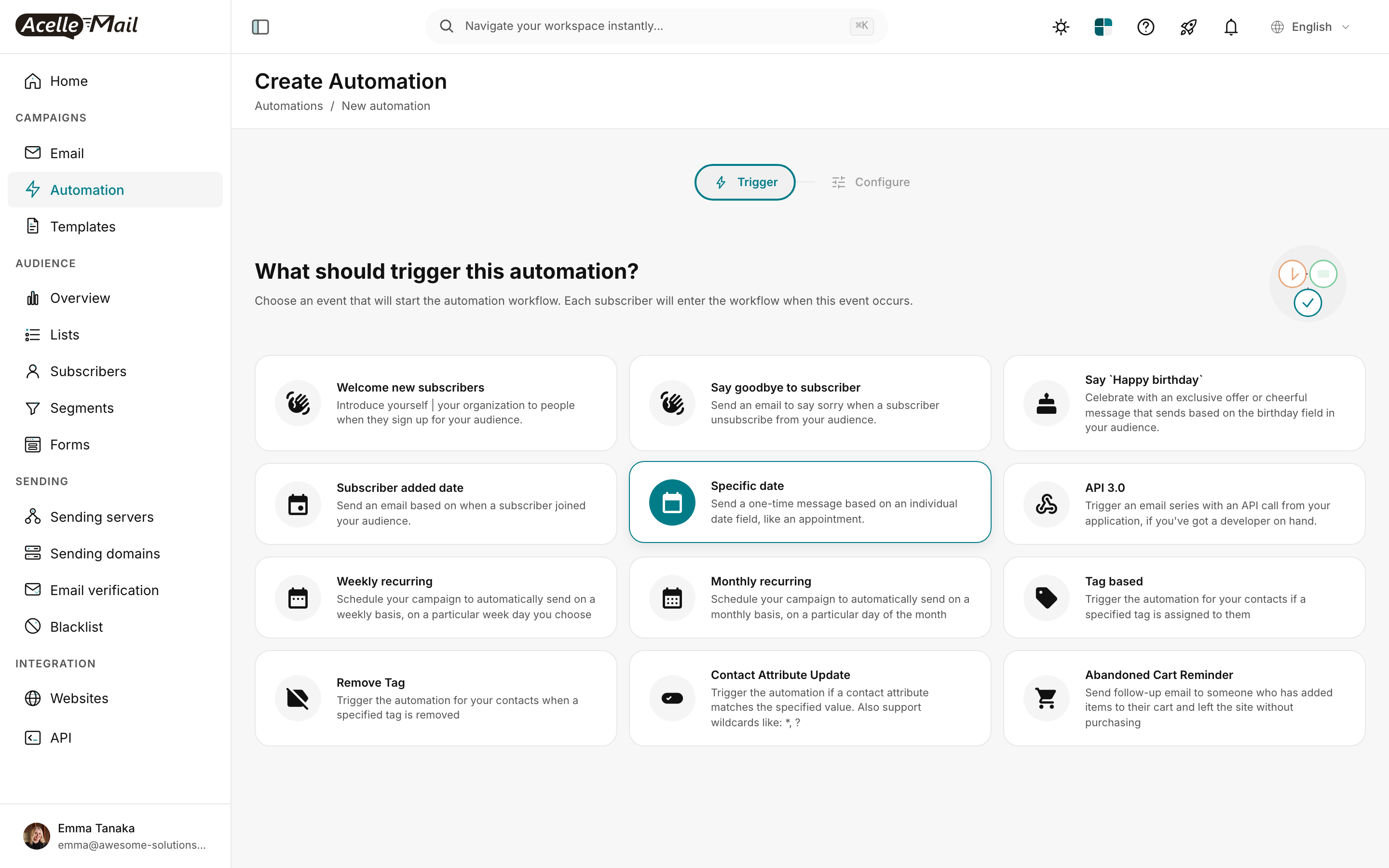
(Screenshot from Welcome Series article — same trigger picker.)
In the Configure tab:
- Tag =
re-engagement-pending
- Audience list = the list that contains your inactives
Step 3 — Build the 3-email win-back flow#
The visual flow in the builder:
TRIGGER  → Tag based: re-engagement-pending
SEND EMAIL → "{{first_name}}, are you still there?" (Email 1)
WAIT     → 5 days
CONDITION → Opened "are you still there?"?
            ├─ YES → OPERATION: Add tag `re-engaged`
            │       OPERATION: Remove tag `re-engagement-pending`
            │       END
            └─ NO  → continue
SEND EMAIL → "One last thing..." (Email 2)
WAIT     → 5 days
CONDITION → Opened "One last thing..."?
            ├─ YES → OPERATION: Add tag `re-engaged`
            │       OPERATION: Remove tag `re-engagement-pending`
            │       END
            └─ NO  → continue
SEND EMAIL → "We're saying goodbye" (Email 3)
WAIT     → 1 day
CONDITION → Opened OR Clicked anything in this flow?
            ├─ YES → OPERATION: Add tag `re-engaged`
            └─ NO  → OPERATION: Move to blacklist
                     END (subscriber removed from active sends forever)
The OPERATION node has three actions worth knowing for re-engagement:
| Operation |
What it does |
Use it for |
| Add tag |
Tags the subscriber |
re-engaged marker for future segments |
| Remove tag |
Untags the subscriber |
Clear re-engagement-pending once they're saved |
| Move to blacklist |
Permanent block (see Blacklist article) |
Final sunset for non-responders |
Step 4 — Compose the 3 emails#
Email 1 — Soft check-in (immediate on tag)#
Subject:    {{first_name}}, are you still there?
Preheader:  We've missed you — here's what you've been missing.
Body:       Hey {{first_name}},

            We noticed you haven't been around for a few months,
            so we wanted to check in.

            Here's a quick look at what you missed:

              • [Most popular post from the last 90 days]
              • [Best offer from the last 90 days]
              • [One small win from your community]

            Still interested? Click below — that's all it takes.

            [Yes, I'm still in →] — button

            No hard feelings if not.

            — Emma
Acknowledge the absence with kindness, not accusation. "We noticed you've been quiet" lands better than "You haven't opened our emails in months".
Email 2 — Last value-add (5 days after, only to non-openers)#
Subject:    {{first_name}}, one last thing before we say goodbye
Preheader:  Free resource inside — no strings.
Body:       Hi {{first_name}},

            Quick honest update: if you don't engage with this
            email or click anything in the next few days, we'll
            stop sending you emails. We hate cluttering your
            inbox if you're not interested.

            Before you go, one last thing we think you'd love:

            [Your single best free resource — guide / template /
             discount / exclusive]

            [Get it now] — button

            Either way — thanks for being part of the list.
The offer needs to be genuinely valuable. If you've trained subscribers to expect promotional emails, a generic "10% off" won't pull them back. Make it something they'd actually want.
Email 3 — Goodbye (5 days after Email 2, to non-engagers)#
Subject:    Saying goodbye, {{first_name}}
Preheader:  Unless you'd like to stay — click here.
Body:       Hi {{first_name}},

            This is our last email to you. In a couple of days,
            we'll remove you from our list.

            No hard feelings — your inbox is your space, and we
            respect that.

            If you've changed your mind, one click keeps you on:

            [Actually, keep me on →] — button

            Otherwise, we wish you well, and thank you for the
            time you've spent with us.

            — Emma
Make the final email feel like a real goodbye, not another sales pitch. Subscribers respect the honesty — some who'd been on the fence reactivate specifically because of it.
Step 5 — Kick off the campaign#
This is where re-engagement differs from event-driven automations. You need to manually bulk-tag the inactive segment to seed the flow.
- Open the Subscribers tab of your list, set the filter to your "Inactive — Win-Back" segment.
- Select all rows (or Select page → Select all if there are many).
- Bulk-action: Add tag →
re-engagement-pending.
- The Tag based automation immediately starts entering each subscriber at TRIGGER.
Alternative: bulk-trigger from the automation's Contacts view. Open the automation → Contacts tab → top-right has a Trigger all subscribers button (with confirmation: "Force trigger all subscribers? This will re-run the entire workflow for everyone."). This bypasses the tag and forces every list subscriber through. Use cautiously — it triggers EVERYONE, not just the inactive cohort.
Step 6 — After the flow runs#
Once subscribers have moved through all 3 emails (about 12 days end-to-end), the OPERATION nodes have done two things:
- Saved subscribers are tagged
re-engaged — they stay on your list, and you can use this tag for future segments ("recently rescued" nurture, etc.).
- Unsaved subscribers are on your blacklist — they won't receive any future campaign, regardless of which list they're on.
Expected outcome: 5-15% of the inactive segment re-engages. The remaining 85-95% gets sunsetted. That's a feature, not a failure — the goal was a cleaner, more engaged list.
Re-run cadence#
Don't run re-engagement constantly. Run it as a scheduled sweep:
| Schedule |
What to run |
| Quarterly |
Re-build the segment, bulk-tag, send the 3-email flow |
| After every major campaign launch |
One-off "win-back" send to subscribers who didn't open the launch |
| Before any major paid acquisition |
Clean the list first — your CPA improves when your sender reputation is healthy |
Most well-run programs sunset 5-10% of their list per year via re-engagement. That's healthy churn, not a problem.
Deliverability payoff#
The 4-8 weeks after a re-engagement sweep typically show:
- +15-30% open rate on subsequent campaigns (dead weight removed)
- +5-10% click rate (the people remaining actually engage)
- −40-60% spam complaint rate (complainers were the inactive cohort)
- Better inbox placement at Gmail / Yahoo / Outlook as ISPs see fresh engagement signals
The first sweep is the biggest. Subsequent quarterly sweeps trim less but maintain the health.
Common issues#
| What you see |
What to do |
| Segment shows 0 inactive subscribers |
Either your audience is unusually engaged (great!) OR the segment conditions are too narrow. Loosen "last opened > 90 days" to 60. |
| Tag based trigger never fires after bulk-tag |
The tag spelling doesn't match between the bulk action and the trigger config. Re-verify both say re-engagement-pending exactly. |
| Email 3 sends to subscribers who already opened Email 1 |
The CONDITION nodes' YES branches don't end the flow. Each YES branch must terminate the flow, not continue to the next SEND EMAIL. |
| Subscribers ended up on the blacklist who shouldn't have |
The final CONDITION's check was too strict (only checking opens, not clicks too). Use "Opened OR Clicked" in the final check. |
| Open rates on Email 1 are surprisingly high |
This is normal and expected. Inactive subscribers often "wake up" specifically because of the "we miss you" framing. Don't get over-excited; check sustained engagement over the next few campaigns. |
| Some inactives marked you as spam |
Their decision; AcelleMail handled it correctly by sunsetting. Don't take it personally; the goal of re-engagement is to push fence-sitters off the fence one way or the other. |
What NOT to do#
- Don't run re-engagement immediately after deliverability problems. Fix the deliverability first (sending domain, sender reputation), THEN run re-engagement. Otherwise you compound the bad signals.
- Don't sunset without warning. The 3-email sequence is your warning. Skipping it and silently removing subscribers might feel cleaner but it skips the recovery opportunity.
- Don't use the same incentive across all 3 emails. Each email's purpose differs (check-in / last-value / goodbye). Repeating "10% off!" three times feels desperate.
- Don't bulk-blacklist instead of bulk-removing. Blacklist is permanent across all your lists; removal from one list still lets them re-subscribe via signup forms. Match the tool to the intent.
Related articles#
