What this is for#
When a recipient mail server rejects your email, it returns a 3-digit SMTP reply code (RFC 5321) paired with a 5-character DSN status code (RFC 3463). The combination tells you precisely what failed and what to do.
This guide is the operator-grade reference for the 20 codes AcelleMail's built-in BounceDictionary recognizes by default — every entry has its real category (hard / soft / policy / technical), the root cause in plain English, and the exact remediation that protects your sender reputation.
If you've ever stared at a bounce log full of 550 5.7.1, 552 5.2.2, and 451 4.7.0 and wondered which ones to take seriously, this article is the answer.
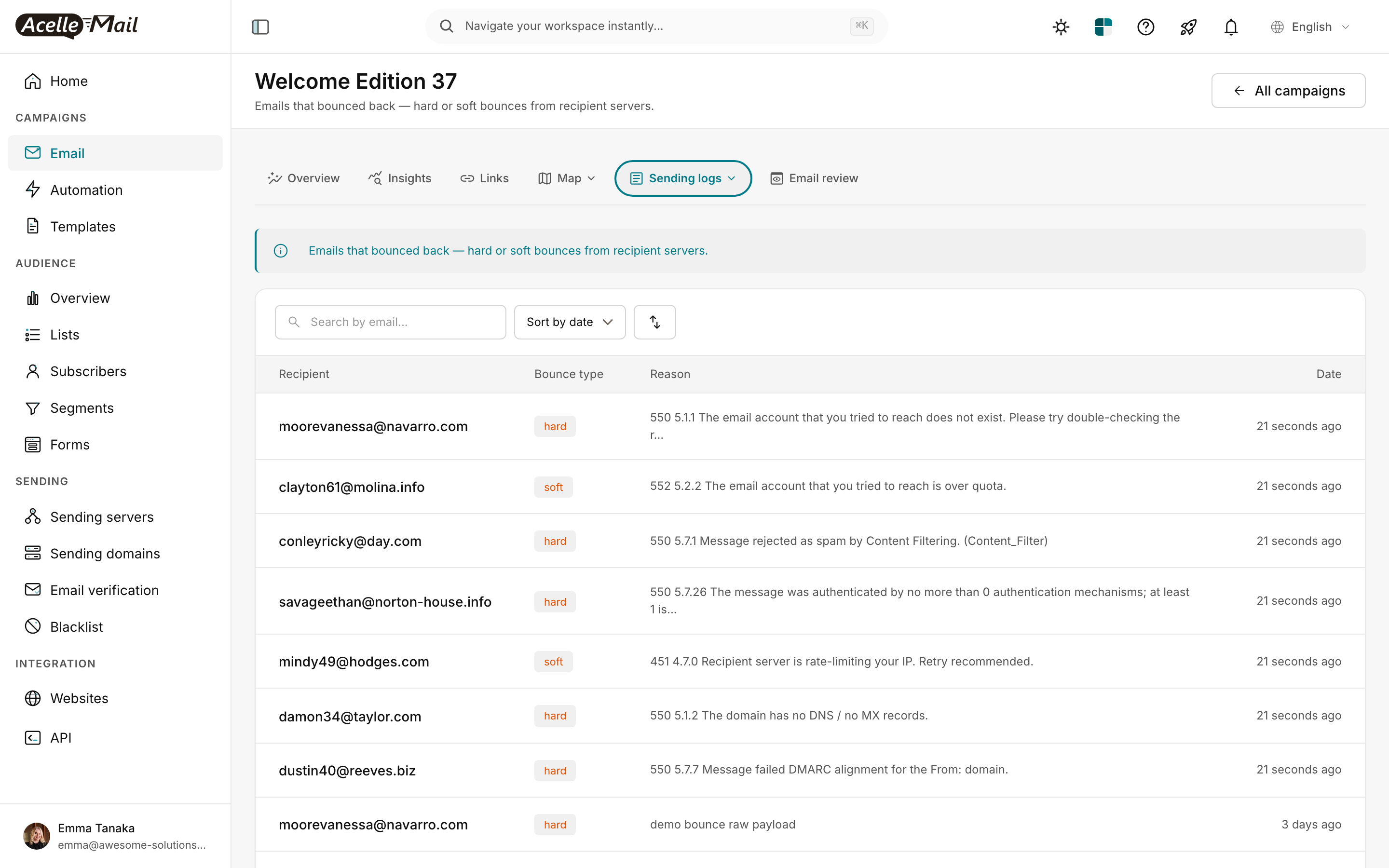
The screenshot above is the Sending logs → Bounce log view on a campaign. Each row pairs the recipient with the bounce type (color-coded hard/soft) and the raw reason string the receiving server returned. The DSN code is embedded in that string — your job as operator is to read it correctly.
How SMTP codes are structured#
Every SMTP rejection is a two-part code:
550 5.1.1 The email account you tried to reach does not exist
└┬┘ └─┬─┘ └────────────── human-readable reason ──────────────┘
 │    │
 │    └── enhanced DSN code (RFC 3463) — fine-grained classification
 │
 └── basic SMTP reply code (RFC 5321) — coarse category:
       4xx = soft (retry-able)
       5xx = hard (permanent)
       2xx = success (not a rejection)
The basic SMTP code tells you whether to retry. The DSN code tells you why. Modern senders care almost exclusively about the DSN code — 5.7.1 and 5.7.7 are both 550 from SMTP's point of view, but they have completely different fixes (spam content vs broken DMARC).
The DSN code itself has three positions:
5 . 7 . 26
│   │   │
│   │   └── detail (specific failure mode)
│   │
│   └── subject (1=address, 2=mailbox, 3=mail-system, 4=network, 5=protocol, 6=content, 7=security)
│
└── class (2=success, 4=persistent-transient, 5=permanent)
For example, 5.7.x is always "permanent + security/policy" — these are the codes you must take seriously because they signal authentication or reputation failures, not recipient-side problems.
How AcelleMail classifies bounces#
Behind the scenes, every bounce that reaches AcelleMail goes through BounceDictionary::lookup($dsnCode) (or the structured-payload parser for SendGrid / AWS SNS / Mailgun webhooks). The dictionary maps each known DSN code to a payload like:
'5.1.1' => [
    'category' => 'hard',
    'sub_category' => 'invalid_address',
    'summary' => 'The mailbox does not exist (5.1.1 — bad destination mailbox / user unknown).',
    'suggested_actions' => [
        'Remove this address from the list immediately to protect sender reputation',
        'Verify list hygiene — repeated 5.1.1 hits may indicate purchased/scraped data',
        'Run a list-validation pass before the next big campaign',
    ],
    'smtp_code' => 550,
],
(Source: app/Services/SendingServer/BounceDictionary.php lines 40-49.)
The category controls how AcelleMail counts the bounce against your sender's bounce-rate threshold:
| Category |
What it means |
Bounce-rate impact |
| hard |
Permanent — the address is invalid or refused |
Counts against bounce rate; address should be suppressed |
| soft |
Transient — retry-able |
Counts toward retry budget; suppress after 3-5 fails |
| policy |
Receiver rejected on policy grounds (spam, DMARC, reputation) |
Counts as hard; signals upstream config problem |
| technical |
Connection / DNS / protocol issue |
Often transient; investigate before suppressing |
| unknown |
Format not recognized |
Manual review required |
The 20 codes AcelleMail recognizes by default#
Permanent rejections (hard) — suppress the address#
| Code |
Sub-category |
Root cause |
What to do |
5.0.0 |
permanent_unspecified |
Destination server gave up — no further detail |
Remove from list; verify recipient domain still resolves |
5.1.1 |
invalid_address |
User unknown — the mailbox doesn't exist |
Remove immediately; suppress to protect reputation. Repeated 5.1.1 hits suggest purchased/scraped data |
5.1.2 |
invalid_domain |
Domain has no DNS / no MX records |
Remove — the domain is dead. Audit import pipeline for typos |
5.1.3 |
invalid_syntax |
Malformed address (RFC 5322 violation) |
Remove; tighten signup-form validation |
5.3.0 |
message_too_large |
Exceeded the recipient server's size limit |
Trim attachments / inline images; move large assets to CDN + link |
5.4.4 |
dns_failure |
DNS resolution failed mid-routing — no A/MX record reachable |
Verify domain; remove if DNS persistently fails |
5.5.0 |
syntax_or_protocol |
Generic SMTP protocol error from upstream provider |
Check sending provider's status page; retry once. Often their bug, not yours |
Policy rejections (hard, but the fix is in your config)#
| Code |
Sub-category |
Root cause |
What to do |
5.7.0 |
reputation |
Recipient blocked on reputation grounds |
Check Sender Score + Postmaster Tools. Pause non-essential sends; warm up a new IP if reputation is damaged. See IP Warmup Schedule for New Sending Servers |
5.7.1 |
spam_block |
Receiver flagged as spam / refused on policy |
Audit content for spam trigger words. Confirm SPF + DKIM + DMARC alignment. Check IP/domain reputation on Sender Score, Talos, Spamhaus |
5.7.6 |
unverified_sender |
Sender domain not verified at provider level |
Verify sender domain. Confirm DKIM is published and signing |
5.7.7 |
dmarc_fail |
Message failed DMARC alignment |
Verify SPF + DKIM both pass AND both align with the From: domain. Check DMARC RUF/RUA reports. See DMARC Enforcement Migration |
5.7.26 |
multiple_auth_failures |
Receiver required SPF and DKIM, neither passed |
Both must publish and pass. If a third party also sends from your domain, include them in SPF and have them DKIM-sign. See How to Set Up SPF, DKIM, and DMARC Records |
Transient failures (soft) — retry budget#
| Code |
Sub-category |
Root cause |
What to do |
4.2.1 |
mailbox_busy |
Temporarily locked |
Retry in 1 hour. After 5 consecutive 4.2.1, soft-suspend |
4.2.2 |
mailbox_full_temporary |
Over quota (transient — user may free space) |
Retry in 12-24 hours. After 3 retries, suppress |
4.4.1 |
connection_timeout |
Couldn't reach destination — timeout / no route |
Retry. If persistent, the domain may be retired |
4.4.7 |
queue_aged |
Aged out of recipient's retry queue |
Retry; usually transient routing congestion |
4.7.0 |
rate_limited |
Recipient server is rate-limiting your IP |
Slow down — drop concurrent connections. New IP? Run warmup ramp instead of full-volume. Check reputation |
5.2.1 |
mailbox_disabled |
Mailbox exists but is disabled (suspended/archived account) |
Pause for 30 days. If still disabled across two attempts, treat as hard |
5.2.2 |
mailbox_full |
Over quota — temporarily inaccessible |
Retry in 24-48 hours. After 3 retries, move to suppression |
That's the full default dictionary. Coverage is deliberately narrow (~20 entries) — the most frequent codes you'll see in production cover the long tail. Codes outside the dictionary fall through to the categoriseRaw() heuristic — read on.
The fallback parser — when no exact match is available#
Not every bounce carries a clean 5-digit DSN code. Older mailers, mis-configured providers, or custom appliances often return only the 3-digit SMTP reply. AcelleMail's BounceDictionary::categoriseRaw() (line 252) handles three scenarios in order:
1. JSON webhook from a known provider#
If the bounce arrived as a structured webhook body (SendGrid, AWS SNS, Mailgun), the parser extracts the DSN code from the provider's known shape:
- SendGrid event JSON.
{event: "bounce", reason: "550 5.1.1 ...", type: "hard"} → parses reason for \b([45]\.\d+\.\d+)\b. Falls back to 5.7.1 when type=blocked or reason contains "spam."
- AWS SNS notification.
{notificationType: "Bounce", bounce: {bounceType: "Permanent", bounceSubType: "NoEmail"}} → maps NoEmail/General → 5.1.1, Suppressed → 5.7.1, Transient/MailboxFull → 5.2.2, other transient → 4.2.1.
- Mailgun events.
{event-data: {event: "failed", "delivery-status": {message: "..."}}} → searches the message text for DSN code.
2. Free-text scan for DSN code#
If JSON parsing fails or the payload has no recognized shape, the parser does a regex scan for the DSN pattern \b([45]\.\d{1,3}\.\d{1,3})\b directly against the raw text. Matches are looked up in the same dictionary.
3. Coarse SMTP-only classification (last resort)#
When no DSN code can be extracted, the parser falls back to the 3-digit SMTP code:
if (preg_match('/\b(5\d{2}|4\d{2})\b/', $raw, $m)) {
    $code = (int) $m[1];
    if ($code >= 500) {
        return ['category' => 'hard', 'sub_category' => 'unspecified_5xx', ...];
    }
    return ['category' => 'soft', 'sub_category' => 'unspecified_4xx', ...];
}
So even an opaque 550 unknown reason will be flagged as hard. The cost is that you lose the precise sub-category — 5.1.1 and 5.7.1 and 5.5.0 all collapse to "unspecified 5xx."
4. Unknown#
If nothing matches, the bounce is tagged unknown / unrecognised_format. Manual review required. Repeated unknowns from the same provider are a strong signal you should extend the dictionary or add a structured handler.
Reading the bounce log#
The campaign bounce log (/campaigns/<uid>/bounce-log) shows each bounce row with three columns:
- Recipient — the email address that bounced
- Bounce type —
hard (red), soft (orange), or unknown (gray)
- Reason — the raw text from the recipient server, containing the SMTP + DSN codes
The view in the screenshot above contains an instructive mix:
550 5.1.1 to moorevanessa@navarro.com — hard. The mailbox doesn't exist. Suppress immediately.552 5.2.2 to clayton61@molina.info — soft. Over quota. Retry in 24h, then suppress if it persists.550 5.7.1 to conleyricky@day.com — policy. Content filter blocked the message. Audit your campaign content.550 5.7.26 to savageethan@norton-house.info — policy. SPF + DKIM both failed. The receiver requires both. Fix your DNS.451 4.7.0 to mindy49@hodges.com — transient. Rate limit. Slow down sends.550 5.1.2 to damon34@taylor.com — hard. Domain has no MX. Suppress.550 5.7.7 to dustin40@reeves.biz — policy. DMARC alignment failure. Fix your sender domain DKIM/SPF alignment.
That single page tells you:
- 4 addresses to suppress immediately (5.1.1, 5.1.2)
- 1 transient (5.2.2) — retry budget
- 2 policy issues that signal your config is broken (5.7.1 content trigger; 5.7.26 SPF+DKIM, 5.7.7 DMARC) — these are the ones to focus on, because they affect every recipient, not just the bounced ones
The hierarchy of "what to fix first"#
Treat your bounce log like a triage queue. In order of severity for sender reputation:
Priority 1 — fix the systemic config problems#
Any 5.7.x bounce is a signal that all your delivery is at risk, not just the one bounced address. In order of urgency:
5.7.26 (multiple auth failures) — your SPF and DKIM aren't passing for this receiver. Fix DNS now. How to Set Up SPF, DKIM, and DMARC Records.5.7.7 (DMARC fail) — your DMARC alignment is broken. DMARC Enforcement Migration walks through the diagnostic.5.7.6 (unverified sender) — your sender domain isn't verified at the provider level. Fix the provider config first.5.7.1 (spam block) — content trigger words, missing physical address, link reputation. Audit your template.5.7.0 (reputation) — IP or domain reputation is damaged. Pause non-essential sends and run a warmup. IP Warmup Schedule for New Sending Servers.
If 5.7.x bounces are >2% of your campaign, treat it as a P0 incident: stop sending, fix the config, then resume slowly.
Priority 2 — hygiene problems#
These don't damage reputation as fast, but unchecked they will. Bulk-suppress and audit your import pipeline:
5.1.1 — bad address. Suppress.5.1.2 — bad domain. Suppress.5.1.3 — malformed syntax. Suppress; tighten signup validation.5.4.4 — DNS failure. Suppress.
If 5.1.x exceeds 5% of any single campaign, your list is contaminated. Email List Hygiene: Clean Your List for Better Deliverability covers cleanup.
Priority 3 — transient (let the retry budget handle it)#
4.2.1, 4.2.2, 4.4.1, 4.4.7, 4.7.0, 5.2.1, 5.2.2 — retry-able. AcelleMail's queue will retry up to 3 times before giving up. Only intervene if a single recipient consistently fails across many campaigns.
Priority 4 — content / size#
5.3.0 (message too large) — trim attachments. Move large assets to CDN.5.5.0 (syntax/protocol) — your sending provider's bug, usually. Check their status page.
Bounce log + tracking log together#
The bounce log answers "which addresses bounced and why." The tracking log (next tab over) answers "which addresses received the message at all." Cross-referencing the two tells you whether a stalled campaign is really a content/SMTP failure or just a delivery-in-progress.
A useful gut-check ratio when staring at a bounce log:
hard_bounces / delivered  >  2 %    →  list hygiene problem
policy_bounces / delivered  >  1 %  →  config problem (SPF/DKIM/DMARC/content)
soft_bounces / delivered  >  10 %   →  rate-limit or reputation problem
If you land outside those thresholds, the cause is usually not with the bounced recipients — it's upstream. Fix the upstream cause, then the bounces clear up on their own.
Provider-specific gotchas#
SendGrid#
SendGrid's event webhook normalizes the bounce type to hard or soft, plus a separate blocked event for policy rejections. Watch for these:
event=blocked → AcelleMail treats this as 5.7.1 (spam_block). Cause is usually content or sender reputation, not the recipient.event=bounce, type=soft, reason="421 ..." → real transient; retry.event=dropped (SendGrid-specific) → SendGrid suppressed the message before sending, often because the recipient is on its global suppression list. Not in the dictionary — log it manually if it's frequent.
AWS SES + SNS#
SES bounce notifications come through SNS with bounceType (Permanent / Transient) and bounceSubType. AcelleMail's parser maps:
Permanent/NoEmail, Permanent/General → 5.1.1Permanent/Suppressed → 5.7.1 (recipient on SES's own suppression list — you need to remove them via the SES console, not just retry)Transient/MailboxFull → 5.2.2- Other
Transient/* → 4.2.1
Important. SES suppression list is global per AWS account. If you migrate from another platform and your list contains addresses SES has already suppressed, you'll see a wave of Permanent/Suppressed bounces that look like spam blocks but are actually SES's deduplication. Remove them from the SES suppression list (or your list) to clear.
Mailgun#
Mailgun uses event-data.event=failed with severity=permanent|temporary. The DSN code lives inside delivery-status.message. If the message text is empty, you'll see unspecified_5xx/unspecified_4xx from the fallback parser. Mailgun is generally good about including the DSN — empty messages usually mean Mailgun rejected internally before sending.
When the dictionary needs extension#
If you start seeing a recurring DSN code that AcelleMail tags as unspecified_5xx or unknown, that's the signal to extend BounceDictionary::CATEGORIES. The PR pattern is:
'5.7.X' => [
    'category' => 'policy',          // or hard / soft / technical
    'sub_category' => 'short_machine_id',
    'summary' => 'One-line explanation an operator can read fast.',
    'suggested_actions' => [
        'Action 1',
        'Action 2',
    ],
    'smtp_code' => 550,               // optional but helpful
],
Coverage is deliberately narrow — most operators don't need 100+ entries. Add codes only when you've seen them in production and have an actual remediation for them. Speculative entries with vague advice rot fast.
Related reading#
