What this is for#
Your campaign sent successfully. The bounce log is clean. The engagement stats look fine. But every test message you check lands in the spam folder.
This is the most demoralizing form of broken deliverability because nothing on the AcelleMail side reports as failing. The receiving mail server accepted the message — it just chose to file it in spam instead of inbox. From your side, that decision is invisible until you go look.
This guide walks the six categories of cause in priority order, the 15-minute diagnostic you can run without any external tooling, and the structural fixes for each. Plus the recipient-server signals AcelleMail does surface so you know what to fix first.
Why "spam folder" is different from "bounced"#
When a recipient mail server rejects your message, you get a bounce (see Decoding SMTP Error Codes and Bounce Messages). When it accepts but filters your message into spam, you get nothing — silent demotion.
That's because filtering happens after the SMTP transaction is over. The receiving server said "250 OK message accepted" and only later, after looking at content, headers, sender reputation, and recipient engagement history, decided spam. There's no protocol callback to tell you that happened. Postmaster tools at Gmail / Yahoo / Outlook can show some of it after the fact, but real-time per-message visibility doesn't exist.
So the diagnostic isn't reactive ("which bounce code did I get?") — it's structural ("which of the six categories of cause am I in?"). Fix the cause, and the filtering decision changes on the next campaign.
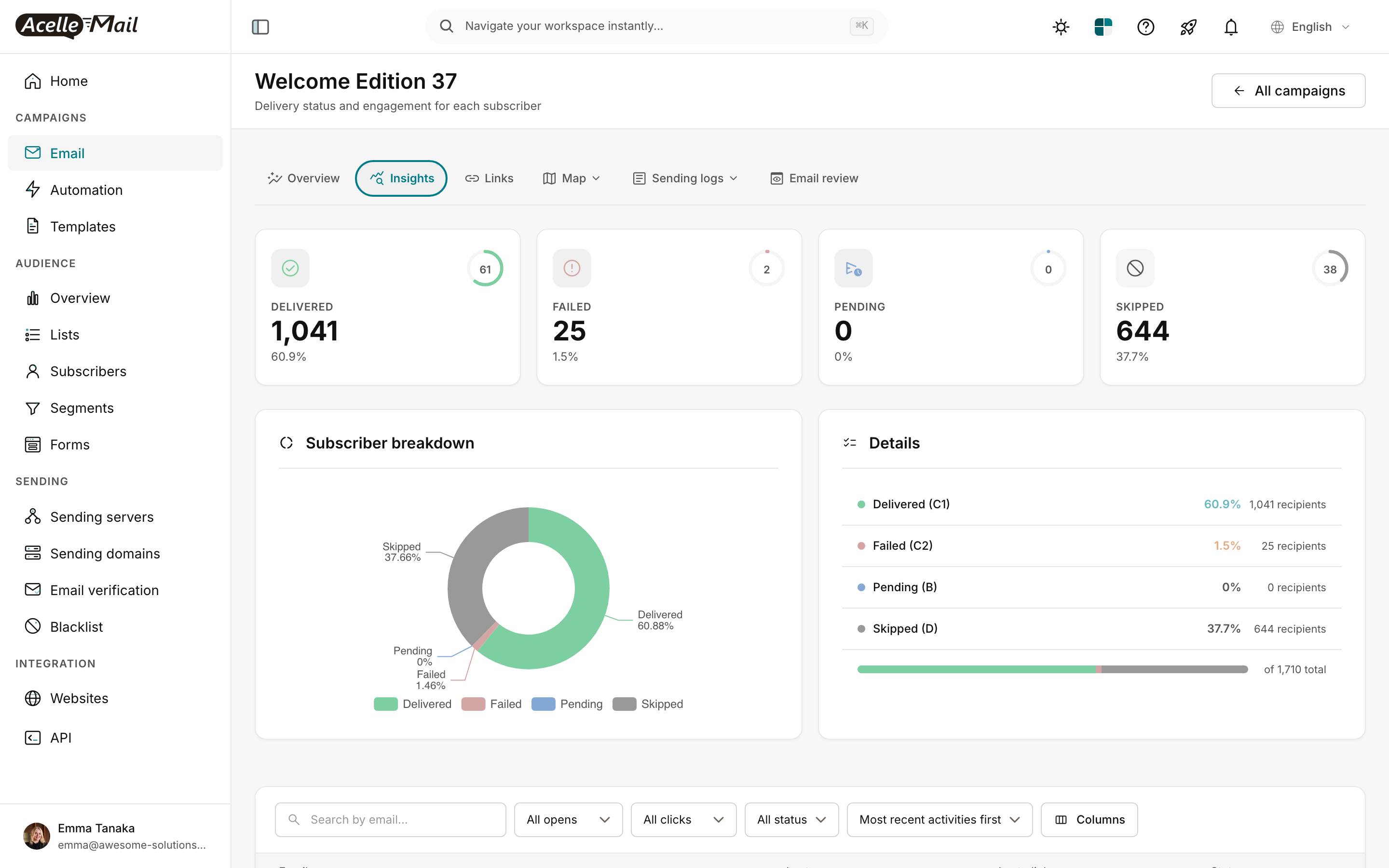
The screenshot above is the campaign Insights tab. "Skipped 37.7%" is a structural red flag — AcelleMail couldn't even attempt delivery to those subscribers (no consent, on suppression list, etc.). Before chasing spam-folder placement, get this number under 5% — see Email List Hygiene: Clean Your List for Better Deliverability.
The six categories of cause#
In rough order of how often each is the actual root cause (from production troubleshooting):
| Priority |
Category |
What's broken |
What it looks like in AcelleMail |
| 1 |
Authentication misalignment |
SPF / DKIM / DMARC not passing or not aligned with the From: domain |
Bounce log shows 5.7.7 or 5.7.26 codes from strict receivers; soft receivers silently spam-file |
| 2 |
Sender reputation |
IP and/or domain reputation damaged or untrusted |
Mix of 5.7.0 / 5.7.1 in bounces from some receivers; quiet spam from others |
| 3 |
Content triggers |
Spam-trigger language, link-density, image-only, missing physical address |
Bounce log clean; opens/clicks low; some 5.7.1 from filter-heavy receivers (AOL, Yahoo) |
| 4 |
List quality |
Old or purchased addresses; high inactive ratio; spam traps |
Skipped + bounce rates high; receivers' adaptive filters demote the domain |
| 5 |
Infrastructure |
Missing or mismatched rDNS / PTR; HELO hostname doesn't match sending IP; no TLS |
Quiet spam; Postmaster Tools shows "low IP reputation"; first message from new IP filtered hard |
| 6 |
Engagement history |
Long-dormant list, mass-send to inactive subs, sudden volume change |
Filtering ramps up over time; receivers feed engagement signal back into reputation |
Priorities 1-3 are fixable in a day with config changes. Priorities 4-6 are structural and take weeks. Start at #1 and work down — you'll often find the issue early and skip 4-6 entirely.
The 15-minute diagnostic#
Do these four checks in order. Each rules out one or more categories.
Step 1 — Send a test message to mail-tester.com#
This is the fastest gut-check on the planet for spam-folder issues. Go to mail-tester.com, grab the unique throwaway address it shows you, then in AcelleMail:
- Create a new test campaign (small, 1 recipient, the mail-tester address as the only subscriber in a fresh list).
- Use the same sending server and same From: domain as the campaign that lands in spam.
- Send.
- Wait 60 seconds, return to mail-tester.com — it'll show you a score out of 10.
Mail-tester surfaces exactly which of priorities 1-3 + 5 you're failing. If you score:
- 9-10/10: auth + content are fine; your problem is probably reputation (priority 2) or engagement (priority 6). Go to Step 4.
- 6-8/10: at least one fixable problem. Read the report — it explicitly names which check failed (SPF, DKIM, DMARC, SpamAssassin score, content rules).
- 0-5/10: broken auth or major content issues. Go to Step 2.
This single test takes 2 minutes and replaces 30 minutes of manual DNS lookups. Run it before anything else.
Step 2 — Verify SPF, DKIM, and DMARC are aligned#
Open Terminal and run:
# Replace yourdomain.com with the From: domain on your campaign
dig +short txt yourdomain.com | grep spf1
dig +short txt _dmarc.yourdomain.com
# DKIM selector varies — common: 'default', 'acelle', 'k1', 'selector1'
dig +short txt default._domainkey.yourdomain.com
You should see:
- SPF: one record starting
v=spf1, ending in ~all or -all, listing the sending IP / include of the provider (e.g. include:_spf.acellemail.example).
- DMARC: one record starting
v=DMARC1; p= followed by none, quarantine, or reject.
- DKIM: a long base64 public key string starting
v=DKIM1; k=rsa; p=.
If any of these is missing or malformed, that's your #1 problem. Fix DNS — see How to Set Up SPF, DKIM, and DMARC Records. Wait 30 minutes for propagation, re-test.
For deeper SPF/DKIM/DMARC config (alignment in particular — the subtle case where records exist but the From: domain doesn't match the Return-Path domain), see:
Step 3 — Check the sending server's actual SMTP transcript#
Send a single test message to a Gmail address you control. In Gmail, open the message → More (3-dot) → Show original.
Look at the Authentication-Results header — Gmail tells you exactly what passed:
Authentication-Results: mx.google.com;
       dkim=pass header.i=@yourdomain.com header.s=acelle;
       spf=pass (google.com: domain of bounce@yourdomain.com designates 1.2.3.4 as permitted sender)
       dmarc=pass (p=NONE sp=NONE dis=NONE) header.from=yourdomain.com;
Three pass lines = auth is good. Any fail, softfail, neutral, or temperror = your problem.
The big one to check: dmarc=pass with alignment. If dkim=pass but on a different domain than header.from, that's a misalignment — common when you DKIM-sign from acellemail.example instead of yourdomain.com. The fix is to sign messages with a DKIM key from yourdomain.com itself, not a service domain.
Step 4 — Check Google Postmaster Tools#
Sign up at postmaster.google.com, add your sending domain, verify with a DNS TXT record (Google walks you through it).
You'll need 24-48 hours of sends after verification before data populates. Then Postmaster Tools shows you per-day:
- Spam rate. Gmail's own measurement of how often users in their inbox flagged your mail as spam. The threshold is 0.1% — above that you'll be aggressively filtered.
- IP reputation. Low / Medium / High / Bad. A Bad rating from Gmail is hard to recover from — usually requires a fresh IP and a full warmup.
- Domain reputation. Same scale, domain-level. Damage here transfers if you move providers, so it's the more important number.
- Authentication. Pass-rate for SPF / DKIM / DMARC. Should be 99%+ if your DNS is right.
- Delivery errors. Sample of bounce reasons from Gmail's side, often more informative than what you see in your bounce log.
For Yahoo, the equivalent is Yahoo Sender Hub (signup at sendershub.yahooinc.com). For Microsoft, it's Outlook Sender Network (sendersupport.olc.protection.outlook.com).
These three Postmaster Tools dashboards together cover ~80% of consumer email by volume. If all three show your domain in good standing, you don't have a reputation problem.
The fixes, in priority order#
Fix Priority 1 — Authentication misalignment#
Most common observed cause. Three failure modes:
Missing records. If SPF / DKIM / DMARC don't exist in DNS at all, every receiver runs you through legacy heuristics — and modern receivers (Gmail since 2024, Yahoo since 2024, Microsoft since 2024) reject or hard-spam unauthenticated bulk mail.
Fix: publish all three. See How to Set Up SPF, DKIM, and DMARC Records.
Misaligned records. Records exist but the From: domain doesn't match the Return-Path domain (SPF alignment) or the DKIM signing domain (DKIM alignment). DMARC p=quarantine or p=reject rejects misaligned mail. p=none quietly spam-files it at strict receivers.
Fix: ensure your From: domain (from@yourdomain.com) matches:
- The Return-Path domain (SPF:
MAIL FROM envelope-sender). AcelleMail usually sets this to a subdomain like bounce.yourdomain.com — that aligns relaxed but not strict. For most DMARC p=quarantine deployments, relaxed is enough.
- The DKIM signing
d= tag. If your sending server signs with d=acellemail.example instead of d=yourdomain.com, the DKIM signature passes but doesn't align with the From: domain. Fix: generate a DKIM key for yourdomain.com and configure your sending server to sign with it.
This is the single most common subtle deliverability bug. Run Step 3 above (Gmail Show Original) — look for header.i=@yourdomain.com after dkim=pass. If it says header.i=@somethingelse.com, that's your bug.
Stale DMARC policy. p=none is "monitoring mode" — receivers see DMARC exists but you've asked them not to enforce. Some strict ISPs still spam-file p=none aligned-fail mail. Tightening to p=quarantine (or p=reject) actively signals you stand behind your authentication.
Fix: see DMARC Enforcement Migration for the safe ramp.
Fix Priority 2 — Sender reputation#
Reputation damage happens fast (one bad campaign can cost months) and recovers slow (8-12 weeks for full restoration after a hit).
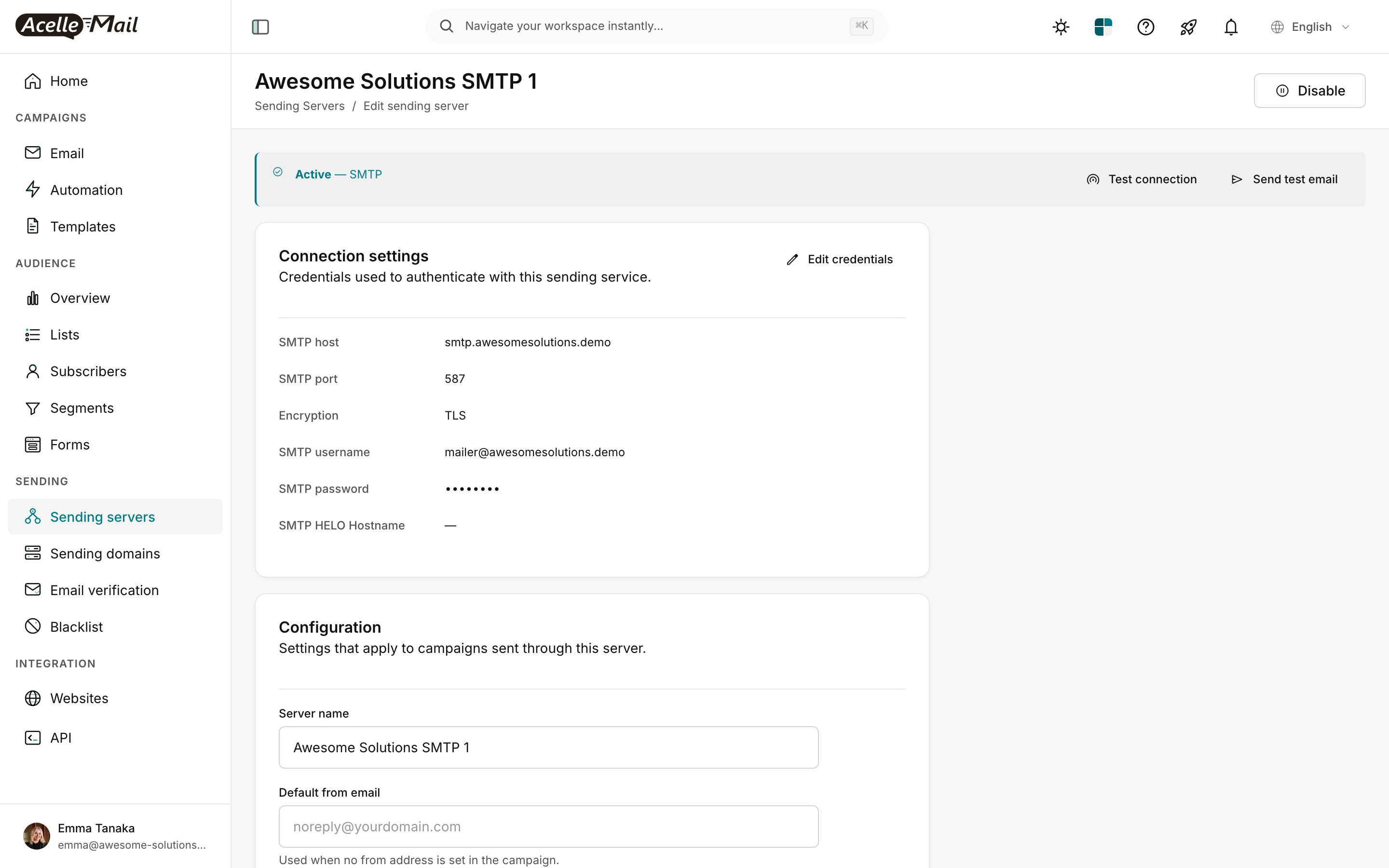
The screenshot shows the sending-server config in AcelleMail — confirm your SMTP host, port (587 with STARTTLS or 465 with TLS), and credentials are correct, and that the sending server is showing as Active.
Common reputation issues:
New IP, no warmup. A new sending IP starts with zero reputation. Sending 10k messages on day 1 looks like spammer behavior. Run a structured warmup ramp.
Fix: see IP Warmup Schedule for New Sending Servers.
Shared IP, one bad neighbor. If you're on a shared IP pool, another tenant's bad campaign can drag down the whole pool's reputation.
Fix: see Dedicated vs Shared IP Address for the volume threshold (~50k/month) above which dedicated makes sense.
Recent bounce-rate spike. Sending to a stale list, a list with typos, or a purchased list creates a 5%+ hard-bounce burst. Receivers' adaptive filters interpret this as spam behavior and demote you.
Fix: clean the list first (see Email List Hygiene), throttle sends for 2-3 weeks, watch Postmaster Tools recover. Don't aggressively retry — that compounds the problem.
Blacklist hit. Spamhaus, Barracuda, or SORBS listed your IP. Receivers check these in real-time. A listing means immediate spam-filing at most consumer receivers.
Fix: check listings at mxtoolbox.com/blacklists.aspx. For each, follow the listing operator's delisting procedure — Spamhaus has a self-service form; others may require email contact and proof of remediation.
For ongoing visibility, see Sender Reputation Monitoring.
Fix Priority 3 — Content triggers#
Content filters look at hundreds of features. The high-impact ones:
Spam-trigger phrases. "FREE!!!", "ACT NOW", "100% GUARANTEED", "click here", "limited time", ALL-CAPS subjects, excessive !!!!. Modern filters are smarter than a fixed list, but these phrases combined with weak authentication consistently push messages to spam.
Fix: rewrite the copy in plain professional language. See Email Subject Line Formulas That Work for templates that don't trigger filters.
Image-only emails. A message that's 90%+ image with minimal text reads to filters as "trying to hide content from scanners." Includes the marketing-emails-are-mostly-a-banner-graphic case.
Fix: maintain a ~60/40 text-to-image ratio. Every image needs alt text. Real text inside the email body, not just inside images. See Email Template Design Best Practices.
Missing physical address / unsubscribe. CAN-SPAM (US), CASL (Canada), and GDPR (EU) all require a physical mailing address and a one-click unsubscribe. Modern filters consider their absence a strong spam signal.
Fix: AcelleMail's default footer template includes both. Verify your campaigns include them. The CAN-SPAM-compliant footer template is in Templates → System templates → Footer.
URL-shorteners. bit.ly, t.co, etc. used heavily in spam — modern filters discount messages that contain them. Use full URLs from your own domain.
Suspicious link reputation. If your domain links to a URL that's blocked by major URL reputation databases (Spamhaus DBL, SURBL), spam-filing is automatic.
Fix: check your domain at mxtoolbox.com. If listed, remediate the linked URL (or remove it) and delist.
Fix Priority 4 — List quality#
A list with 30%+ unengaged addresses (no opens / clicks in 90+ days) signals to receivers that you're sending unwanted mail. Receivers feed engagement back into their filtering decisions.
Fix in this order:
- Hard-bounce suppress. Anything with
5.1.1, 5.1.2, 5.1.3. See Decoding SMTP Error Codes and Bounce Messages.
- Repeated soft-bounce suppress. 3+ soft bounces over 30 days → move to suppression.
- Long-inactive prune. Subscribers with no opens or clicks in 180+ days → either re-engagement campaign or remove. See Email List Hygiene.
- Validate before import. Run new list imports through an email-validation service (NeverBounce, Kickbox, ZeroBounce) before sending the first campaign. Catches typos, role addresses, disposable domains, known spam traps.
A clean 50k list outperforms a contaminated 200k list on every meaningful metric — open rate, click rate, and inbox placement.
Fix Priority 5 — Infrastructure#
These are server-level config items that often fall to the operator who installed AcelleMail, not the person sending campaigns.
Reverse DNS (PTR record). The sending IP must reverse-resolve to a hostname that forward-resolves back to the same IP. Most consumer receivers require this. Many cloud providers (AWS, GCP) don't set it by default; some (DO, Vultr) set it to the droplet name.
Fix: set the PTR record at your hosting provider. Common locations:
- AWS: Set Reverse DNS on the EIP via support request.
- DigitalOcean: Rename the droplet to
mail.yourdomain.com (DO sets PTR from droplet name).
- Vultr: Reverse DNS panel on the instance.
Verify with
dig +short -x <ip>.
HELO/EHLO hostname. The hostname the sending server announces during SMTP handshake. Should match the sending IP's PTR record. Misalignment ("HELO says mail.yourdomain.com, but PTR resolves to ec2-1-2-3-4.compute-1.amazonaws.com") is a major spam signal.
Fix: in AcelleMail's sending server config, set the HELO hostname field explicitly. Make it match dig +short -x <sending-ip>.
No TLS. Modern receivers strongly prefer TLS-encrypted SMTP transactions. Gmail's UI shows the red "unlocked" icon for non-TLS messages, which contributes to user-reported-spam signal.
Fix: configure your sending server to use TLS. Port 587 with STARTTLS is the standard.
Open relay test. If your sending server is an open relay (accepting mail from any source, not just authenticated AcelleMail), it'll be blacklisted within hours.
Fix: lock down sending server authentication. SMTP AUTH LOGIN or AUTH PLAIN required for all outbound. Verify with an external open-relay tester (mxtoolbox.com/SuperTool.aspx?action=smtp:).
Fix Priority 6 — Engagement history#
Receivers track per-subscriber-per-sender engagement: did the user open recent messages from you? Did they click? Did they archive without reading? Did they mark as spam?
A subscriber with 6 months of "never opens" tells the receiver this is unwanted mail. Sending more to that subscriber damages reputation for everyone else on the list.
Fix patterns:
Segment by engagement. Send your main campaigns only to subscribers who opened or clicked in the last 90 days. Use a "winback" track for older subscribers (one or two re-engagement messages over a month; if no response, remove).
Throttle volume gracefully. Sudden 10× volume increase (from 5k/day to 50k/day overnight) looks like spam-cannon behavior. Ramp over 2-3 weeks.
Honor unsubscribes immediately. AcelleMail handles this by default. But if you import lists from external sources, double-check the import does not re-add unsubscribed addresses.
When you've fixed everything and it's still not working#
Two scenarios:
It's been < 4 weeks since the fix. Reputation lags. Receivers' adaptive filters re-evaluate slowly, especially after a known-bad period. Be patient and watch Postmaster Tools weekly.
It's been > 4 weeks and Postmaster Tools shows good standing. The remaining problem is usually one of:
- A specific receiver (Outlook in particular) has a long memory. If you've ever crossed their spam threshold, they may keep you in spam for years. Workaround: use Sender Network's Sender Score Certified program, or accept the long ramp.
- A specific recipient organization runs an aggressive in-house filter (Proofpoint, Mimecast, Barracuda Email Security Gateway). Their filters are tuned far stricter than consumer Gmail/Yahoo. Workaround: get individual recipients to "release" your sender and add you to their organization's allow-list.
These last two are out of your control as a sender. Focus your effort on what is in your control — the first six priorities above will cover the 95% case.
Related reading#
