What this is for#
You built the workflow, activated it, added a test subscriber to the trigger list — and nothing happens. No email. No log entry. The automation just sits there.
This is a different problem from a stuck campaign (see Why Is My AcelleMail Campaign Stuck in "Sending" Status). Campaigns are one-shot dispatches; automations are persistent state machines that advance per-subscriber, per-tick. When an automation isn't triggering, the failure is somewhere in the dispatch → scan → advance chain, and the diagnostic walks that chain in order.
This guide is the operator-grade reference for the eight real-world causes, source-grounded against the Automation 2 runtime in app/Model/Automation2.php and app/Domain/Automation/Runtime/*.
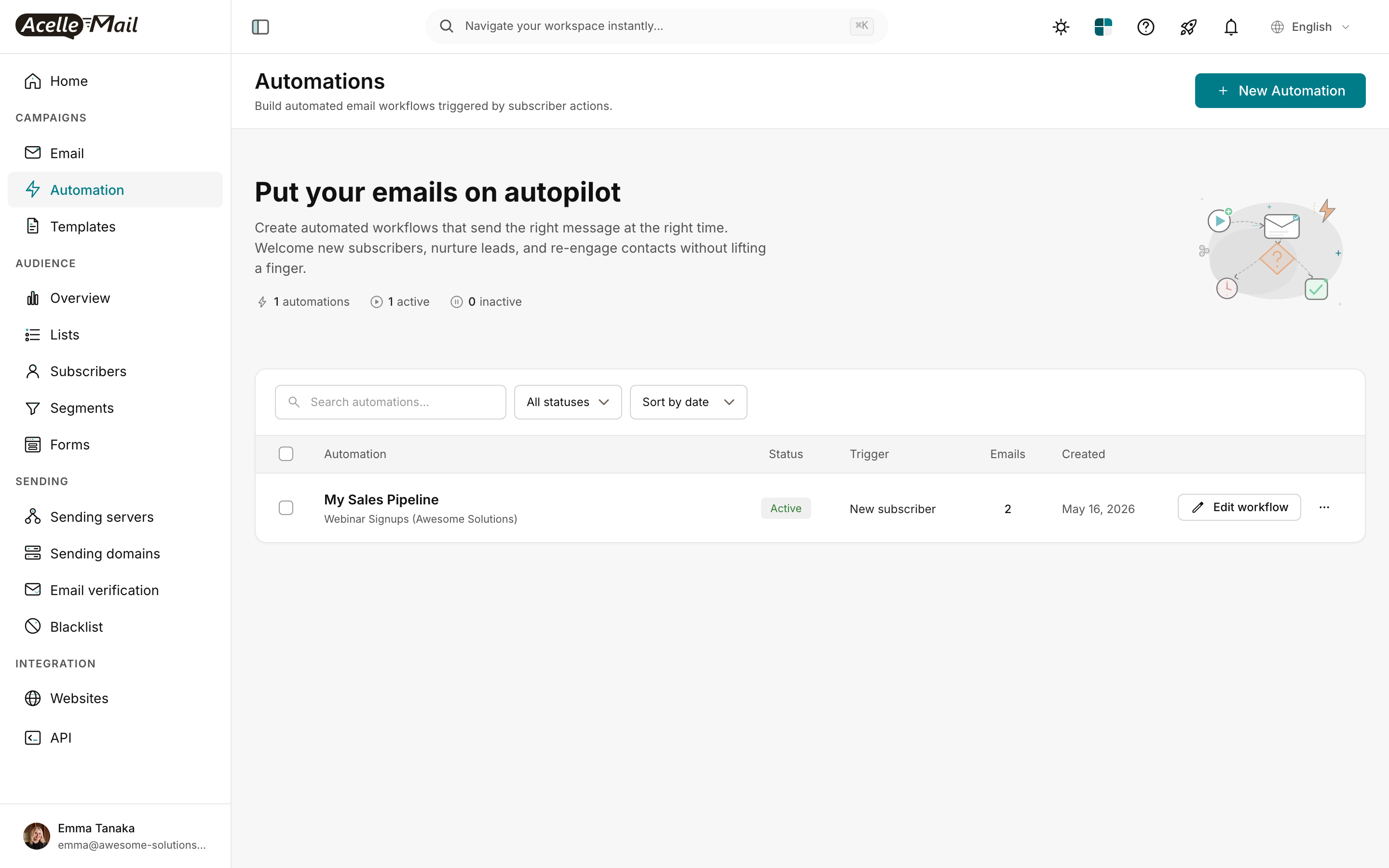
The screenshot above is the Automations index at /automations. Read the header counter ("1 automations · 1 active · 0 inactive") and each row's Status column first — if your automation isn't in the "active" count, cause #1 below applies and you can skip the rest of the diagnostic.
How automation triggering actually works#
The Automation 2 runtime has three components running on a fixed schedule:
-
automation:dispatch runs every 5 minutes. Registered in routes/console.php:
Schedule::command('automation:dispatch')->everyFiveMinutes();
It queues a DispatchAutomationJobs job on the automation_dispatch queue.
-
The job calls Automation2::run(), which iterates every customer, then every active automation per customer:
$automations = $customer->local()->activeAutomation2s;  // line 371
foreach ($automations as $automation) {
    // … grab per-automation exclusive lock …
    $automation->check();
}
The activeAutomation2s relation filters by status = 'active'. Inactive automations are skipped here — line 1 of the chain.
-
Automation2::check() does two things per pass:
CronTriggerScanner::scan($this) — creates new AutoTrigger rows when cron-driven triggers (weekly/monthly/birthday/specific-date) match a subscriber.advanceDueTriggers() — ticks every AutoTrigger row that's due. A row is "due" when it's in Running phase, OR in Waiting phase with scheduled_at ≤ now, AND held_at IS NULL.
The advance phase is bounded: 200 rows per call, 32 inner-loop advances per row (matching TriggerDispatcher::drain). These bounds exist so a runaway automation can't monopolize the dispatcher.
For event-driven triggers (welcome / goodbye / tag-added / attribute-changed), the work happens outside the cron path:
event fires → TriggerAutomation listener → TriggerDispatcher::dispatch
            → creates AutoTrigger row → drains synchronously up to 32 advances
So if you subscribe to a list and the welcome email doesn't send immediately, the failure is in the listener path, not the cron path. That distinction shifts which of the eight causes you investigate first.
The 5-step diagnostic#
Step 1 — Is the automation Active?#
cd /var/www/acellemail
sudo -u www-data php artisan tinker --execute='
  $a = App\Model\Automation2::where("uid","REPLACE_UID")->first();
  echo "status: ".$a->status."\n";
  echo "last_error: ".($a->last_error ?: "(none)")."\n";
  echo "updated_at: ".$a->updated_at."\n";
'
status must be active. If it says inactive, no amount of debugging will help — see cause #1.
Step 2 — Is automation:dispatch actually running?#
tail -100 /var/www/acellemail/storage/logs/laravel.log | grep -i "automation:dispatch\|DispatchAutomation"
grep -i automation /var/www/acellemail/storage/logs/automation-dispatch.log | tail -50
You should see entries every ~5 minutes. If nothing for >15 minutes, cron is the problem — see cause #2.
Step 3 — Inspect the per-automation log#
Every active automation writes to its own log file:
tail -100 /var/www/acellemail/storage/logs/automations/REPLACE_UID.log
What to look for:
Checking automation "Welcome Series" — every 5 minutes confirms the dispatcher is reaching this automation.LOCK timeout, another process is currently handling automation "..." — cause #4 (lock held).Automation "X" skipped, user "..." not on active subscription — cause #6.Error while executing automation "X". <stack trace> — cause #7.
Absence of log entries despite the dispatcher running = the automation isn't in activeAutomation2s (status not active OR scope filter excluding it).
Step 4 — Check the AutoTrigger table#
AutoTrigger rows are the per-subscriber state — the "subscriber is at step 3 of 7, waiting until 2026-05-20 09:00." If the trigger row never gets created, no email fires.
sudo -u www-data php artisan tinker --execute='
  $a = App\Model\Automation2::where("uid","REPLACE_UID")->first();
  $rows = $a->autoTriggers()->orderByDesc("id")->limit(10)->get();
  echo "trigger count: ".$a->autoTriggers()->count()."\n";
  foreach ($rows as $r) {
    echo "  id=".$r->id." sub=".$r->subscriber_id
      ." phase=".$r->phase
      ." scheduled_at=".($r->scheduled_at ?? "-")
      ." held_at=".($r->held_at ?? "-")
      ." last_error=".substr($r->last_error ?? "", 0, 60)
      ."\n";
  }
'
Three outcomes:
- No rows at all → trigger condition isn't matching subscribers. Cause #3.
- Rows exist but
phase=Waiting with scheduled_at in the past → drain failing. Cause #4 or #5.
- Rows exist with
held_at set → admin paused this subscriber. Cause #5.
- Rows with
last_error populated → handler exception. Cause #7.
Step 5 — Verify queue workers are alive#
sudo supervisorctl status acellemail-worker:*
All workers should be RUNNING. The automation dispatcher queues advance work, so dead workers mean rows stay Running forever without progressing. See Setting Up Queue Workers and Cron Jobs and Why Is My AcelleMail Campaign Stuck in "Sending" Status (the queue-worker discussion applies identically here).
The eight causes, in order of frequency#
1. Status not Active (most common)#
Symptom. You created the automation, set up the trigger, designed the flow — but never clicked Activate. Or you clicked Pause during testing and forgot to resume.
Why it happens. The Activate button is intentionally subtle. AcelleMail will not run automations in inactive status — $customer->local()->activeAutomation2s (Automation2.php:371) filters them out at the dispatcher.
Fix. Open the automation, click Pause / Activate (the pill in the header next to the workflow name). The status badge should change from gray "Inactive" to green "Active." The next cron tick (within 5 minutes) will pick it up.
You can also verify and flip in tinker:
sudo -u www-data php artisan tinker --execute='
  $a = App\Model\Automation2::where("uid","REPLACE_UID")->first();
  $a->setActive();
'
setActive() (line 200-201) sets $this->status = self::STATUS_ACTIVE and saves.
2. Cron daemon stopped#
Symptom. All automations stopped triggering. Campaigns also broken (cron drives everything in routes/console.php). New automations don't dispatch at all.
Why it happens. Identical mechanism to the campaign-stuck-in-sending diagnosis — cron daemon stopped, crontab missing, or schedule:run failing. See cause #1 of Why Is My AcelleMail Campaign Stuck in "Sending" Status for the fix.
Fix.
sudo systemctl enable --now cron
# Verify crontab:
sudo crontab -u www-data -l | grep acellemail
# Should show: * * * * * cd /var/www/acellemail && php artisan schedule:run >> /dev/null 2>&1
Wait 5 minutes, then check storage/logs/automation-dispatch.log for fresh entries.
3. Trigger condition not met (the subtle ones)#
Symptom. Specific automation has zero AutoTrigger rows despite eligible subscribers being added.
Why it happens. Trigger conditions are evaluated literally. The most common mistakes:
"List subscriber added" trigger watching the wrong list. If your automation is set to "Subscriber added to list: Newsletter" but you added the test subscriber to "VIP Customers," the trigger doesn't match.
Fix: open Settings → Mailing list, confirm it's the list you're adding subscribers to. The settings screenshot accessed via the Settings button on the automation flow header. Test by adding a fresh subscriber via the AcelleMail UI directly — not via API, not via CSV import (those have separate trigger paths).
Tag-based trigger requires exact tag match. "Trigger when tag added: VIP" requires the exact tag string. vip lowercase won't match VIP. Trailing spaces matter (VIP ≠ VIP).
Fix: in tinker, inspect actual tags on the subscriber:
sudo -u www-data php artisan tinker --execute='
  $s = App\Model\Subscriber::where("email","test@example.com")->first();
  print_r($s->tags->pluck("name")->all());
'
Date-based trigger (birthday, anniversary, specific date) timing. Birthday triggers fire at the customer's account timezone "next midnight after the birthday date." If your subscriber's BIRTHDAY field is 2026-05-17 and right now is 2026-05-16 14:00, the trigger fires at midnight TONIGHT — not now.
Cron scanner: CronTriggerScanner::scan() is called inside Automation2::check() every 5 min, but it only creates AutoTrigger rows for subscribers whose date matches "today or earlier" in the relevant timezone.
Fix: wait until the date arrives, OR temporarily flip the field to today's date to test.
API trigger (custom workflow) requires explicit dispatch. "Trigger via API" triggers don't watch anything — they only fire when you POST /api/v1/automations/{uid}/trigger with the subscriber email. If you assumed it would auto-trigger on list-add, it won't.
Fix: see Using API Triggers for Custom Automation Workflows for the correct webhook pattern.
Segment trigger checks against a dynamic segment. Static lists are evaluated at add-time; dynamic segments (tags contains "X" or country = "US") are evaluated whenever the runtime touches the subscriber. If your segment rule has a typo or matches zero subscribers, the trigger never fires.
Fix: navigate to the segment, click Refresh count or test by exporting matched subscribers.
4. Lock held from a hung previous run#
Symptom. Automation log shows LOCK timeout, another process is currently handling automation "..." repeatedly. New ticks can't acquire the lock. AutoTrigger rows freeze.
Why it happens. Automation2::check() wraps work in with_cache_lock("run_automation_{$this->uid}", ..., $lockTime = 7200) — a 2-hour cache lock. If a previous tick crashed without releasing the lock (worker killed mid-job, server reboot), the lock stays in cache until expiration.
Adversarial scenario: a long-running step (large batch send, expensive segment query) holds the lock for >5 minutes; the next cron tick can't acquire it; this repeats until the work completes or the lock expires.
Diagnose.
sudo -u www-data php artisan tinker --execute='
  $lockKey = "laravel_cache_run_automation_REPLACE_UID";
  echo "lock exists: ".(Illuminate\Support\Facades\Cache::has("run_automation_REPLACE_UID") ? "yes" : "no")."\n";
'
Fix. Clear the cache lock:
sudo -u www-data php artisan tinker --execute='
  Illuminate\Support\Facades\Cache::forget("run_automation_REPLACE_UID");
'
If using Redis as cache backend, you can also redis-cli DEL the key directly. Verify by checking the automation log for the next tick — LOCK timeout messages should stop.
For the management-level lock (Cache::get(MANAGE_LOCK_KEY) shows currently-running automations as a debug aid), inspect:
sudo -u www-data php artisan tinker --execute='
  print_r(Illuminate\Support\Facades\Cache::get("running_automations", []));
'
This shows which automation a previous worker thought it was running and its pid. If ps -p <pid> confirms the process no longer exists, the lock entry is stale and should be cleared.
5. Subscriber held by admin override#
Symptom. Some subscribers progress through the automation; others don't. The non-progressing ones have held_at set on their AutoTrigger row.
Why it happens. Acelle has a Tier-2 admin override that "holds" a specific subscriber's automation progression without affecting others on the same flow. The advanceDueTriggers() query (line 493) explicitly excludes held_at IS NOT NULL rows. Once held, the subscriber's flow pauses at whatever step they were on — their phase and scheduled_at remain intact, ready to resume.
Diagnose. Pull all AutoTrigger rows for the suspected subscriber:
sudo -u www-data php artisan tinker --execute='
  $s = App\Model\Subscriber::where("email","test@example.com")->first();
  $rows = App\Model\AutoTrigger::where("subscriber_id", $s->id)->get();
  foreach ($rows as $r) {
    echo "automation ".$r->automation2_id." phase ".$r->phase." held_at ".($r->held_at ?? "-")."\n";
  }
'
Any row with held_at populated is paused.
Fix. Unhold the row (or the entire automation's holds):
sudo -u www-data php artisan tinker --execute='
  // Unhold one specific row
  $r = App\Model\AutoTrigger::find(REPLACE_ID);
  $r->held_at = null;
  $r->save();
  // Or unhold all rows for an automation:
  App\Model\AutoTrigger::where("automation2_id", REPLACE_AUTOMATION_ID)
    ->whereNotNull("held_at")
    ->update(["held_at" => null]);
'
The next cron tick will pick them up.
6. Customer subscription not Active#
Symptom. Automation logs show Automation "X" skipped, user "..." not on active subscription. The automation has status active but never advances.
Why it happens. Automation2::run() line 384 gates execution on $customer->getCurrentActiveSubscription(). If the customer's plan is expired, suspended, or in a grace state, automation work is silently skipped (campaigns may or may not be — depends on plan settings, but automations always are).
This typically happens after a payment failure, end-of-trial, or admin-level account suspension.
Diagnose.
sudo -u www-data php artisan tinker --execute='
  $c = App\Model\Customer::find(REPLACE_CUSTOMER_ID);
  $sub = $c->getCurrentActiveSubscription();
  echo "active sub: ".($sub ? "yes (id=".$sub->id.")" : "NO")."\n";
  if ($sub) {
    echo "  plan: ".$sub->plan_id."\n";
    echo "  ends_at: ".($sub->ends_at ?? "(open)")."\n";
    echo "  status: ".$sub->status."\n";
  }
'
Fix. Restore the subscription via the admin UI, then verify automations resume on the next cron tick. If the customer is in trial-grace and you want trial features to include automations, see the SaaS-specific subscription-config docs.
7. AutoTrigger row in failed state#
Symptom. AutoTrigger rows have last_error populated. The row is stuck at one step — usually the Send step — but never advances past it.
Why it happens. The handler for a specific node type threw an exception. Common causes:
- Send-step template references a deleted custom field (
{COMPANY} when the field was removed).
- Send-step sender email no longer exists (deleted sending server).
- Condition-step segment query is malformed.
- Operation-step (add-tag, remove-tag) references a deleted tag.
Diagnose.
sudo -u www-data php artisan tinker --execute='
  $rows = App\Model\AutoTrigger::whereNotNull("last_error")
    ->where("automation2_id", REPLACE_AUTOMATION_ID)
    ->limit(20)->get();
  foreach ($rows as $r) {
    echo "id=".$r->id." sub=".$r->subscriber_id." err=".substr($r->last_error, 0, 200)."\n";
  }
'
Fix. Identify the broken node:
- Open the automation flow at
/automations/<uid>/edit.
- Look for a node referenced in the error text.
- Fix the root cause (re-add the deleted field, restore the sending server, fix the segment query).
- Clear
last_error on the affected rows so they re-attempt:
sudo -u www-data php artisan tinker --execute='
  App\Model\AutoTrigger::where("automation2_id", REPLACE_AUTOMATION_ID)
    ->whereNotNull("last_error")
    ->update(["last_error" => null]);
'
8. Queue worker dead#
Symptom. automation:dispatch runs successfully (you see it in laravel.log), but the actual work — sending the queued emails, advancing chained nodes — never happens. Email-send queue depth grows.
Why it happens. The dispatcher queues work to be done by the queue worker pool (the same workers that run campaigns). If supervisor is down or the worker config doesn't include the automation queues, those jobs sit forever.
Diagnose + fix. Identical to cause #2 in Why Is My AcelleMail Campaign Stuck in "Sending" Status. Restart supervisor:
sudo systemctl enable --now supervisor
sudo supervisorctl restart acellemail-master:* acellemail-worker:*
For the right supervisor config that watches the batch, automation_dispatch, and per-customer queues, see Setting Up Queue Workers and Cron Jobs.
When event-driven triggers fail (welcome, goodbye, tag)#
Event triggers don't wait for the cron path — they fire via a listener (App\Listeners\TriggerAutomation) the moment the relevant event dispatches. If your welcome automation doesn't fire on subscriber signup but your weekly digest does, the cron path is healthy and the listener path is broken.
Diagnose:
# Are event listeners registered?
sudo -u www-data php artisan event:list | grep -i "Subscribe\|Tag\|Attribute"
# Watch the dispatcher log for event-triggered work
tail -f storage/logs/automation-dispatch.log
Add a test subscriber via the AcelleMail UI to a list with a welcome-trigger automation. Within a few seconds, you should see a log entry. If silent, common causes:
- Subscriber added via API/CSV — those paths use bulk-import flows that don't fire
SubscriberAdded events by default. Welcome automations only fire on UI-driven adds and on addSubscriber() API calls (not bulk import ones).
- Listener queue is wedged — listeners run on the queue. Same fix as cause #8: restart supervisor.
- Welcome trigger watching the wrong list — same as cause #3.
The bulk-import behavior is intentional: a 100k-subscriber import would otherwise fire 100k welcome emails, which is a deliverability disaster. For mass-import-with-welcome workflows, use the dedicated TriggerAutomationForImportedContacts listener path (advanced setup; see the API reference).
The visual diagnostic — read the flow canvas#
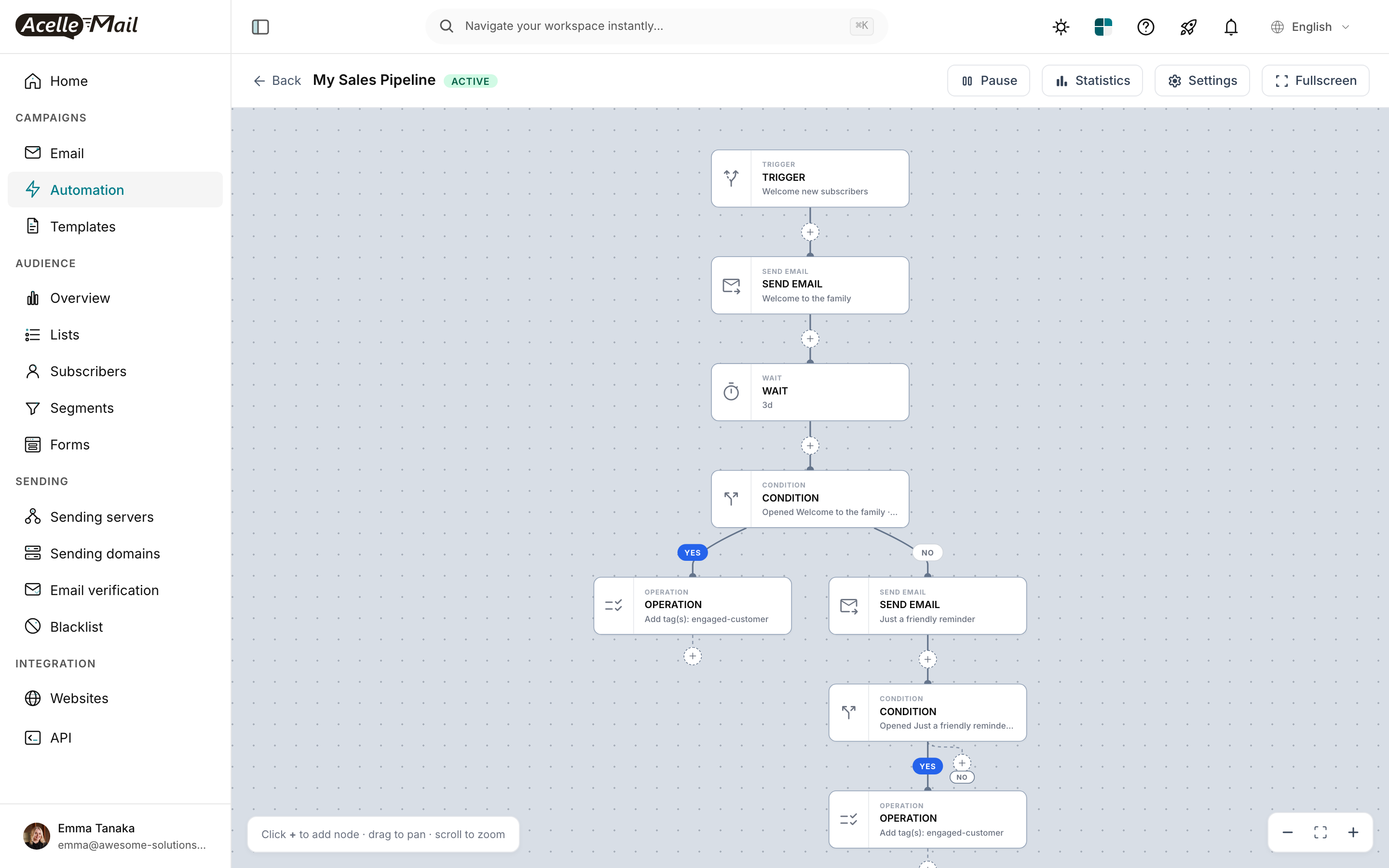
The flow canvas at /automations/<uid>/edit is your visual debugger. Key things to confirm:
- Status badge in the header is green "ACTIVE." If gray or yellow, cause #1.
- Trigger node at the top shows what the trigger is. If "New subscriber" but you're adding via API import, cause #3 (bulk-import bypass).
- WAIT nodes show their wait duration. A 7-day wait at the top of the flow means the first SEND won't fire for 7 days regardless of how healthy the rest is. Test with shorter waits during dev.
- CONDITION nodes show their branching rules. A condition like "Opened email X" requires the previous email and its open event, which can take 24+ hours. Don't expect immediate progression past condition nodes.
- Statistics button opens per-node throughput — number of subscribers who entered each node, exited each branch. Zeroes downstream of a working trigger usually point to a CONDITION that's filtering everyone out.
Real-world checklist (pin this for incident response)#
- ☐ Status is
active (Step 1)
- ☐
automation:dispatch ran in the last 10 minutes (Step 2)
- ☐ Per-automation log shows recent "Checking automation" entries (Step 3)
- ☐
AutoTrigger rows exist for test subscribers (Step 4)
- ☐ Queue workers running (Step 5)
- ☐ Customer subscription active (cause #6)
- ☐ No
held_at on test subscriber's rows (cause #5)
- ☐ No
last_error on AutoTrigger rows (cause #7)
- ☐ Cache lock for this automation not held (cause #4)
Most incidents resolve at step 1 or 2.
Related reading#
