What this is for#
A campaign that says "Sending" hours after you hit Send is the single most common operator panic on a self-hosted email platform. The worry is real — but in most cases there's a precise, identifiable cause and the fix is two commands away.
This guide walks the actual mechanics of AcelleMail's send pipeline, the auto-rerun that already runs every 10 minutes (so you may not need to do anything), and a 5-minute diagnostic to land on one of six root causes in order of real-world frequency.
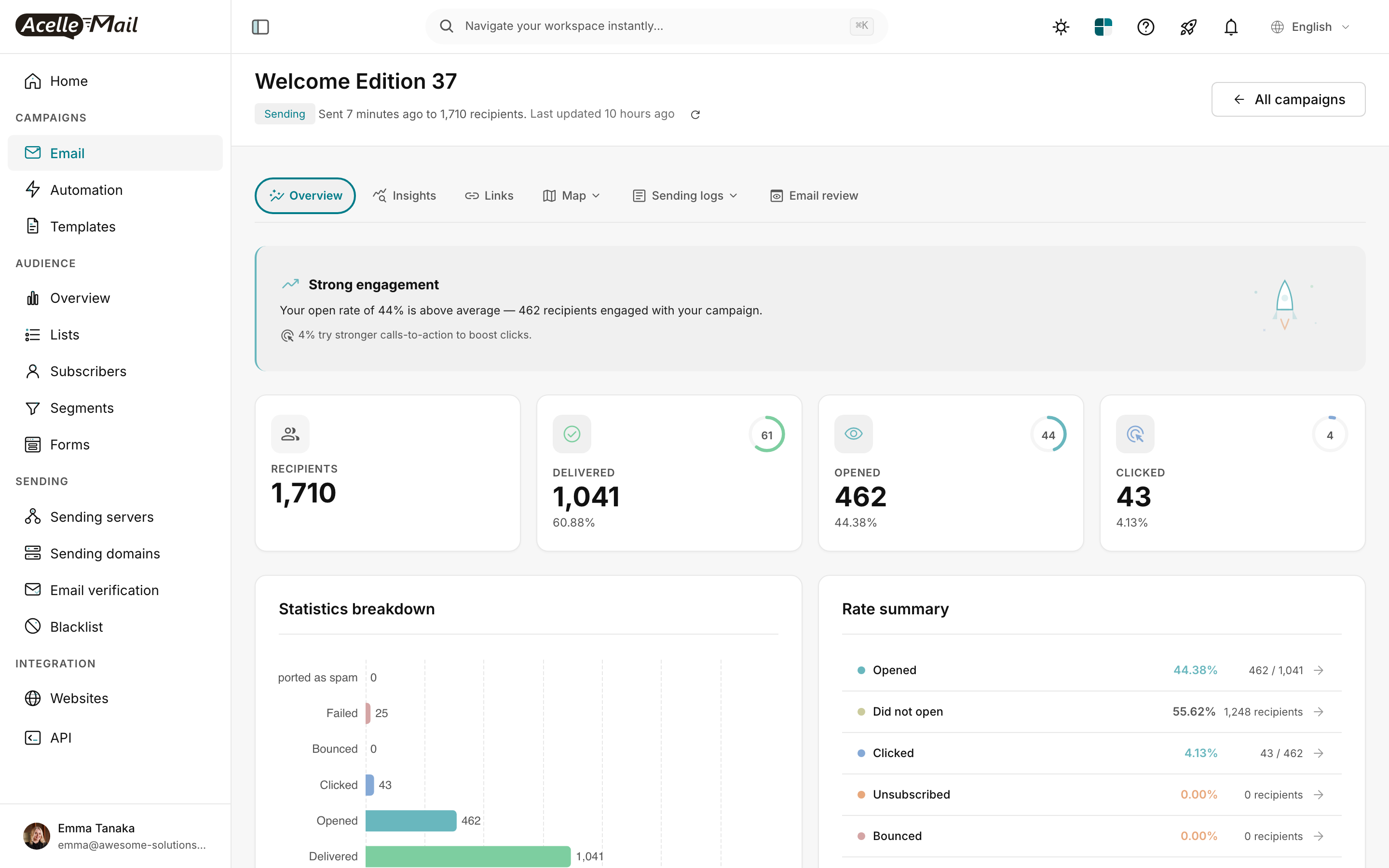
The "Last updated 10 hours ago" line above is what an operator looks at first — it tells you the worker hasn't touched this campaign in 10 hours, while the badge still says "Sending." That mismatch is the diagnosis.
What "Sending" actually means#
AcelleMail's campaign lifecycle is a five-state machine:
new → queued → sending → done
              ↓
          scheduled (variant of queued)
Two boolean flags overlay any state: is_paused (operator pressed Pause) and is_error (a worker threw an unrecoverable exception). The status itself is one of new, queued, sending, scheduled, awaiting_winner, sending_winner, or done. (Source: app/Model/Campaign.php lines 3422-3428.)
When the worker process picks up your campaign from the queue and starts dispatching message-send jobs in batches, it calls setSending():
// app/Model/Campaign.php
public function setSending()
{
    $this->is_error = false;
    $this->is_paused = false;
    $this->status = self::STATUS_SENDING;
    $this->running_pid = getmypid();          // ← OS PID of the worker that started the batch
    $this->delivery_at = Carbon::now();       // ← timestamp the batch began
    $this->save();
}
Two things matter here for diagnostics:
running_pid records the PID of the worker that picked up the batch. If that PID is no longer alive on the server, the worker died mid-job.delivery_at stamps when the batch began. Combined with the campaign's debug()['last_activity_at'] (updated every few seconds while sending), it tells you whether the worker is still doing work or has gone quiet.
STATUS_SENDING persists in the database until the batch's then callback fires setDone() — which only happens when every message-send job in the batch finishes. So as long as one job is still queued and unprocessed, the campaign stays in "Sending" by design. That's not stuck — that's correct.
The question is: is the batch actually moving forward, or is it idle?
AcelleMail already tries to fix this for you#
Before you do anything, know that AcelleMail ships with a self-healing audit job that runs every 10 minutes, scans every campaign in sending status, and force-resumes any that have been idle longer than 5 minutes.
From routes/console.php line 162:
Schedule::command('campaign:rerun')->everyTenMinutes();
The command itself (app/Console/Commands/RerunCampaigns.php) reads each sending campaign's debug() payload, extracts the last_activity_at timestamp, and:
$triggerIfExceeds = 300;  // 5 minutes
$diffInSeconds = $now->diffInSeconds($lastActivityAt, $abs = true);

if ($diffInSeconds > $triggerIfExceeds) {
    $notice = sprintf("Audit: Campaign '%s' is pending (last updated '%s'), force resuming...", $campaign->name, $lastActivityAt->diffForHumans());
    $campaign->logger()->warning($notice);
    $campaign->execute($force = true, ACM_QUEUE_TYPE_BATCH);
}
Practical implication. If your campaign has been "Sending" for less than 10-15 minutes, the right action is often to do nothing — campaign:rerun will catch it on the next cron tick and force-resume.
If the campaign has been sending for more than 15 minutes with no progress, then campaign:rerun itself is not running — and that's the actual problem. See cause #1 below.
The 5-minute diagnostic#
Run these four checks in order. Each one rules out a category of cause.
Step 1 — Is cron alive?#
sudo systemctl status cron
The output should include Active: active (running). If it says inactive or failed, nothing scheduled is running — not the rerun audit, not the bounce handler, not automations, not the queue:adjust priority-pool launcher. Start it:
sudo systemctl enable --now cron
Then verify your crontab actually has the AcelleMail entry:
sudo crontab -u www-data -l | grep acelle
# should show:
# * * * * * cd /var/www/acellemail && php artisan schedule:run >> /dev/null 2>&1
If you don't see that line, your installation was never completed properly. See Setting Up Queue Workers and Cron Jobs.
Step 2 — Is the queue worker running?#
AcelleMail dispatches the actual message-send jobs to a Laravel queue worker pool managed by supervisor. Check it:
sudo supervisorctl status
You should see something like:
acellemail-master:acellemail_master_00    RUNNING   pid 12345, uptime 6 days, 4:12:38
acellemail-worker:acellemail_worker_00    RUNNING   pid 12346, uptime 6 days, 4:12:38
acellemail-worker:acellemail_worker_01    RUNNING   pid 12347, uptime 6 days, 4:12:38
acellemail-worker:acellemail_worker_02    RUNNING   pid 12348, uptime 6 days, 4:12:38
If any line says STOPPED, FATAL, or EXITED, the worker isn't picking up jobs. Restart the pool:
sudo supervisorctl restart acellemail-master:* acellemail-worker:*
If supervisorctl itself can't find the program, supervisor isn't installed or the AcelleMail config was never written. See Setting Up Queue Workers and Cron Jobs.
Step 3 — What does the campaign log say?#
Every campaign has its own log file at storage/logs/campaigns/<uid>.log. The uid is in the URL when you view the campaign — /campaigns/6a07fa33ba1fc/overview → uid is 6a07fa33ba1fc.
cd /var/www/acellemail
tail -50 storage/logs/campaigns/6a07fa33ba1fc.log
Look for the most recent timestamp. If the last log line is hours ago, the worker stopped doing anything. If it's a recent error (PDOException, smtp error, rate limit), that's your cause.
The campaign:rerun audit also writes here. A line like:
[2026-05-16 14:23:01] WARNING: Audit: Campaign 'Welcome Edition 37' is pending (last updated '12 minutes ago'), force resuming...
confirms the auto-rerun is working — wait one more tick.
Step 4 — How fresh is the worker activity?#
In the campaign overview page, the line under the title shows when the campaign started sending and when its activity was last updated:
"Sent 7 minutes ago to 1,710 recipients. Last updated 10 hours ago."
If "Last updated" is older than 5-10 minutes, the worker is not actively processing this batch. Combined with Step 1/Step 2/Step 3, you can now identify which cause applies.
The six causes, in order of frequency#
1. Cron daemon stopped (most common)#
Symptom. All campaigns are stuck. New automations don't trigger. Bounces aren't processed. Subscription expirations don't roll over.
Why it happens. Cron is a single point of failure — a forgotten package upgrade, a server reboot without proper service enabling, or a custom systemctl mask that nobody documented. The cron daemon needs to fire php artisan schedule:run every minute to drive everything in routes/console.php.
Fix.
sudo systemctl enable --now cron
# Wait 90 seconds, then:
tail -f /var/www/acellemail/storage/logs/laravel.log
You should see Laravel framework log entries appearing roughly every minute as the scheduler ticks. If tail is silent for 2+ minutes, the cron service may be running but the crontab itself is missing — see Step 1 above.
2. Queue worker dead (very common after server reboots)#
Symptom. New campaigns go to queued and stay there. The queued count grows. Old sending campaigns are stuck.
Why it happens. Supervisor isn't running, or its config doesn't include the AcelleMail worker programs. After a reboot, supervisor must be started before workers exist. Some installers forget systemctl enable supervisor.
Fix.
sudo systemctl enable --now supervisor
sudo supervisorctl reread
sudo supervisorctl update
sudo supervisorctl status
All worker programs should be RUNNING. If they keep restarting or stay FATAL, run a worker manually to see the real error:
cd /var/www/acellemail
sudo -u www-data php artisan queue:work --queue=batch --once
Common one-time errors: misconfigured .env (wrong QUEUE_CONNECTION, missing Redis password), out-of-disk on /var/log, permission issues on storage/. See Setting Up Queue Workers and Cron Jobs.
3. Worker killed mid-job (OOM, server reboot, manual kill -9)#
Symptom. One specific campaign is stuck in sending, others are fine. The running_pid in the campaign row no longer exists on the server.
Why it happens. The worker was processing a batch when it was killed — by the OOM killer, by a server reboot, by systemctl restart supervisor while a job was in flight. The batch's "then" callback never fires, so the campaign stays in sending forever from the database's point of view.
Diagnose. Pull the running_pid from the database and check if the process exists:
cd /var/www/acellemail
sudo -u www-data php artisan tinker --execute='
  $c = App\Model\Campaign::where("uid","6a07fa33ba1fc")->first();
  echo "pid: ".$c->running_pid."\n";
'
ps -p <pid>
# If "no such process", the worker died.
Auto-fix (preferred). Just wait. Within 10 minutes, campaign:rerun will detect that last_activity_at is > 5 minutes old and call $campaign->execute($force=true, 'batch'), which queues fresh send jobs to a fresh worker.
Manual fix.
sudo -u www-data php artisan campaign:rerun
This runs the audit immediately instead of waiting for the next 10-minute cron tick.
If you need to nudge one specific campaign:
sudo -u www-data php artisan tinker --execute='
  $c = App\Model\Campaign::where("uid","6a07fa33ba1fc")->first();
  $c->resume("batch");
'
The resume() method (Campaign.php:3742) handles every branch — paused, error, sending_winner, awaiting_winner, A/B test phase, normal — and picks the right recovery path.
4. Customer-specific custom queue with no worker listening#
Symptom. One customer's campaigns are stuck. Other customers send fine.
Why it happens. AcelleMail supports per-customer priority queues — customers.custom_queue_name lets you route a high-volume sender's campaigns to a dedicated queue (e.g. custom01), then queue:adjust (which runs every minute via cron) launches extra worker processes to drain that queue without blocking the shared pool.
If you set custom_queue_name but never updated supervisor to listen to that queue, jobs land in a queue nobody is reading.
Diagnose.
sudo -u www-data php artisan tinker --execute='
  $cust = App\Model\Customer::find(123);
  echo "queue: ".($cust->custom_queue_name ?? "(default)")."\n";
'
Then inspect supervisor's worker config:
sudo cat /etc/supervisor/conf.d/acellemail-worker.conf | grep -E "queue|command"
The --queue= argument should include the customer's queue name (comma-separated list of queues the worker watches, in priority order).
Fix. Edit /etc/supervisor/conf.d/acellemail-worker.conf and add the custom queue:
command=php /var/www/acellemail/artisan queue:work --queue=custom01,batch --tries=3 --timeout=300
Then sudo supervisorctl reread && sudo supervisorctl update && sudo supervisorctl restart acellemail-worker:*.
For high-volume customers, see Scaling for 100k Emails per Day.
5. SMTP backpressure or provider rate limit#
Symptom. Progress bar advances slowly, then stalls. Campaign log shows messages like "Throttling", "Maximum sending rate", "4.7.0 too many recipients", or "Account is in sandbox mode".
Why it happens.
- Your sender's configured max send rate (in Sending Servers → edit → "Max send rate") is below your real throughput. AcelleMail will pause to honor it.
- Your upstream provider has imposed a rate limit (SES sandbox = 200/day, Mailgun new account = 100/hr, SMTP relay quota).
- The provider has temporarily suspended your account (reputation issue, bounce-rate spike, missing payment).
Diagnose. Check the campaign log:
tail -200 storage/logs/campaigns/<uid>.log | grep -iE "rate|throttl|quota|suspend|sandbox|bounce"
For SES, check the console for sandbox status and the daily sending quota. For Mailgun, check Logs → look for permanent_fail codes. For SMTP relays, check your provider's dashboard for blocks.
Fix. Don't aggressively retry — that often gets the account further restricted. Instead:
- Lower the campaign's send rate (Sending Servers → max rate).
- Wait out the rate-limit window (typically 1 hour) —
campaign:rerun will resume automatically.
- If you're on SES sandbox, request production access (24-48 hour review).
For dedicated IP planning, see Dedicated vs Shared IP Address.
6. Lost database connection mid-batch#
Symptom. Campaign log shows PDOException, MySQL server has gone away, Lost connection to MySQL server during query. Status stayed at sending.
Why it happens. MySQL's wait_timeout (default 28800 seconds) closes idle connections. If a worker pauses (waiting on SMTP, processing a large batch) and the connection times out before the next query, the next query throws gone away. Laravel's queue worker doesn't always reconnect cleanly.
Fix.
- Bump MySQL
wait_timeout to at least 86400 in /etc/mysql/mariadb.conf.d/50-server.cnf (or equivalent) and restart MySQL.
- Set
DB_CONNECTION_RECONNECT=true in .env if your AcelleMail version supports it.
- Restart workers so they pick up fresh connections:
sudo supervisorctl restart acellemail-worker:*.
For long-running ops, also check Redis if you use it as the queue backend — see Redis for Queue Processing.
Manual recovery commands cheat-sheet#
Force-resume one campaign by uid#
cd /var/www/acellemail
sudo -u www-data php artisan tinker --execute='
  $c = App\Model\Campaign::where("uid","REPLACE_UID")->first();
  $c->resume("batch");
'
Run the audit immediately (don't wait for the next 10-min cron)#
sudo -u www-data php artisan campaign:rerun
Pause a campaign you suspect is broken#
sudo -u www-data php artisan tinker --execute='
  $c = App\Model\Campaign::where("uid","REPLACE_UID")->first();
  $c->pause();
'
Inspect campaign internal state#
sudo -u www-data php artisan tinker --execute='
  $c = App\Model\Campaign::where("uid","REPLACE_UID")->first();
  print_r([
    "status" => $c->status,
    "is_paused" => $c->is_paused,
    "is_error" => $c->is_error,
    "running_pid" => $c->running_pid,
    "delivery_at" => $c->delivery_at?->toDateTimeString(),
    "last_activity_at" => $c->debug()["last_activity_at"] ?? null,
    "last_error" => $c->last_error,
  ]);
'
Check campaign list — which ones are sending right now#

The campaign index at /campaigns shows a status column for every campaign. Any row with the green "Sending" badge has status=sending in the database; if it's been there longer than your typical batch duration, treat it as a candidate for the diagnostic above.
Verify what was actually delivered so far#
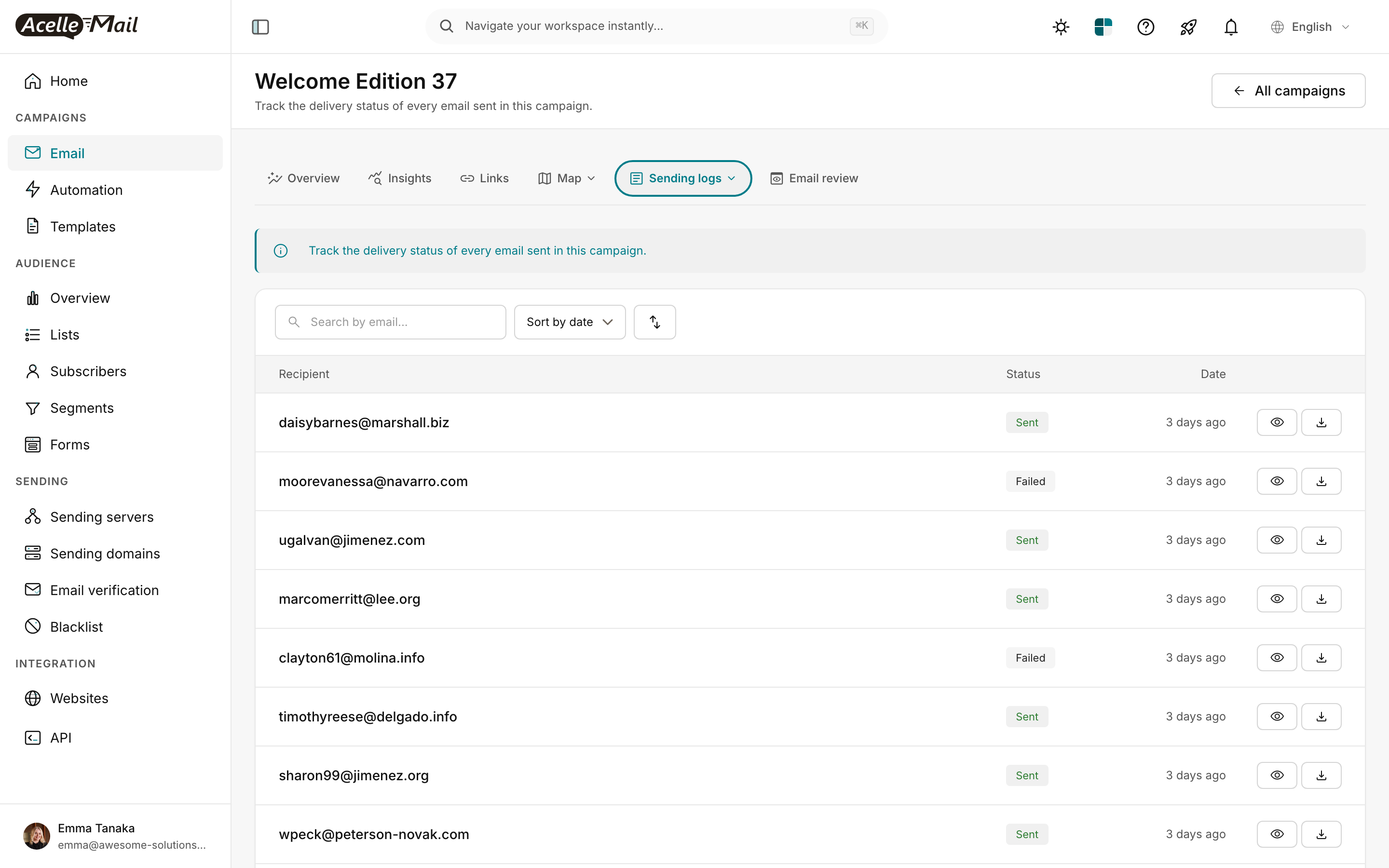
The Sending logs tab on each campaign shows every recipient and whether they were Sent, Failed, or Bounced. If you see thousands of Sent entries but the status still says Sending, you're past the halfway point — the worker is still going, just slowly. If you see zero entries, the batch never actually dispatched and the cause is upstream (cron / worker / queue).
When auto-rerun is the wrong answer#
The campaign:rerun audit calls execute($force=true, 'batch'), which restarts the batch — but resume() (Campaign.php:3742) has different branches for different states:
- Normal campaign in
sending → full restart via execute(), re-dispatching unsent recipients only (deduplication via tracking_logs).
sending_winner (A/B test winner rollout) → resumes the winner-only send, preserves status.awaiting_winner → clears flags only, no resend (UI waits for operator to pick winner).- A/B test phase (
hasAbTest() && isSending()) → continues sending test variants, preserves sending status to avoid the regression to queued.
The audit is safe to run any time — it asks the campaign which branch it belongs to and acts accordingly. So if you're tempted to write a "smarter" cron job, you don't need one.
What "Sending" never means#
Two things that look like "stuck in sending" but aren't:
- Paused state. If
is_paused = true, the campaign shows a yellow Paused badge, not the green Sending badge. The fix is to press Resume in the UI (or call $c->resume("batch") in tinker), not to debug the worker.
- Error state. If
is_error = true, you'll see a red Error badge with the last_error excerpt. The cause is in the campaign log — check storage/logs/campaigns/<uid>.log for the full stack trace.
If you see "Sending" without those overlays, status is genuinely sending and the diagnostic above applies.
Related reading#
