What this is for#
Klaviyo is the dominant email + SMS marketing platform for Shopify and WooCommerce stores. Its event-driven data model (every page view, add-to-cart, checkout, purchase becomes a behavioral event), native commerce integrations (Shopify, WooCommerce, BigCommerce, Magento, Salesforce Commerce Cloud), and predictive analytics are genuinely best-in-class for ecommerce.
It's also the most expensive email platform on the market. The per-active-profile pricing scales aggressively: ~$45/month at 1k profiles, ~$330/month at 25k, ~$1,500/month at 100k, ~$7,000+/month at 250k. For ecommerce brands doing $1M-$50M/year revenue, Klaviyo is often the #2 or #3 SaaS line item after Shopify itself and ad spend.
This guide is the operator-grade playbook for migrating from Klaviyo to self-hosted AcelleMail. The migration is harder than Mailchimp/MailerLite/Brevo/Kit because of Klaviyo's deep ecommerce-event integration — but the cost savings at high-volume tiers are dramatic.
Companion reads: Migrating from Mailchimp to AcelleMail, Migrating from MailerLite to AcelleMail, Migrating from Brevo (Sendinblue) to AcelleMail, Migrating from ConvertKit (Kit) to AcelleMail.
Cost comparison — realistic numbers#
Klaviyo's pricing scales by active profile count (profiles that received at least one campaign or were active in a flow in the last 30 days):
| Active profiles |
Klaviyo Email-only |
AcelleMail (license + VPS + SES) |
Year 1 saving |
| 1,000 active profiles |
$30/mo = $360/yr |
$39 + $7/mo VPS + $5/mo SES (3x/wk sends) ≈ $183 yr 1 |
$177 |
| 5,000 active profiles |
$100/mo = $1,200/yr |
$39 + $12/mo VPS + $20/mo SES ≈ $423 yr 1 |
$777 |
| 10,000 active profiles |
$150/mo = $1,800/yr |
$39 + $20/mo VPS + $40/mo SES ≈ $759 yr 1 |
$1,041 |
| 25,000 active profiles |
$400/mo = $4,800/yr |
$39 + $30/mo VPS + $100/mo SES ≈ $1,599 yr 1 |
$3,201 |
| 50,000 active profiles |
$750/mo = $9,000/yr |
$39 + $50/mo VPS + $200/mo SES ≈ $3,039 yr 1 |
$5,961 |
| 100,000 active profiles |
$1,510/mo = $18,120/yr |
$39 + $80/mo VPS + $400/mo SES ≈ $5,799 yr 1 |
$12,321 |
| 250,000 active profiles |
$3,425/mo = $41,100/yr |
$39 + $200/mo VPS + $1,000/mo SES ≈ $14,439 yr 1 |
$26,661 |
Sources. Klaviyo Email pricing as of 2026-05 (klaviyo.com/pricing). AcelleMail license at codecanyon.net/item/acellemail. VPS pricing reflects DigitalOcean droplets per tier. SMTP cost assumes Amazon SES at $0.10/1k emails, with sends scaled by realistic ecommerce cadence (~3-5 per profile per week). Numbers exclude operator time.
Klaviyo SMS pricing is separate (per message: ~$0.011 in US). If you use Klaviyo for SMS, that cost continues on your separate SMS provider post-migration.
The crossover is below 1k active profiles. For ecommerce brands doing 6+ figures in monthly revenue from email — which is the typical Klaviyo customer — year-1 savings of $10-30k easily fund the migration effort plus a senior ops contractor for several months.
Why Klaviyo migration is harder#
Most email platforms are "send bulk + run drip" tools with shallow ecommerce hooks. Klaviyo is the inverse — a behavioral-event data store with email as one output channel. That means:
-
Klaviyo Profiles contain enormous amounts of data beyond email + name. Every page view, product viewed, cart action, purchase, refund, browse session, list join, predictive-LTV value, predictive-AOV value, RFM scores. Migrating this data is mostly impossible — AcelleMail doesn't have an equivalent behavioral data store.
-
Klaviyo Flows are event-triggered, not list-triggered. "Abandoned cart" fires when Shopify emits a cart-abandoned event. "Post-purchase" fires when Shopify emits an order-paid event. These events don't exist in AcelleMail's native trigger model — they have to be re-wired through API triggers + webhook integrations.
-
Klaviyo's predictive analytics (CLV, churn risk, next purchase prediction) don't migrate. AcelleMail doesn't have these features. If your strategy depends on them, factor in either rebuilding via a separate analytics tool (Triple Whale, KNO, Lifetimely) or accepting their loss.
-
Klaviyo's product blocks (dynamic product recommendations in email) are powered by their internal product catalog sync. AcelleMail doesn't sync product catalogs natively. You'll need to either pull product data into your email template at send time (custom integration) or send less dynamic emails.
Estimate 2-3x more migration effort than a Mailchimp or Brevo migration. That said, the cost savings justify it for most Klaviyo customers above $1k/month.
What Klaviyo gives you that AcelleMail does differently#
| Feature |
Klaviyo |
AcelleMail |
Migration approach |
| Behavioral event store |
Yes (deep) |
No |
Loses; events only used to trigger via API webhook |
| Shopify/WooCommerce native integration |
Yes (best-in-class) |
REST API + webhook bridge |
Custom integration (see Step 7) |
| Product feed for dynamic content |
Yes |
Via custom merge data passed in API send |
Manual; less dynamic |
| Predictive analytics (CLV, churn) |
Yes |
No |
Use external tool (Triple Whale, KNO) |
| Abandoned cart flows |
Native |
Possible via webhook trigger |
Custom webhook bridge required |
| SMS + email unified |
Yes |
Email only |
Separate SMS provider (Twilio, Postscript, Klaviyo SMS if kept) |
| Visual email editor |
Yes |
Yes (BeeFree) |
Template rebuild |
| Visual flow editor |
Yes |
Yes (Automation 2) |
Re-build node-by-node |
| Segmentation engine |
Best-in-class (event-based + RFM) |
Tag + field + list-based segments |
Loses event-segments; reshape as tags applied by automation |
| A/B testing |
Yes (subject, content, sender, send time) |
Yes (subject, content, sender) |
Re-create |
| Send time optimization |
Yes (per-profile predictive) |
No |
Send at fixed time; lose ~5-10% open rate edge |
| Multi-store / multi-brand |
Yes (paid tier) |
Native via multi-customer |
Migrate per-store |
| Reviews / SMS / loyalty integrations |
Yes (paid add-ons) |
No |
Continue using third-party reviews/loyalty tools |
| Time to "first send" |
Hours |
Hours (install + DNS + warmup) |
Comparable |
The architectural shift: Klaviyo is commerce data + email. AcelleMail is email. You'll bolt commerce data on through API integrations rather than getting it native.
The 8-week timeline#
For most Klaviyo migrants, expect 10-12 weeks rather than 8 — because of the ecommerce-event re-wiring.
| Week |
Phase |
| Week 1 |
Install AcelleMail + DNS prep |
| Week 2 |
Export from Klaviyo + import to AcelleMail |
| Weeks 3-4 |
Template rebuild + flow → automation rebuild |
| Weeks 5-6 |
Ecommerce event re-wiring (Shopify/WooCommerce → AcelleMail webhooks) |
| Week 7 |
DNS migration |
| Week 8 |
IP warmup if dedicated |
| Weeks 9-10 |
Parallel period |
| Week 11 |
Cutover + Klaviyo cleanup |
| Week 12 |
Post-cutover stabilization + commerce-event monitoring |
Step 1 — Install AcelleMail (Week 1)#
For Klaviyo migrants — typically high-volume ecommerce — pick a VPS sized for production from day 1:
For 50-100k active profiles sending 4-6x/week, plan $30-80/month VPS. Above 100k profiles or 2M emails/month, see Scaling for 100k Emails per Day.
Post-install foundation:
Step 2 — Export from Klaviyo (Week 2)#
Klaviyo's export flow is mature but data is spread across several places.
Export profiles#
In Klaviyo (klaviyo.com app):
- Audience → Profiles → All Profiles.
- Click the Export button (top right).
- Choose Export all profiles or filter by status / list / segment.
- Select fields. At minimum: Email, First Name, Last Name, Created At, Consent (email_consent + email_consent_timestamp), Country, City, Region, Source, Total Lifetime Value, Last Active.
- Export → email with CSV link. Large profile sets (250k+) can take 30-60 min.
Sample CSV header:
Klaviyo ID,Email,First Name,Last Name,Title,Organization,Phone Number,Address1,City,Region,Country,Zip,Source,Email Consent,Email Consent Timestamp,SMS Consent,Email Marketing Consent,Created,Last Active,Total Lifetime Value,Total Number of Orders
Note: Klaviyo's consent + status model#
Klaviyo separates email subscription consent (email_consent), SMS consent (sms_consent), and Email Marketing Consent (a stricter signal). Import only profiles with explicit Email Marketing Consent:
# Email Marketing Consent = "Yes" only
awk -F',' 'NR==1 || $16 == "Yes"' klaviyo-profiles.csv > mailable-profiles.csv
# Suppressed: Email Marketing Consent != Yes OR consent_timestamp >2 years ago
# (Klaviyo doesn't have a single "unsubscribed" flag — it's the absence of marketing consent)
Export lists + segments#
Klaviyo distinguishes:
- Lists — manual collections (you add profiles explicitly)
- Segments — dynamic groups (rule-based: "all profiles who purchased in last 30 days")
For lists:
- Audience → Lists.
- For each list, click → Export List.
- CSV per list.
For segments — don't try to export Klaviyo segments directly. They're computed from behavioral events that don't migrate. Instead:
- Take a snapshot of each important segment's membership today (export the segment as a CSV).
- After migration, rebuild the segment in AcelleMail using tags that you apply to migrated profiles based on their snapshot membership.
Example: Klaviyo segment "VIP customers (3+ purchases, $500+ LTV)" → snapshot 1,247 profiles today → after import, tag those 1,247 with vip-customer → AcelleMail segment tags contains vip-customer.
This loses the dynamic-recompute property (Klaviyo recomputes nightly; the snapshot is frozen at migration date). To restore dynamism, re-wire your ecommerce event webhooks to re-apply tags when new purchases happen — see Step 6.
Export flows#
Klaviyo Flows don't export as files. Document each manually:
For each flow under Flows:
- Screenshot the canvas (full view).
- Note the trigger (e.g. "Started Checkout", "Placed Order", "List Joined: Newsletter", "Date-based: Birthday").
- For each step:
- Email → record template name + send conditions
- Time delay → record duration
- Conditional split → record the rule (e.g. "Has placed an order before? Yes/No")
- Trigger split → record metric value comparisons
- Update profile → record property changes
- Save each Email's HTML (click email → Edit → View source → copy).
Klaviyo power users often have 15-30 active flows (welcome series, abandoned cart, browse abandonment, post-purchase, replenishment, win-back, birthday, etc.). Plan a full week for documentation + rebuild.
Export campaign templates#
For each campaign template:
- Content → Templates.
- Click → Get HTML source → save as
template-<name>.html.
Export the metric event history (optional but valuable)#
Klaviyo tracks every behavioral event per profile. Some patterns (especially "show product recommendations based on past purchases") rely on this data.
To preserve it:
- Analytics → Metric → Custom Activity.
- Export the relevant metric event types (e.g. "Placed Order", "Viewed Product").
- Store as CSV — you'll feed it back into AcelleMail subscribers' custom fields if relevant (e.g.
LAST_PURCHASE_DATE, LAST_PURCHASED_PRODUCT_CATEGORY).
This is the most laborious part of a Klaviyo export. Most migrants skip it and accept losing the behavioral history.
Step 3 — Clean the CSV (Week 2)#
Standard cleanup applies — see Email List Hygiene: Clean Your List for Better Deliverability.
Klaviyo-specific:
- Filter to Email Marketing Consent = Yes (the strict signal).
- Filter out profiles with no
Email (Klaviyo allows phone-only profiles; those don't migrate to AcelleMail).
- Dedupe by Email — Klaviyo profiles are unique by email, but if you have multiple Klaviyo accounts (multi-store), check across them.
- Validate through NeverBounce/Kickbox for >25k. Even Klaviyo's validation has spam-trap drift over 12+ months.
Step 4 — Field mapping (Week 2)#
| Klaviyo CSV column |
AcelleMail List Field |
Notes |
Email |
EMAIL (system) |
Required |
First Name |
FIRST_NAME |
|
Last Name |
LAST_NAME |
|
Phone Number |
PHONE (custom — create) |
For separate SMS provider |
Address1, City, Region, Country, Zip |
ADDRESS_LINE1, CITY, REGION, COUNTRY, ZIP (all custom — create) |
If using physical-segmentation |
Source |
SOURCE (custom — create) |
|
Email Consent Timestamp |
OPT_IN_TIME (system) |
Critical for GDPR |
Created |
(drop — use OPT_IN_TIME instead) |
|
Last Active |
LAST_ACTIVE (custom — create) |
Optional |
Total Lifetime Value |
LIFETIME_VALUE (custom — create) |
Useful for VIP segments |
Total Number of Orders |
ORDER_COUNT (custom — create) |
Useful for cohort segments |
Klaviyo ID |
(drop — internal, not portable) |
|
| any custom property |
<UPPERCASE_NAME> (custom — create) |
One per Klaviyo property |
After import, the LIFETIME_VALUE and ORDER_COUNT fields drive your VIP-tier segmentation in AcelleMail — these replace Klaviyo's "purchased >X times" predicates.
Step 5 — Import to AcelleMail (Week 2)#
For Klaviyo migrants, the recommended import strategy:
- One AcelleMail List named
Customers — migrated from Klaviyo.
- All consenting profiles into that list.
- Tags applied per Klaviyo segment snapshot (Step 2).
- Segments rebuilt in AcelleMail using field + tag rules.
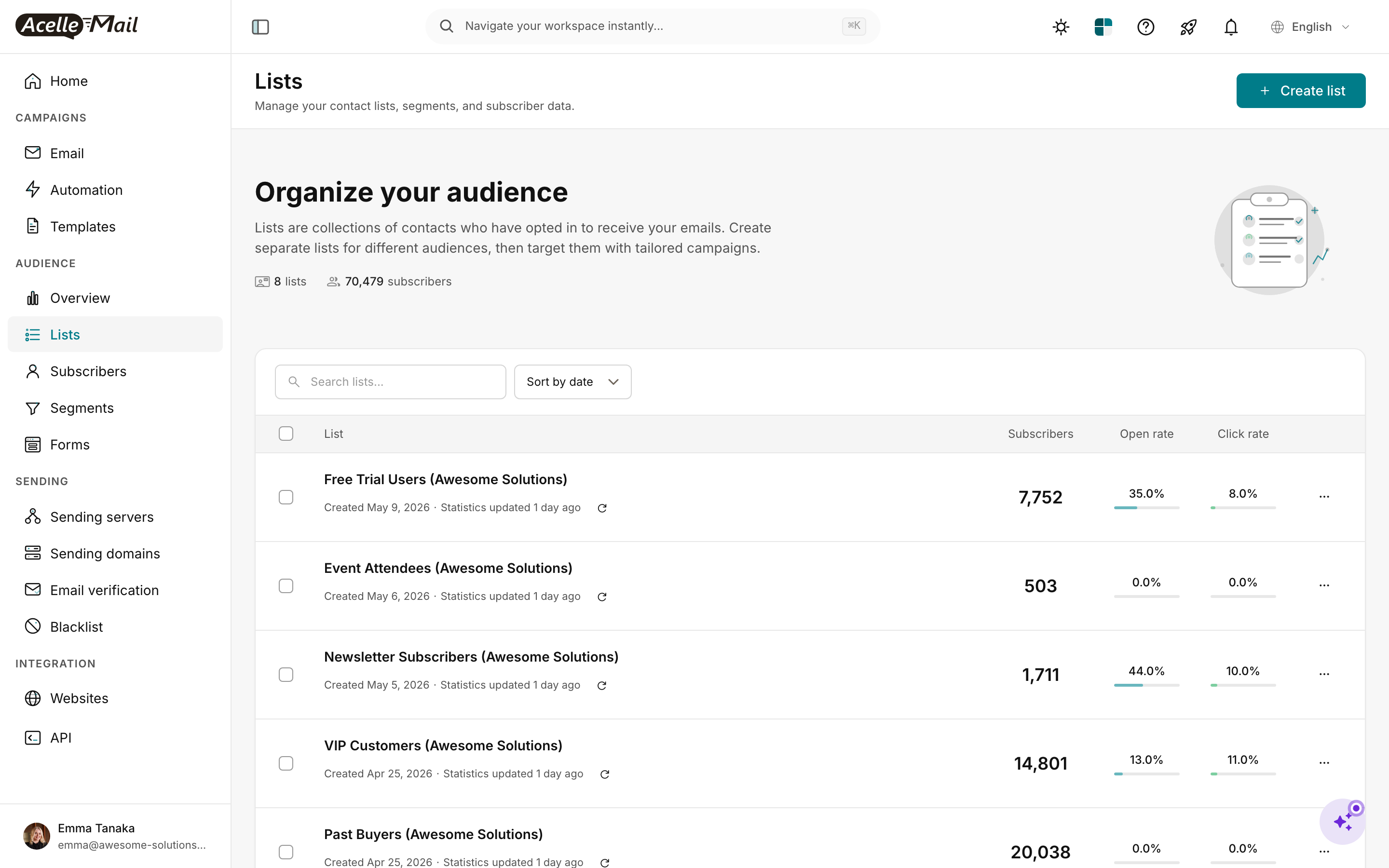
Create the list with the correct From email / Reply-to / Physical address (matters for compliance + deliverability).
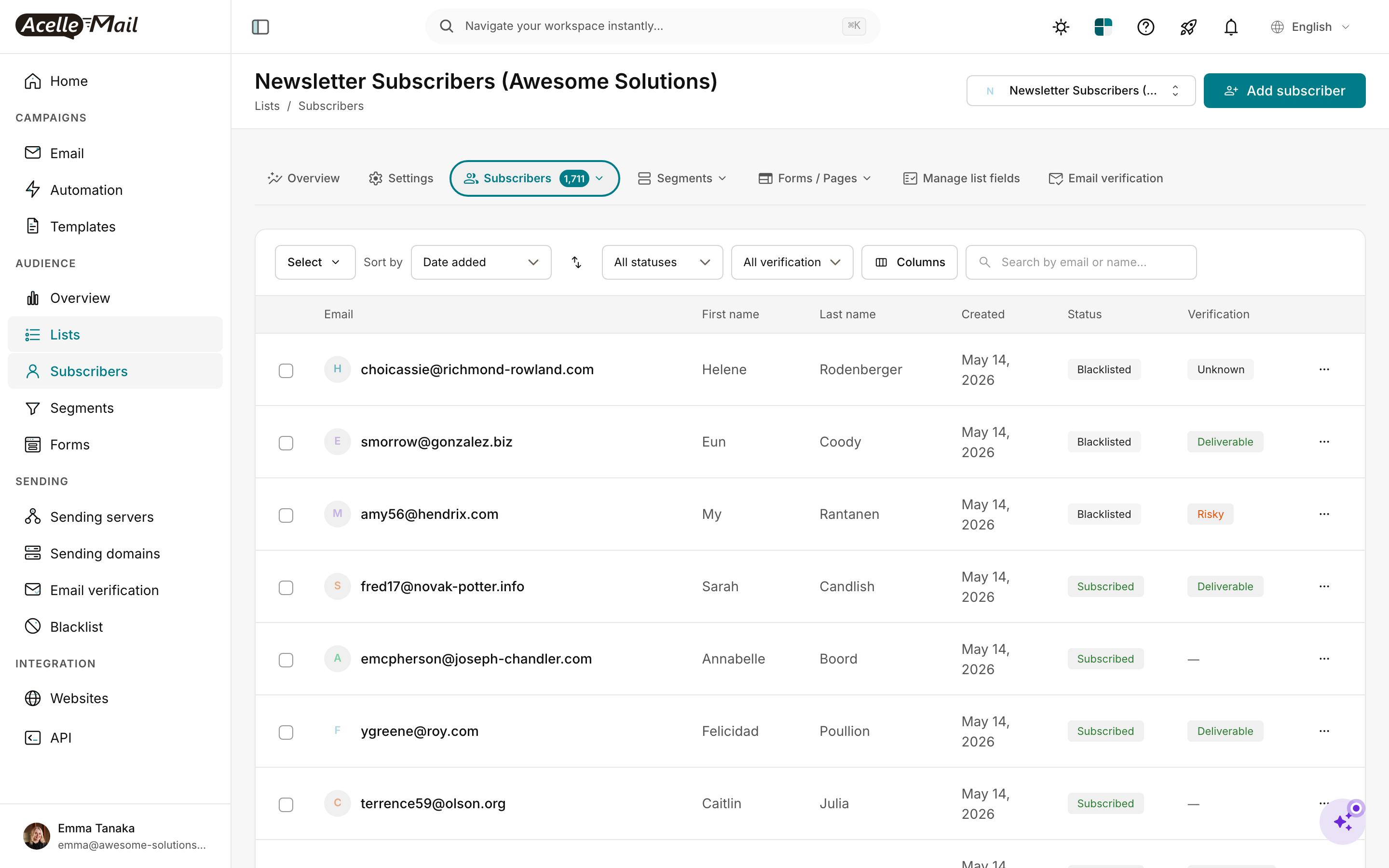
Create all custom List Fields per Step 4 mapping.
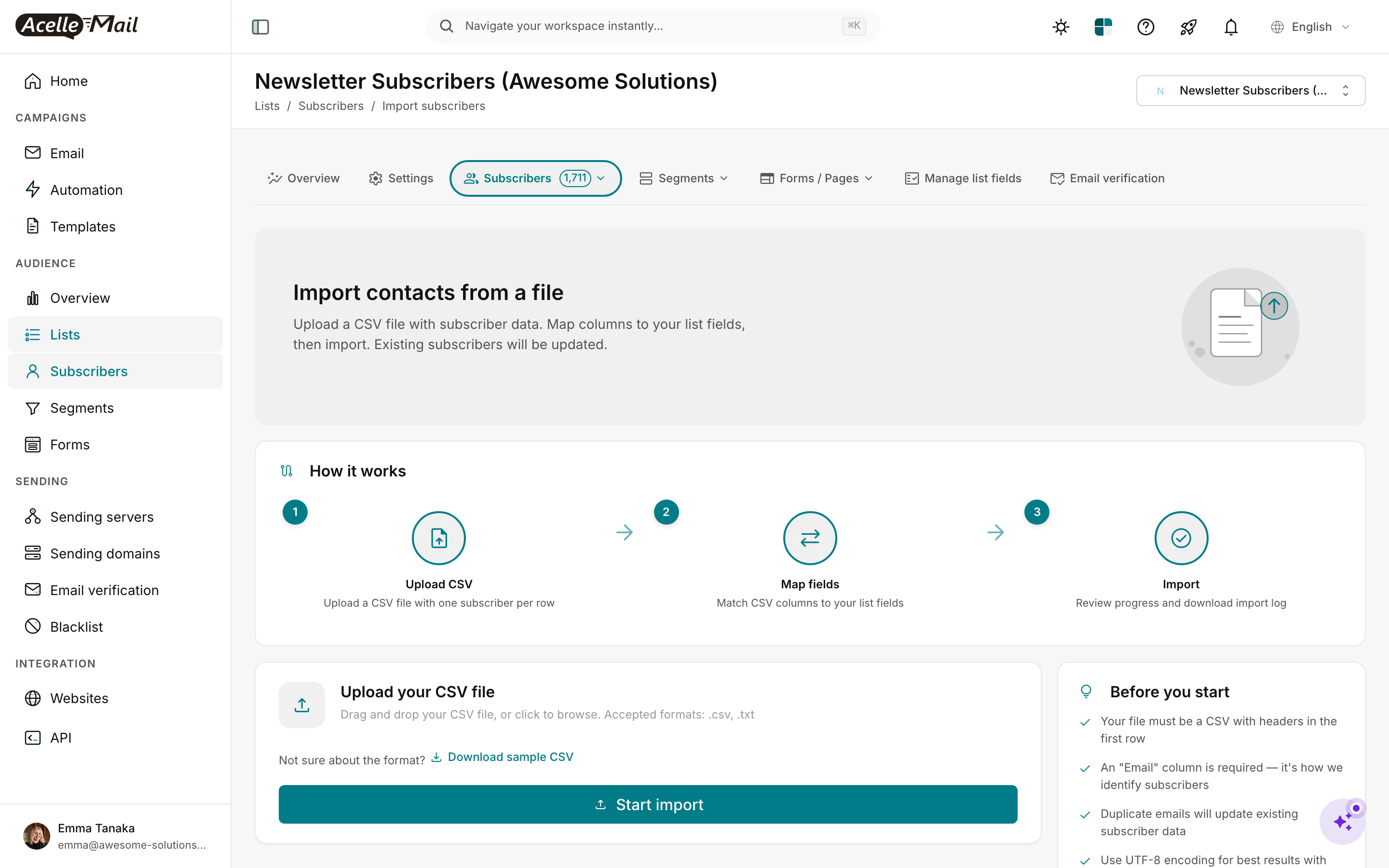
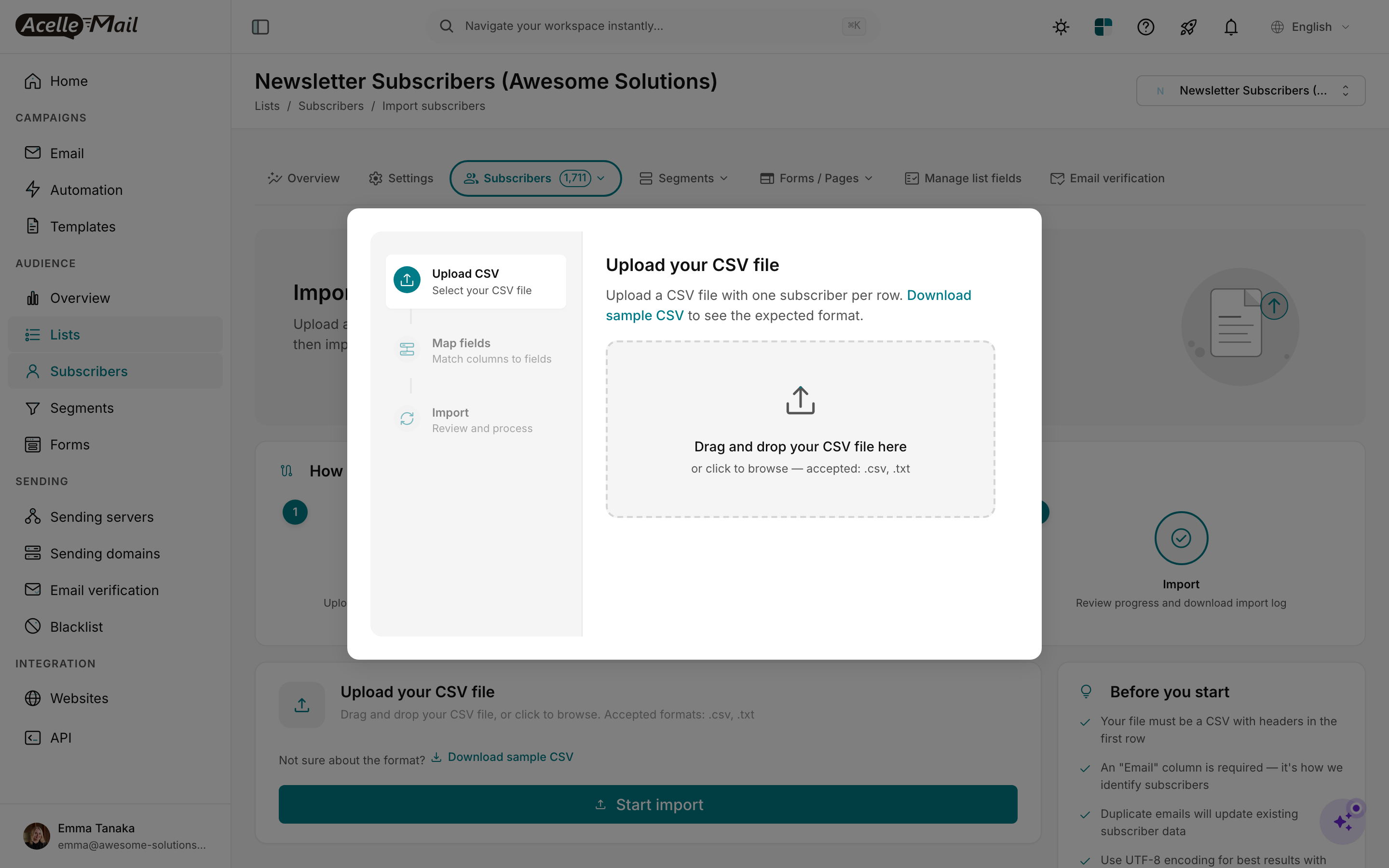
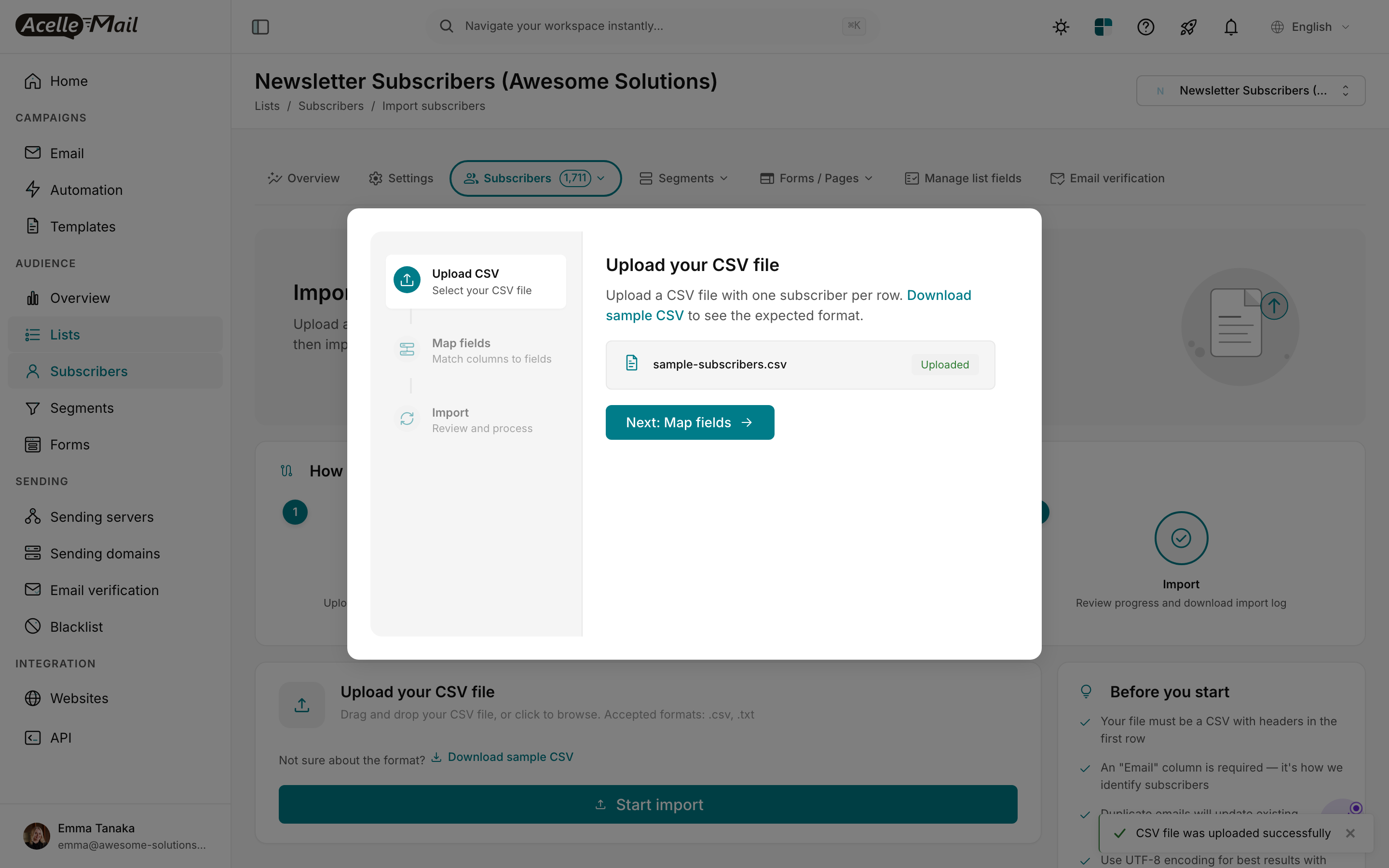
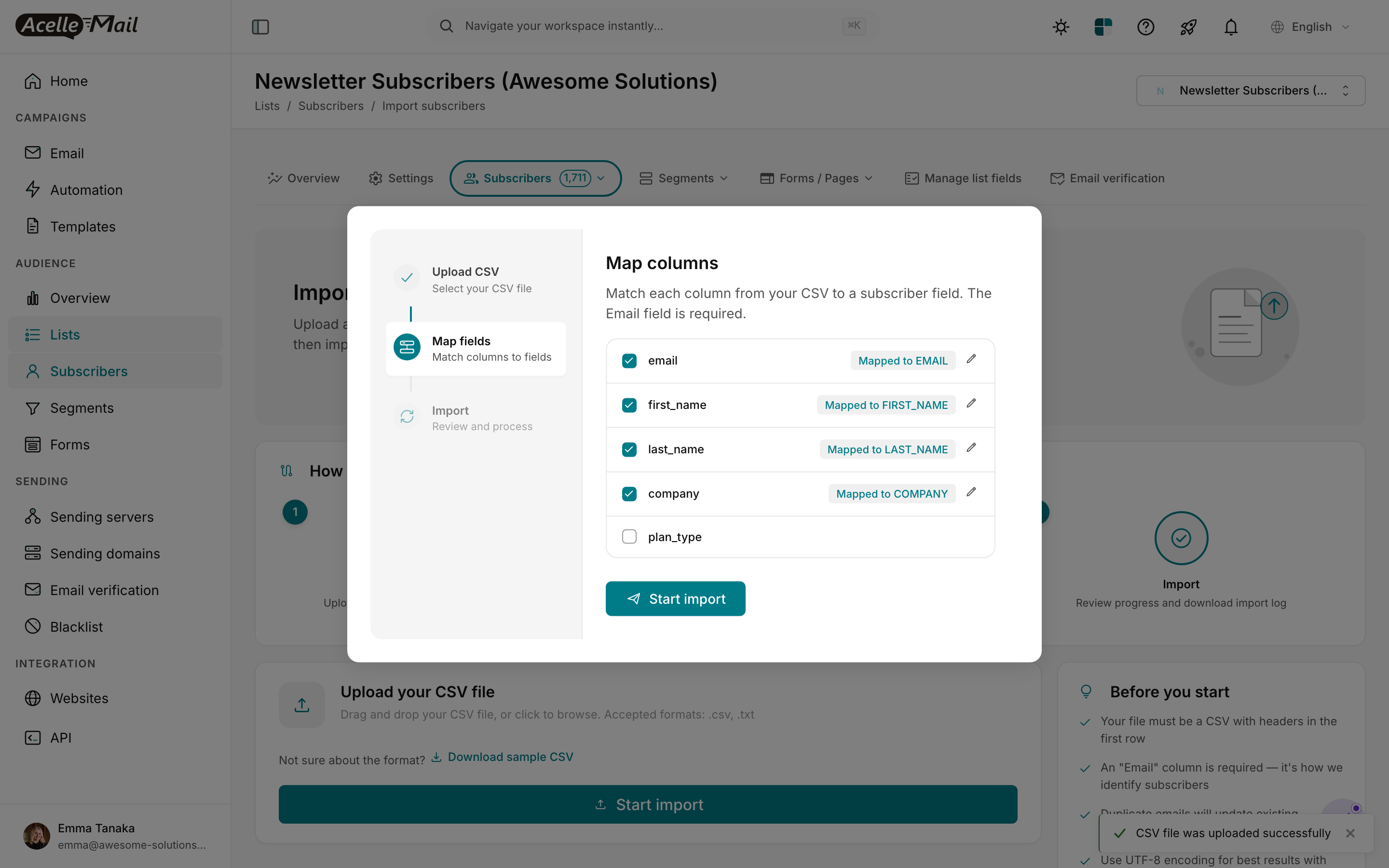
Map columns to fields. Verify all the LIFETIME_VALUE, ORDER_COUNT, OPT_IN_TIME map correctly.
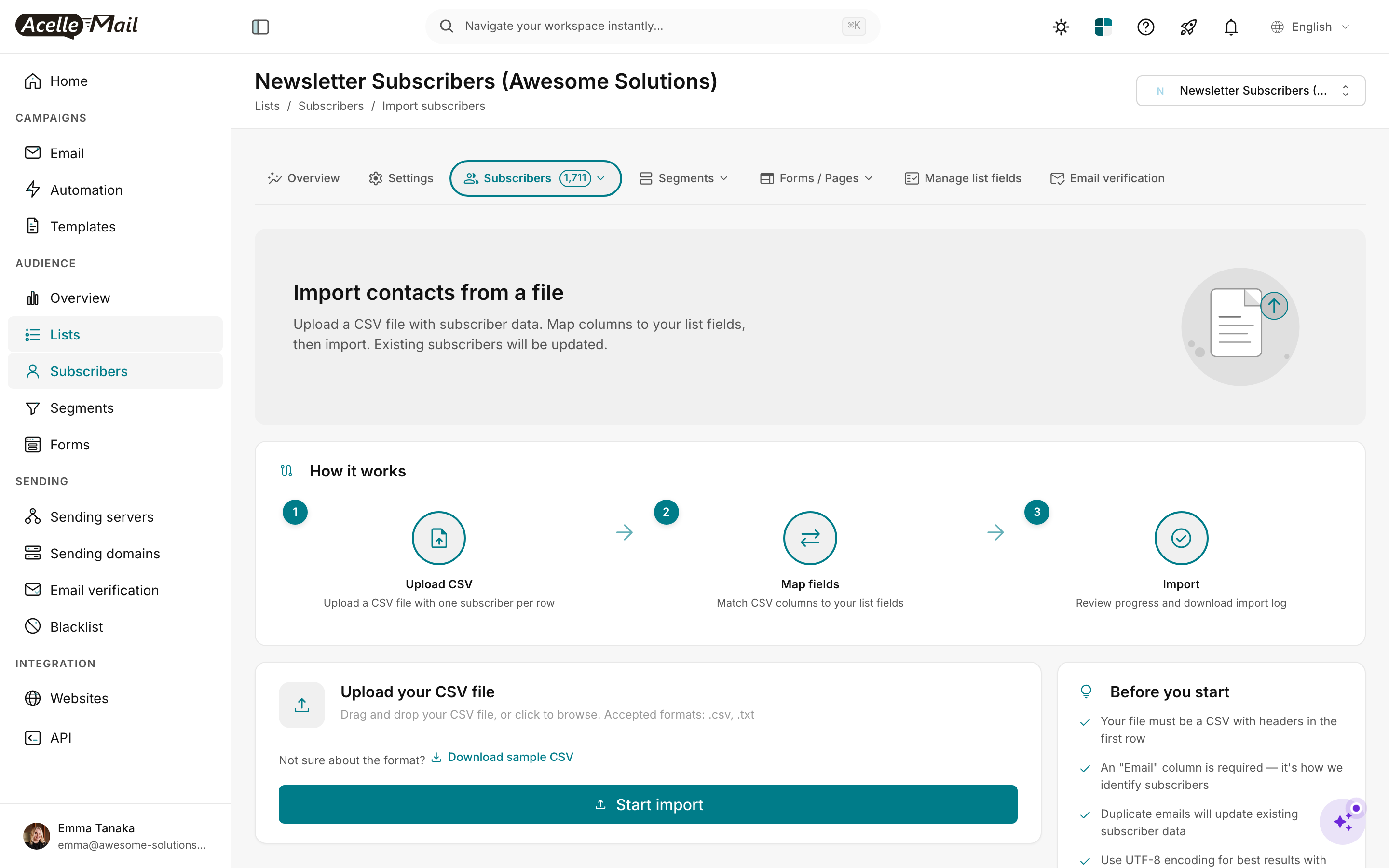
Verify counts. Cross-check 5 random profile sample data: open the subscriber in AcelleMail, check that LIFETIME_VALUE, ORDER_COUNT, etc. match the Klaviyo source.
Apply tags per Klaviyo segment snapshots#
For each Klaviyo segment CSV you exported (Step 2):
sudo -u www-data php artisan tinker --execute='
  $segmentCsv = "/tmp/klaviyo-vip-customers.csv";
  $tagName = "vip-customer";
  $csv = fopen($segmentCsv, "r");
  $headers = fgetcsv($csv);
  $emailIdx = array_search("Email", $headers);
  $count = 0;
  while (($row = fgetcsv($csv)) !== false) {
    $email = $row[$emailIdx];
    $sub = App\Model\Subscriber::where("email", $email)->first();
    if (!$sub) continue;
    $tag = App\Model\Tag::firstOrCreate([
      "name" => $tagName,
      "customer_id" => $sub->mailList->customer_id,
    ]);
    $sub->tags()->syncWithoutDetaching([$tag->id]);
    $count++;
  }
  fclose($csv);
  echo "tagged $count subscribers with $tagName\n";
'
Repeat per segment.
Import suppression#
Settings → Suppression list → Import → load the unsubscribed/bounced/spam-complained profiles from Klaviyo.
Step 6 — Port templates + rebuild flows (Weeks 3-4)#
Templates#
For each Klaviyo template HTML:
- AcelleMail: Templates → New → Custom HTML.
- Paste HTML.
- Search-replace Klaviyo merge tags:
| Klaviyo tag |
AcelleMail tag |
{{ first_name }} |
{FIRST_NAME} |
{{ email }} |
{EMAIL} |
{{ person.<custom> }} |
{<CUSTOM>} |
{{ event.<property> }} |
(use API merge data passed at send time) |
{{ unsubscribe_url }} |
{UNSUBSCRIBE_URL} |
Product blocks that pull from Klaviyo's product catalog ({% for product in catalog %}...) don't translate directly. Options:
- Pre-render the product block in the API send call. Your application pulls product data, builds the HTML block server-side, passes it as a merge tag.
- Send less dynamic emails. Trade engagement for migration speed.
Most ecommerce migrants do the pre-render approach for top-priority emails (welcome, abandoned cart, post-purchase) and accept reduced dynamism for less-critical ones (newsletter).
Flows → AcelleMail Automation 2#
For each Klaviyo flow, build the AcelleMail equivalent:
| Klaviyo trigger |
AcelleMail trigger |
Notes |
| List join: Newsletter |
Subscriber added to list (with filter) |
Native equivalent |
| Started Checkout |
Trigger via API (webhook from store) |
Custom — see Step 7 |
| Placed Order |
Trigger via API (webhook from store) |
Custom — see Step 7 |
| Viewed Product |
Trigger via API (webhook from store) |
Custom — usually skipped |
| Date-based (birthday) |
Date-based trigger |
Native equivalent |
| Profile property changed |
Subscriber field changed |
Native equivalent |
For the ecommerce-event triggers (Started Checkout, Placed Order), see Using API Triggers for Custom Automation Workflows for the pattern.
A typical Klaviyo migrant flow set:
| Flow |
Complexity |
Effort |
| Welcome series (list-trigger) |
Low |
1-2 hrs |
| Abandoned cart (Started Checkout trigger) |
High (needs Shopify webhook integration) |
1-2 days |
| Browse abandonment (Viewed Product trigger) |
High |
1-2 days |
| Post-purchase / order confirmation |
High |
1-2 days |
| Post-purchase upsell (delayed) |
Medium |
4-6 hrs |
| Replenishment / re-order reminder |
Medium |
4-6 hrs |
| Win-back / dormant |
Medium |
4-6 hrs |
| Birthday / anniversary |
Low |
1-2 hrs |
Plan a focused 2-week block for flow rebuild.
Step 7 — Ecommerce event re-wiring (Weeks 5-6) — the hardest step#
This is what makes Klaviyo migration different. The flows above depend on real-time events from your store. After cutover, those events need to land somewhere — and that somewhere is AcelleMail's webhook API.
Architecture#
Shopify (or WooCommerce) event
    ↓
your application webhook handler (or Shopify Flow)
    ↓
POST to AcelleMail /api/v1/automations/<uid>/trigger
    ↓
AcelleMail Automation runs for that subscriber
Three concrete implementation paths:
Option A — Direct Shopify Flow → AcelleMail webhook#
If on Shopify Plus or Shopify Advanced, Shopify Flow can POST to arbitrary endpoints. Set up a Flow for each event:
Trigger: Order created
Action: HTTP POST
URL: https://your-acellemail.com/api/v1/automations/<order-confirmation-flow-uid>/trigger
Headers: { Authorization: Bearer <your-api-key> }
Body: { email: "{{ order.customer.email }}", first_name: "{{ order.customer.first_name }}", order_total: "{{ order.total_price }}" }
The body fields are passed as merge data to AcelleMail, available in the triggered email template as {ORDER_TOTAL}, {FIRST_NAME}, etc.
Repeat for Cart abandoned, Browse, etc.
Option B — Self-hosted webhook bridge#
If not on Shopify Plus, run a small webhook receiver (Cloudflare Worker / Vercel function / EC2 nano instance) that:
- Receives Shopify/WooCommerce webhooks.
- Transforms the payload.
- POSTs to AcelleMail's trigger endpoint.
This is more flexible (you can add custom logic, dedup, retry) but is more code to maintain.
Option C — WooCommerce: native plugin + custom hook#
For WooCommerce, the vbrandsync or similar bridge plugins can fire on WooCommerce hooks and call AcelleMail's API. Or write a small custom plugin:
add_action('woocommerce_order_status_completed', function ($order_id) {
    $order = wc_get_order($order_id);
    wp_remote_post('https://your-acellemail.com/api/v1/automations/<uid>/trigger', [
        'headers' => ['Authorization' => 'Bearer YOUR_TOKEN'],
        'body' => json_encode([
            'email' => $order->get_billing_email(),
            'first_name' => $order->get_billing_first_name(),
            'order_total' => $order->get_total(),
        ]),
    ]);
});
Test thoroughly#
For each re-wired event, run a real end-to-end test:
- Place a test order in your staging store.
- Verify the webhook fires (check your bridge's logs).
- Verify AcelleMail's automation runs (check the automation's per-subscriber tracking).
- Verify the email sends (check AcelleMail's send log + your inbox).
Plan 2-3 days for testing alone. Each event you don't test is a potential silent failure post-cutover that may take weeks to surface.
Step 8 — Configure sending server (Week 7)#
For high-volume ecommerce (typical Klaviyo migrant: 50k-500k profiles, 200k-2M emails/month):
| Provider |
Cost @ 500k emails/month |
Notes |
| Amazon SES |
$50/mo |
Cheapest; production-access required |
| SendGrid Pro |
$90/mo |
Easier signup |
| Postmark |
$200+/mo |
Premium reputation; per-email pricier |
| Mailgun Foundation+ |
$80+/mo |
Generous trial |
| Dedicated SMTP appliance |
varies |
For 5M+/mo only |
For most Klaviyo migrants, SES is the obvious choice. Above 100k profiles, consider a dedicated IP add-on — see Dedicated vs Shared IP Address.
Step 9 — DNS migration (Week 7)#
| DNS record |
Klaviyo value |
AcelleMail addition |
Approach |
| SPF |
v=spf1 include:_spf.klaviyo.com ?all |
Append: include:amazonses.com |
Add new include in parallel; remove Klaviyo at cutover |
| DKIM |
klaviyo._domainkey.<yourdomain> (CNAME) |
New selector for AcelleMail |
Coexist (different selectors) |
| DMARC |
v=DMARC1; p=quarantine; rua=... |
(unchanged) |
Stay on existing |
| Branded tracking domain |
Klaviyo branded link.yourdomain.com |
Configure AcelleMail tracking domain |
Switch CNAME at cutover |
Branded tracking is important for ecommerce (it shows clean URLs in customer emails rather than klaviyo.com/click). AcelleMail supports custom tracking domains — configure in Sending Servers → Tracking domains.
References: Complete DNS Setup for Email Sending, How to Set Up SPF, DKIM, and DMARC Records.
Step 10 — IP warmup (Week 8)#
Critical for high-volume ecommerce — if your AcelleMail SMTP starts at zero reputation and you bring 500k+ profile volume on day 1, you'll get filtered hard.
Even on shared SES, the domain reputation builds up over weeks. Plan a ramp:
- Week 8 day 1-2: 5% of normal volume
- Week 8 day 3-5: 15%
- Week 8 day 6-7: 30%
- Week 9 day 1-3: 50%
- Week 9 day 4-7: 75%
- Week 10 day 1+: 100%
Full reference: IP Warmup Schedule for New Sending Servers.
Step 11 — Parallel period (Weeks 9-10)#
For ecommerce, the parallel period is critical because the cost of a deliverability dip is direct revenue loss.
Random recipient split:
| Phase |
Klaviyo share |
AcelleMail share |
| Week 9 day 1-3 |
90% |
10% |
| Week 9 day 4-7 |
75% |
25% |
| Week 10 day 1-3 |
50% |
50% |
| Week 10 day 4-7 |
25% |
75% |
| Week 11 day 1 |
0% |
100% (cutover) |
Watch daily — ecommerce metrics matter more than raw email metrics:
- Revenue per send on AcelleMail vs Klaviyo. Should be within 10-15% of each other after warmup. If AcelleMail is consistently 30%+ lower, pause and debug — usually a deliverability issue.
- Open rate — should track within 5% of Klaviyo baseline.
- Click rate — should track within 5%.
- Bounce rate — should be <2% (if list cleanup was thorough).
- Spam complaints — <0.1%.
- Postmaster Tools — postmaster.google.com.
- Sender reputation — see Sender Reputation Monitoring.
- FBL — see Feedback Loops (FBL) Setup.
If revenue-per-send drops more than 15% on AcelleMail vs Klaviyo, pause the AcelleMail share immediately, debug, fix, then resume. Don't push through.
Step 12 — Cutover + Klaviyo cleanup (Week 11)#
- Update SPF — remove the Klaviyo include.
- Verify
spf=pass dkim=pass dmarc=pass on fresh send.
- Switch branded tracking CNAME from Klaviyo to AcelleMail.
- Update any external integrations (subscription tools, loyalty programs, review platforms) that still call Klaviyo's API.
- Verify your ecommerce event webhooks are still firing. Place a test order; confirm AcelleMail receives the trigger.
- Downgrade Klaviyo to free tier (retain historical data access).
- 30 days later: confirm steady-state. Then cancel Klaviyo if your retention preferences allow.
Common pitfalls#
Underestimating the ecommerce-event re-wiring. This is THE Klaviyo-specific pain. Budget 2 weeks; don't rush. Every event you forget = a flow that silently doesn't trigger post-cutover.
Skipping the branded tracking migration. Klaviyo customers usually have branded link tracking (link.yourstore.com). If you don't migrate this, your customers see ugly Klaviyo URLs in archived emails forever and AcelleMail URLs in new emails — a brand-trust hit.
Losing predictive analytics insights. Klaviyo's CLV / churn / next-purchase predictions don't migrate. If your strategy depends on them (e.g. "send win-back at predicted churn date"), plan an external analytics tool (Triple Whale, KNO, Lifetimely) before cutover.
Forgetting SMS. If you used Klaviyo for SMS, you need to migrate SMS separately to Postscript / Twilio / etc. AcelleMail is email only.
Forgetting the product catalog sync. Klaviyo's product blocks rely on the catalog. After cutover, those blocks render empty unless you pre-render server-side.
Underestimating revenue impact during parallel. Even a healthy migration shows ~5% revenue dip during parallel weeks due to warmup. Plan for it; don't panic if you see it.
Cancelling Klaviyo too fast. The 30-day buffer is gold — it gives you fallback if an ecommerce event you forgot surfaces a problem post-cutover.
FAQ#
How long does a Klaviyo migration really take?
Realistic: 10-12 weeks for a 50k-active-profile ecommerce store with 10-15 flows and Shopify integration. The ecommerce-event re-wiring is the dominant time sink.
Should I migrate if I'm under 25k active profiles?
Less obvious. Year-1 savings of ~$3,200 fund some operations time but not a senior contractor. If you're hands-on technical, yes — migrate. If you're outsourcing all ops, the break-even is higher (~50k profiles).
What about Klaviyo SMS — can I migrate that too?
No. AcelleMail is email-only. For SMS, migrate to a dedicated SMS provider (Postscript for Shopify, Klaviyo SMS standalone, Twilio SMS, MessageBird).
Can I keep Klaviyo for predictive analytics and use AcelleMail for sending?
Theoretically yes (Klaviyo has a paid "Klaviyo Data Platform" tier without sending). Practically rare — defeats most of the cost savings. Better path: separate analytics tool + AcelleMail.
Does AcelleMail support the same A/B testing depth?
Yes for subject lines, content, and sender. Not for send-time optimization (Klaviyo's predictive STO doesn't have an AcelleMail equivalent). Most operators don't notice the STO loss after a few campaigns.
Will my Klaviyo metric history (Placed Order, Viewed Product events) migrate?
No. Event history is a per-platform behavioral data store. You can export the CSVs for archive but they don't replay into AcelleMail.
What about Klaviyo Reviews, Loyalty, or other paid add-ons?
Don't migrate. Continue using them if they're delivering value; just don't expect AcelleMail to have equivalents.
Related articles#
