What this is for#
ConvertKit — rebranded to Kit in January 2024 — built its product around the creator economy: bloggers, course authors, newsletter writers, podcasters, YouTubers who monetize their audience directly. Its core abstractions — tags instead of lists, sequences instead of static drip campaigns, forms that integrate with content sites — are tuned for that audience.
The trade-off is per-subscriber pricing. Kit Creator and Creator Pro both charge by total subscriber count, with no email-sent cap. Below 10k subscribers, the value is strong. Past 10k — and especially past 50k where dedicated 6-figure-revenue creators live — the per-subscriber curve gets steep and a self-hosted alternative pays for itself in a few months.
This guide is the operator-grade playbook for migrating from Kit to AcelleMail. You pay one-time for the license, run on your own VPS, pay your upstream SMTP provider's per-email rate (~$0.10-$1.00 per 1k emails — vs Kit's ~$1.00-$3.00 per 1k subscribers per month, sent or not).
Companion reads: Migrating from Mailchimp to AcelleMail, Migrating from MailerLite to AcelleMail, Migrating from Brevo (Sendinblue) to AcelleMail.
Cost comparison — realistic numbers#
Kit's Creator Pro pricing scales smoothly by subscriber count (no email cap):
| Total subscribers |
Kit Creator Pro |
AcelleMail (license + VPS + SES) |
Year 1 saving |
| 1,000 subs (any send volume) |
$59/mo = $708/yr |
$39 + $7/mo VPS + $2/mo SES ≈ $147 yr 1 |
$561 |
| 5,000 subs |
$99/mo = $1,188/yr |
$39 + $12/mo VPS + $5/mo SES ≈ $243 yr 1 |
$945 |
| 10,000 subs |
$149/mo = $1,788/yr |
$39 + $20/mo VPS + $10/mo SES ≈ $399 yr 1 |
$1,389 |
| 25,000 subs |
$279/mo = $3,348/yr |
$39 + $30/mo VPS + $25/mo SES ≈ $699 yr 1 |
$2,649 |
| 50,000 subs |
$479/mo = $5,748/yr |
$39 + $50/mo VPS + $50/mo SES ≈ $1,239 yr 1 |
$4,509 |
| 100,000 subs |
$679/mo = $8,148/yr |
$39 + $80/mo VPS + $100/mo SES ≈ $2,199 yr 1 |
$5,949 |
| 250,000 subs |
$1,499/mo = $17,988/yr |
$39 + $200/mo VPS + $250/mo SES ≈ $5,439 yr 1 |
$12,549 |
Sources. Kit Creator Pro pricing as of 2026-05 (kit.com/pricing). AcelleMail license at codecanyon.net/item/acellemail. VPS pricing reflects DigitalOcean droplets per tier. SMTP cost assumes Amazon SES at $0.10/1k emails. Numbers exclude operator time.
The Kit-to-AcelleMail crossover is below 1k subscribers — at any Kit paid tier, AcelleMail year-1 cost is lower. The decision isn't whether to migrate; it's whether the ops effort is worth the savings. For a creator at 50k subs, $4.5k/year savings funds a few hours of paid ops help per month plus all infrastructure with thousands left over.
What Kit gives you that AcelleMail does differently#
| Feature |
Kit |
AcelleMail |
Migration note |
| Tag-based segmentation |
Native (no "lists") |
"Lists" + dynamic Segments (tags-as-rule) |
Direct map; tags become AcelleMail tags |
| Visual automations |
Yes (visual editor) |
Yes (Automation 2 visual editor) |
Re-build node-by-node |
| Sequences |
Yes (drip-style email series) |
Same concept; build as Automation with sequential Send + Wait nodes |
Each Kit sequence = 1 AcelleMail automation |
| Forms (inline, modal, slide-in) |
Yes (creator-focused designs) |
Yes (Forms + Funnels) |
Re-create; less creator-tuned but functional |
| Landing pages |
Yes |
Yes (Funnels feature) |
Re-create |
| Commerce (product sales, courses) |
Kit Commerce + tip jar |
No |
Use Stripe / Lemonsqueezy / Gumroad / Podia |
| Tip jar / paid newsletter |
Native |
No |
Use a separate Stripe Patreon-style integration |
| WordPress integration |
Native plugin |
REST API + ConvertKit-style native plugin via community |
Re-wire |
| Creator Network / paid recommendations |
Yes (revenue-share with other creators) |
No |
A creator-specific Kit feature; doesn't migrate |
| Sender reputation |
Shared pool, transparent reporting |
You pick SMTP; reputation is yours |
Strategic upgrade |
| Time to "first send" after signup |
Minutes |
Hours (install + DNS + warmup) |
Trade for cost + sovereignty |
The creator-specific gotcha. Kit Commerce (digital product sales) doesn't migrate. If you sell courses, ebooks, or templates through Kit Commerce, plan a separate ecommerce solution (Lemon Squeezy, Podia, Teachable, Stripe direct) before cutting over. Same for Tip Jar and paid newsletters.
The 8-week timeline#
Same skeleton as other migration guides. Kit-specific bits per step.
| Week |
Phase |
| Week 1 |
Install AcelleMail + DNS prep |
| Week 2 |
Export from Kit + import to AcelleMail |
| Week 3 |
Template rebuild + sequence → automation rebuild + sending-server config |
| Weeks 4-5 |
DNS migration |
| Week 6 |
IP warmup if dedicated |
| Weeks 7-8 |
Parallel period |
| Week 9 |
Cutover + Kit downgrade |
Step 1 — Install AcelleMail (Week 1)#
Pick your host:
For 10-50k creator subscribers with weekly cadence, $12-30/month VPS is plenty. Above 100k subs sending 2-3x/week, see Scaling for 100k Emails per Day.
Post-install foundation:
Step 2 — Export from Kit (Week 2)#
Kit's exports are mature — built around their creator audience who often migrate between platforms.
Export subscribers#
In Kit (app.kit.com):
- Subscribers (top nav).
- Click Export Subscribers (top right).
- Choose All subscribers or filter by tag, segment, form, or status.
- Pick fields: at minimum Email, First name, State, Created at, Source, Referrer, Tags.
- Export → email with CSV (~1-3 min for sub-100k lists).
Sample CSV header:
subscriber_id,first_name,email_address,state,created_at,source,referrer,tags,segments
The tags column is comma-separated tag names — this is the gold of a Kit export. Tags drive everything in Kit, so preserving them through migration is the most important data-quality task.
Note: Kit's state values#
Kit state |
What it means |
Import to AcelleMail? |
active |
Mailable |
Yes |
inactive |
No recent engagement; Kit's auto-classified |
Yes (mark with a custom field for re-engagement) |
complained |
Marked as spam by recipient |
No (suppression list) |
bounced |
Hard-bounced |
No (suppression list) |
cancelled |
Unsubscribed |
No (suppression list) |
Filter:
# Mailable
awk -F',' 'NR==1 || $4 ~ /^(active|inactive)$/' kit-export.csv > mailable.csv
# Suppression
awk -F',' 'NR==1 || $4 ~ /^(complained|bounced|cancelled)$/' kit-export.csv > suppression.csv
Document tags (the central data model)#
Kit's tag system is its everything. Migrating without preserving tag semantics means losing the segmentation foundation. Before importing:
- Subscribers → Tags → export this list (or screenshot the page).
- For each tag, note how many subscribers have it.
- Note which tags drive sequences/automations (you'll re-wire these in Step 6).
A typical Kit power-user has 50-200 tags. Most are organizational (e.g. lead-magnet:7-day-course, purchased:advanced-course, signup-source:guest-post-techcrunch). Many are dynamic (added by sequences/automations).
Export sequences#
Kit sequences are email drips. To export:
- Sequences (left nav).
- For each sequence, open it. The right panel shows each email + delay.
- For each email in the sequence:
- Click → More → Get HTML (saves the raw email HTML).
- Note the delay (e.g. "Send 3 days after previous").
A sequence with 7 emails = 7 HTML files + a recipe sheet with delays.
Export visual automations#
Kit Visual Automations (the canvas-based ones, more powerful than sequences) don't have a direct export. Document each manually:
- Automations (left nav).
- Screenshot each automation canvas (full view).
- Note each node's:
- Type (Event, Action, Filter, Goal)
- Settings
- Connections
A typical Kit visual automation: "Lead magnet trigger → Add tag X → Send email A → Wait 3 days → Filter: in tag Y? → Send email B → Goal: tag added Z."
This becomes your AcelleMail rebuild recipe in Step 6.
Export forms#
Kit forms can be embedded on your website. Two approaches post-migration:
Option A — Keep Kit forms running, just change destination. Kit's API can forward form submissions to a webhook. After migration, point that webhook at AcelleMail's subscriber-add endpoint. The form keeps working, the data flows to AcelleMail.
Option B — Replace with AcelleMail forms. AcelleMail Forms generate embeddable HTML that you swap into your site. Loses the Kit form designs but gives full control.
Most creators choose Option A in week 2 then Option B over months as time permits.
Export landing pages#
Kit landing pages are hosted on Kit's domain. They migrate by manual rebuild in AcelleMail Funnels — there's no direct import. Plan ~1 hour per landing page.
Export Kit Commerce / paid products#
If you use Kit Commerce, migrate it to a separate ecommerce solution before the Kit cutover:
- Lemon Squeezy — simplest creator-focused replacement (tax handling included)
- Stripe Payment Links — DIY, lowest fees
- Gumroad — creator-popular but separate platform
- Podia / Teachable — if you sell courses with content delivery
Do this in parallel with the email migration; budget a week for store rebuild + Stripe migration.
Step 3 — Clean the CSV (Week 2)#
Tag-explosion check#
The most common Kit-migration data hygiene issue is tag explosion — lists with 100-300 tags accumulated over years, half of which are stale or one-time.
Audit before import:
- List all tags + subscriber counts (export from Kit).
- For tags with <10 subscribers, decide: delete or keep.
- For tags with hyper-specific names (e.g.
signup-from-tweet-2022-04-17), decide: archive (don't import) or keep.
- Goal: end with ~30-80 high-value tags. AcelleMail tag count isn't capped, but lists with 200+ tags become unmanageable.
Standard cleanup#
# Active/inactive only
awk -F',' 'NR==1 || $4 ~ /^(active|inactive)$/' kit-export.csv > mailable.csv
# Dedupe
awk -F',' '!seen[$3]++' mailable.csv > deduped.csv
For lists >25k, run through validation (NeverBounce / Kickbox / ZeroBounce). Kit's internal validation is good but not perfect — catch any drift.
Step 4 — Field mapping (Week 2)#
| Kit CSV column |
AcelleMail List Field |
Notes |
email_address |
EMAIL (system) |
Required, unique |
first_name |
FIRST_NAME |
|
created_at |
OPT_IN_TIME (system) |
Preserves history |
source |
SOURCE (custom — create) |
|
referrer |
REFERRER (custom — create) |
|
tags |
(Tag mapping — see below) |
Critical |
segments |
(drop — re-create as AcelleMail Segments) |
|
state |
KIT_STATE (custom — create) |
If preserving inactive for re-engagement |
The tag mapping strategy#
AcelleMail supports subscriber tags natively. After import (Step 5), you'll run a tinker script to parse the tags column from the CSV and apply tags to each subscriber.
sudo -u www-data php artisan tinker --execute='
  $csv = fopen("/tmp/kit-import.csv", "r");
  $headers = fgetcsv($csv);
  $emailIdx = array_search("email_address", $headers);
  $tagsIdx = array_search("tags", $headers);
  while (($row = fgetcsv($csv)) !== false) {
    $email = $row[$emailIdx];
    $tagsCsv = $row[$tagsIdx];
    if (!$email || !$tagsCsv) continue;
    $tags = array_map("trim", explode(",", $tagsCsv));
    $sub = App\Model\Subscriber::where("email", $email)->first();
    if (!$sub) continue;
    foreach ($tags as $tagName) {
      $tag = App\Model\Tag::firstOrCreate([
        "name" => $tagName,
        "customer_id" => $sub->mailList->customer_id,
      ]);
      $sub->tags()->syncWithoutDetaching([$tag->id]);
    }
  }
  fclose($csv);
  echo "done\n";
'
Adjust based on your AcelleMail version's Tag model structure — verify the relationship method (tags() vs subscriberTags()) before running.
Step 5 — Import to AcelleMail (Week 2)#
For Kit migrants, the import strategy is usually:
- One AcelleMail List named
Kit Subscribers — migrated YYYY-MM (since Kit doesn't use lists in the segmentation model).
- All subscribers go into that one list.
- Tags + Segments do the per-audience targeting (matching how Kit worked).
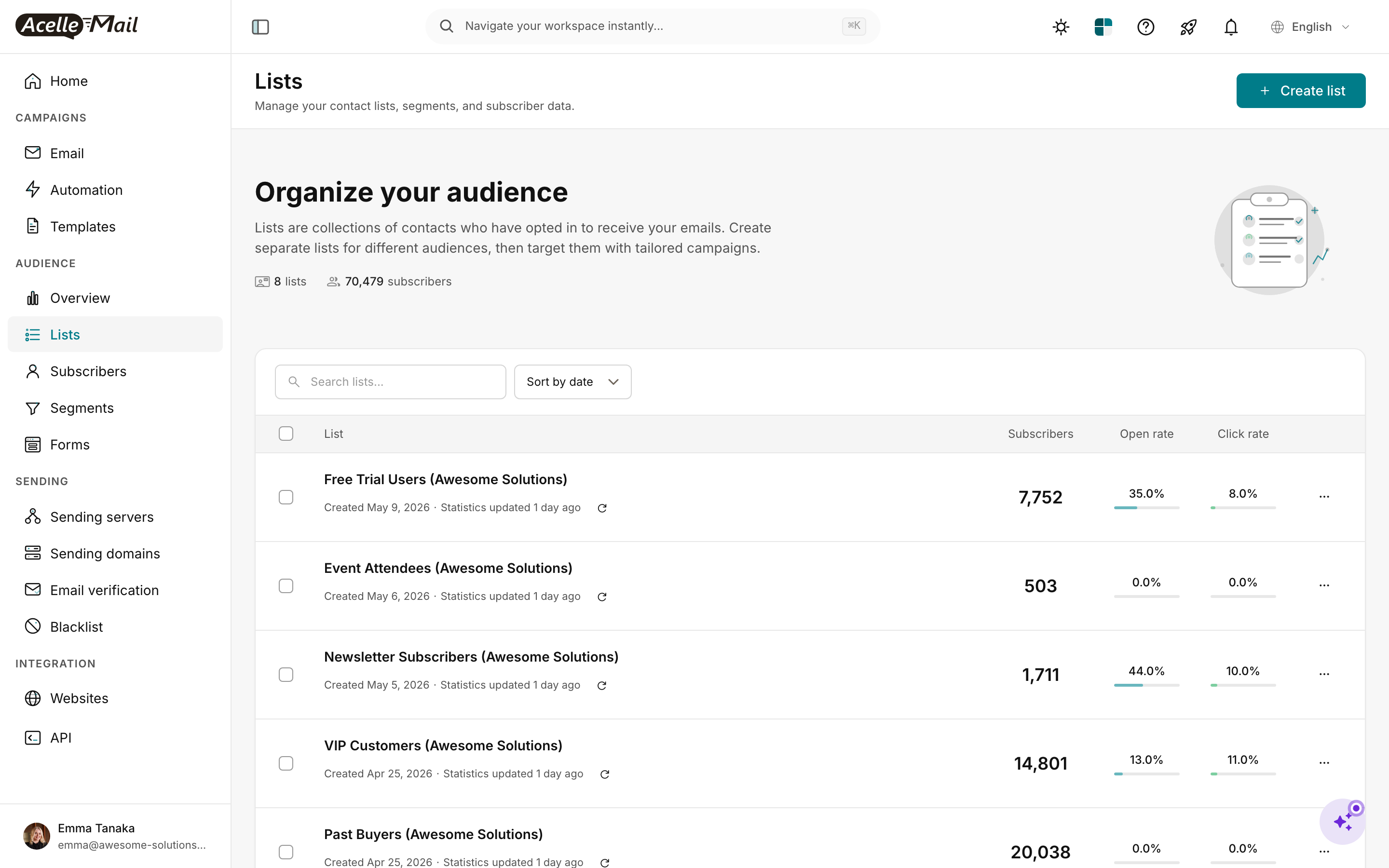
Create the destination list:
- Lists → New list → fill From email / Reply-to / Physical address.
- Save.
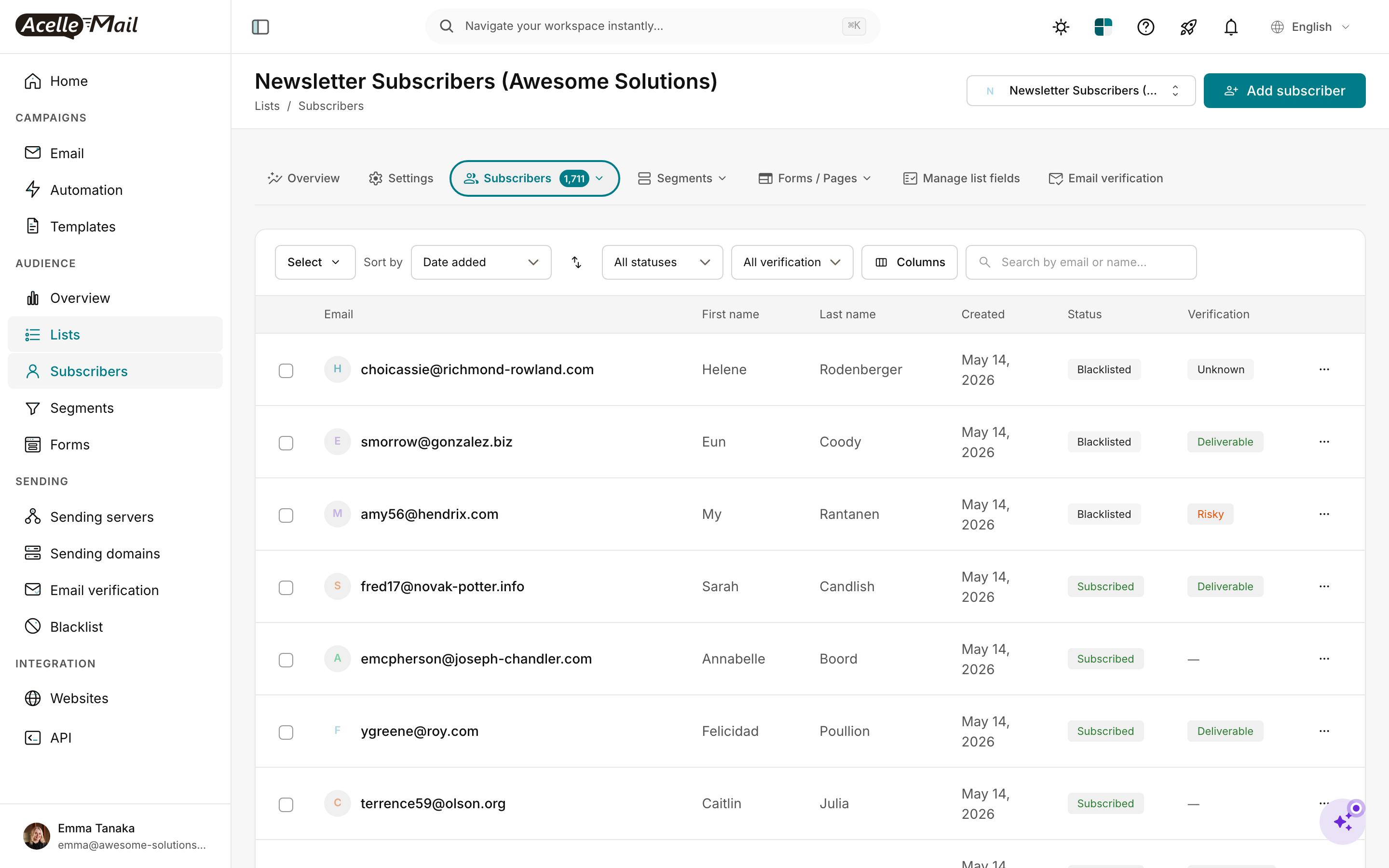
Create custom fields (Step 4 mapping).
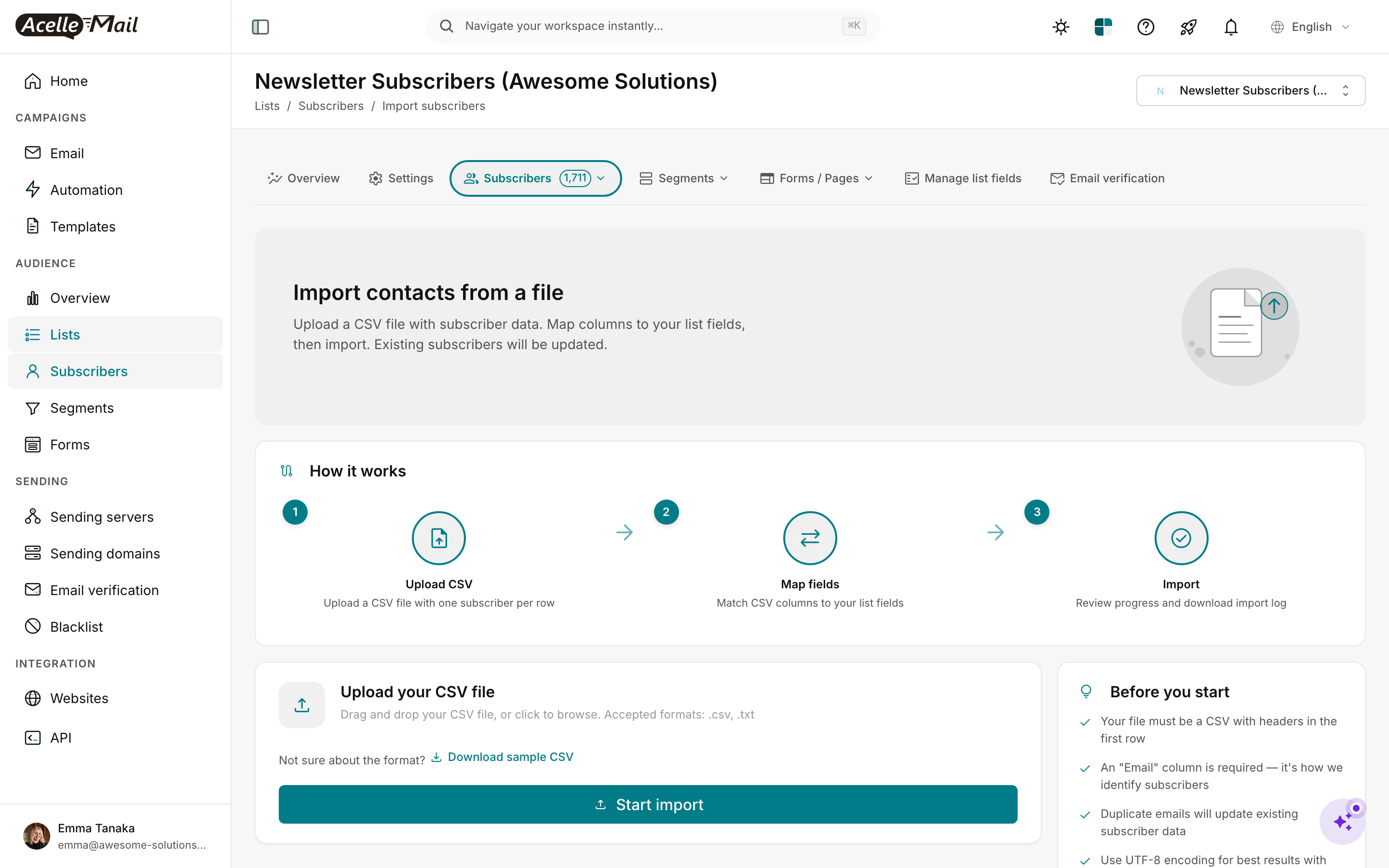
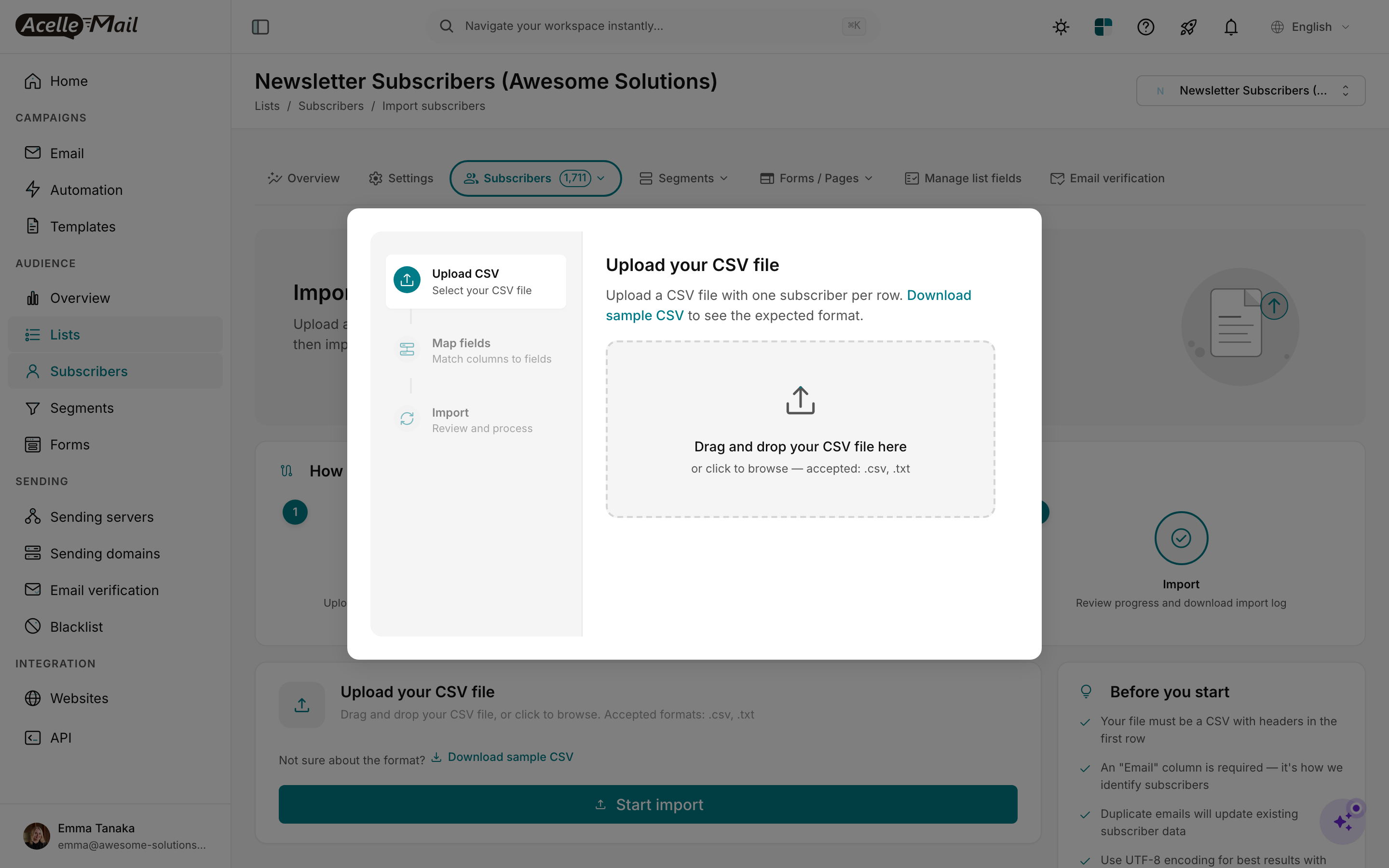
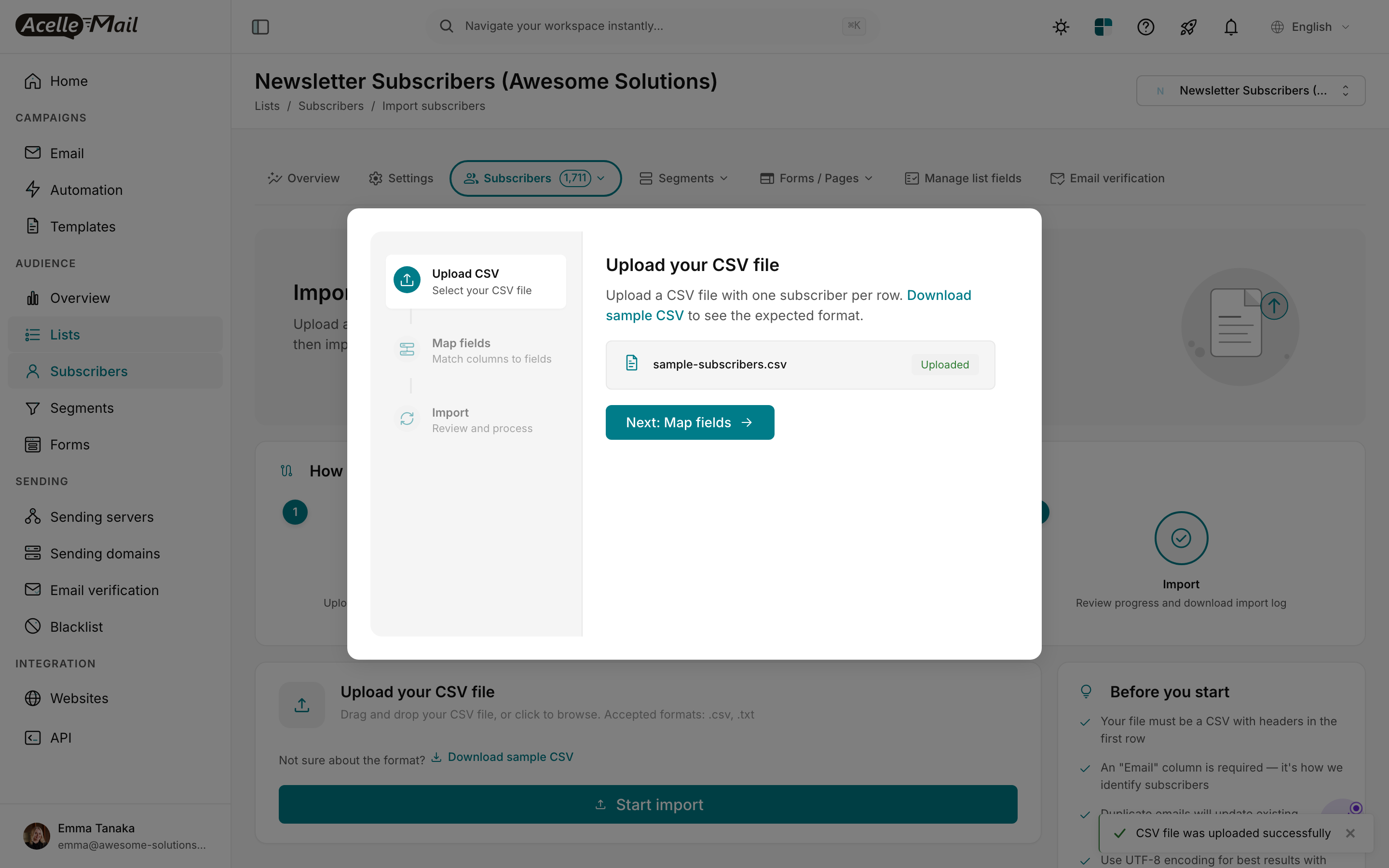
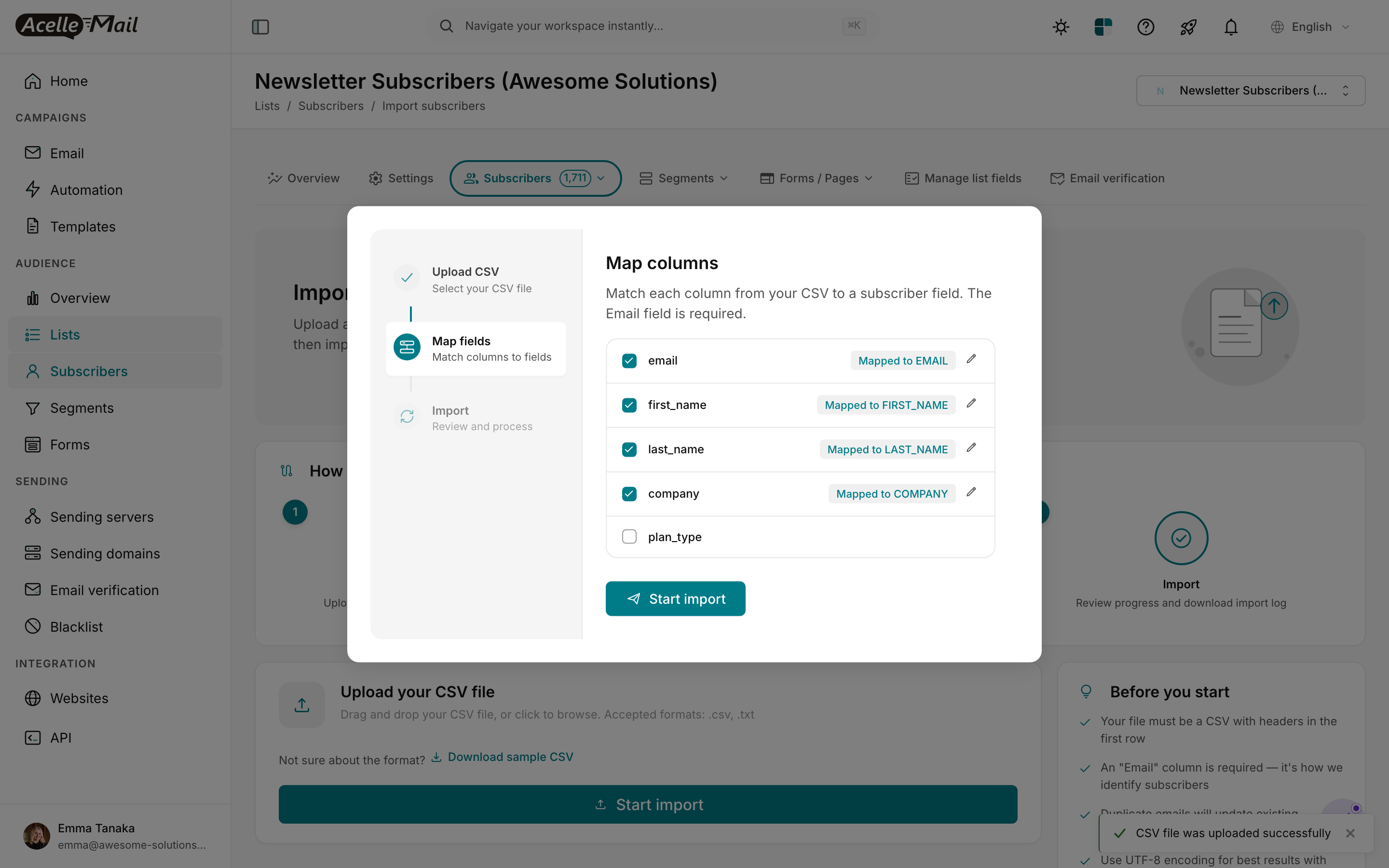
Map columns to fields. Drop the tags column at this step — you'll apply tags via the tinker script (above) after import.
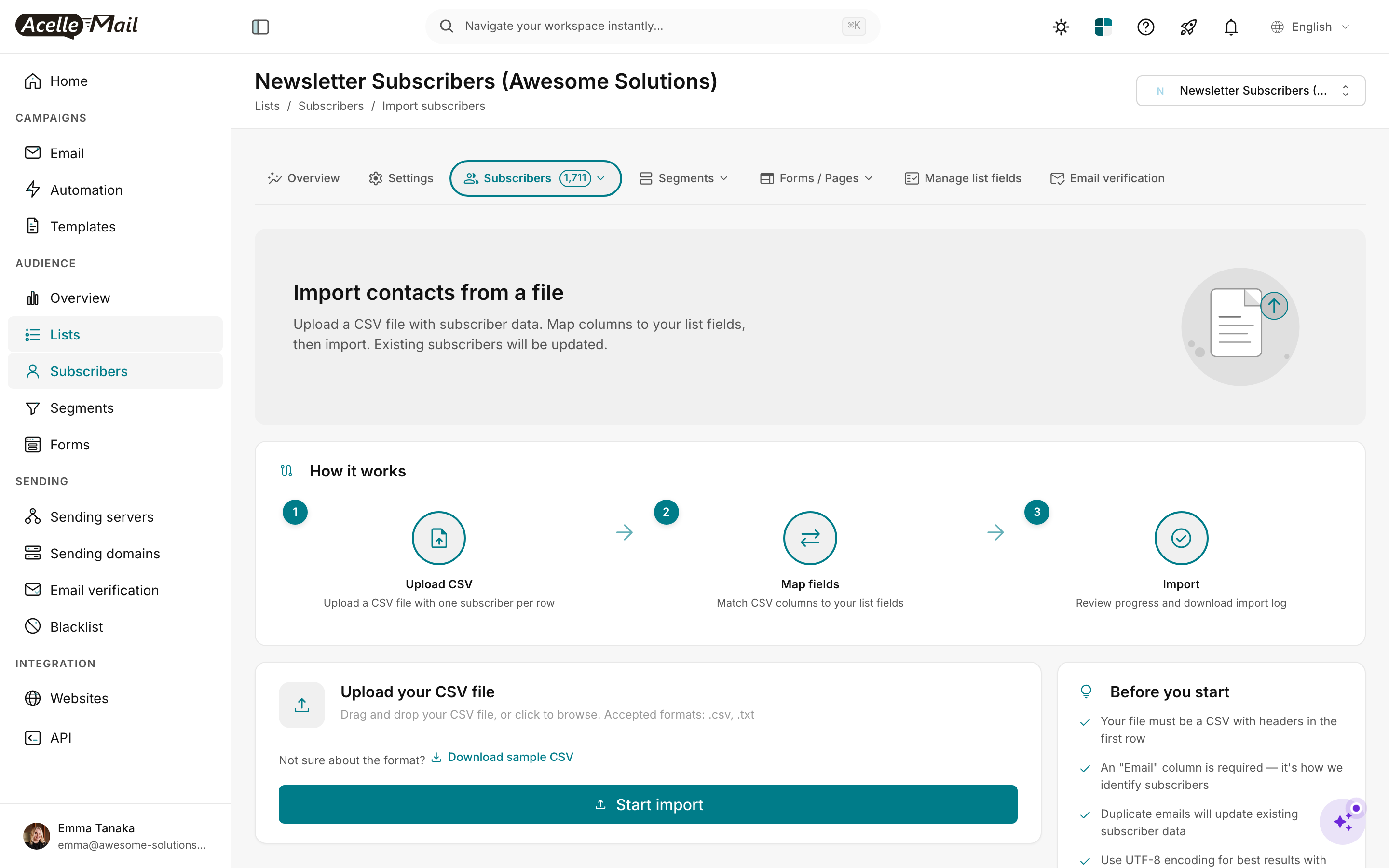
Verify subscriber count. Then run the tag-application script (above).
Import suppression#
Settings → Suppression list → Import → load suppression.csv (Kit cancelled + bounced + complained subscribers).
Re-create segments#
For each Kit segment you used regularly, recreate as an AcelleMail Segment:
- Kit "subscribers with tag X" → AcelleMail Segment:
tags contains "X".
- Kit "subscribers from form Y" → AcelleMail Segment:
SOURCE = "form Y" (or whatever custom field carries that info).
- Kit "subscribers who opened email Z" → AcelleMail Segment: more complex; usually rebuilt as a tag applied by automation rather than a dynamic segment.
Step 6 — Port templates + rebuild sequences/automations (Week 3)#
Templates#
For each Kit email HTML file:
- AcelleMail: Templates → New template → Custom HTML.
- Paste HTML.
- Search-replace Kit merge tags:
| Kit tag |
AcelleMail tag |
{{ subscriber.first_name }} |
{FIRST_NAME} |
{{ subscriber.email_address }} |
{EMAIL} |
{{ subscriber.<custom> }} |
{<CUSTOM>} |
{{ unsubscribe_url }} |
{UNSUBSCRIBE_URL} |
Kit's templates tend to be plain-text-heavy (creators prefer this for engagement), which makes the port faster than Brevo or Mailchimp migrations. Most creator newsletters port cleanly in 5-10 min each.
Sequences → AcelleMail Automations#
Each Kit sequence becomes one AcelleMail automation:
- Automation → New automation.
- Trigger: usually "Subscriber added to list" (with a tag filter) OR "Tag added."
- Add the email-send and wait-delay nodes per the documented sequence.
- Test with a fresh subscriber before activating.
A 7-email welcome sequence rebuilds in ~30 minutes.
Visual Automations → AcelleMail Automation 2#
Same approach, more complex. Each canvas node maps to an AcelleMail automation node:
| Kit canvas node |
AcelleMail node |
| Event: subscriber added to a form |
Trigger: subscriber added (with filter on SOURCE field) |
| Event: tag added |
Trigger: tag added |
| Event: purchase made |
Trigger: Webhook received (point your store at it) |
| Action: send email |
Send Email node (pick template) |
| Action: add tag |
Operation: add tag |
| Action: remove tag |
Operation: remove tag |
| Action: update field |
Operation: update subscriber field |
| Filter: in tag? |
Condition: has tag X |
| Filter: by field value |
Condition: field-based |
| Wait |
Wait node (delay) |
| Goal: tag added |
Wait + Condition node combo |
Plan ~60-90 min per complex visual automation. For specific patterns (post-purchase, lead-magnet delivery, re-engagement), see:
Test each automation end-to-end with a fresh test subscriber before activating.
Step 7 — Configure sending server (Week 3)#
Pick your upstream SMTP:
| Provider |
Cost @ 100k subs sending weekly (~400k/mo) |
Notes |
| Amazon SES |
~$40/month |
Cheapest; production-access required |
| SendGrid Essentials |
$14.95/40k/mo (probably need higher tier) |
Easy signup |
| Postmark |
$50/mo (might need higher tier) |
Premium reputation; per-email pricier |
| Mailgun Foundation |
$35/50k/mo (need higher tier) |
Generous trial |
For creators sending mostly newsletters (1-2x/week per audience), SES is the consistent winner on cost. For creators with high-frequency niche sends (daily), consider Postmark for the reputation boost.
Setup: Sending Servers → New → pick type → credentials → Test connection → Send test email. Verify the test reaches your inbox.
Step 8 — DNS migration (Weeks 4-5)#
Kit-specific DNS pattern:
| DNS record |
Kit value |
AcelleMail addition |
Approach |
| SPF |
v=spf1 include:_spf.kit.com ?all |
Append: include:amazonses.com (or your provider) |
Add new include in parallel; remove Kit at cutover |
| DKIM |
kit._domainkey.<yourdomain> (CNAME to Kit) |
New selector for AcelleMail |
Coexist (different selectors) |
| DMARC |
v=DMARC1; p=quarantine; rua=... |
(unchanged) |
Stay on existing |
References: Complete DNS Setup for Email Sending, How to Set Up SPF, DKIM, and DMARC Records, DMARC Enforcement Migration.
Step 9 — IP warmup (Week 6)#
If using shared SMTP pool, skip.
If dedicated — full warmup at IP Warmup Schedule for New Sending Servers. Kit migrants almost universally use shared SES (no dedicated unless 100k+ subs and 4M+ emails/month, see Dedicated vs Shared IP Address).
Step 10 — Parallel period (Weeks 7-8)#
Random recipient split over 2 weeks:
| Phase |
Kit share |
AcelleMail share |
| Day 1-3 |
90% |
10% |
| Day 4-7 |
75% |
25% |
| Day 8-10 |
50% |
50% |
| Day 11-14 |
25% |
75% |
| Day 15 (cutover) |
0% |
100% |
For creator audiences (highly engaged, watch open rates closely), monitor daily:
Step 11 — Cutover + Kit cleanup (Week 9)#
- Update SPF — remove the Kit include.
- Verify
spf=pass on fresh send (AcelleMail include still present).
- Update any embed code on your website to point at AcelleMail forms (if you went with Option B from Step 2).
- Update any external integrations (Zapier, Webhooks, partner CRMs) to send to AcelleMail's API instead of Kit's.
- Downgrade Kit to free tier — keep for archive access.
- 30 days later: confirm AcelleMail steady-state, then cancel Kit.
Common pitfalls#
Tag explosion. Importing 200+ tags as-is creates an unmanageable mess. Audit and consolidate to ~30-80 high-value tags before import.
Forgetting Kit Commerce. If you sell products through Kit Commerce, set up replacements (Lemon Squeezy, Stripe direct, Gumroad) before cutover. You can't migrate Kit Commerce orders/products; they live in Kit's ecosystem.
Trying to migrate the Creator Network. Kit's Creator Network paid-recommendations feature doesn't migrate. If you actively monetize through this, you'll lose that revenue stream — factor into the cost-benefit decision.
Underestimating sequence rebuild time. A long-time Kit creator with 10-15 active sequences will need 1-2 days of rebuild time. Schedule a focused block.
Skipping the segment recreation. Kit segments drive your campaign targeting. If you don't recreate them as AcelleMail Segments, you can't easily send to "subscribers with tag X" — you'd have to manually filter every send.
Form-integration breakage. Kit forms are deeply integrated with creator websites. After Kit cancellation, those forms stop accepting submissions. Plan the Step 2 Option A (webhook bridge) or Option B (full form rebuild) before cutover.
Audience-specific quirks. Some creators have audiences who are highly aware of platform changes — they may notice a "from name" difference, a different unsubscribe page, etc. Send a "you may notice some changes" heads-up to your most engaged tag (e.g. purchaser or vip) a week before cutover.
FAQ#
How long does a creator migration really take?
Realistic: 6-9 weeks for a 50k-subscriber creator with 5-10 sequences and a couple of visual automations. Faster (3-4 weeks) for newer creators with simpler funnels.
Does Kit have a built-in export/migration tool?
The subscriber CSV export is comprehensive. Templates are exportable individually. Sequences and visual automations are manual documentation. Plan accordingly.
What about Kit's Recommendations / Creator Network revenue?
Doesn't migrate. Factor the lost monthly revenue from Creator Network into the cost-benefit calculation. For most creators below 50k subs, the Creator Network revenue is dwarfed by the Kit subscription savings.
Can I migrate Kit's analytics history?
No. Engagement history is per-platform. You can export reports to keep as archives but the data doesn't replay into AcelleMail. AcelleMail starts fresh; real engagement repopulates within 2-4 sends.
What if I have a free Kit account (under 10k subs)?
Free Kit accounts have feature limits that often make AcelleMail more attractive even at year 1. But the ops overhead is real — only worth it if you're hitting the Kit free-tier limits.
Will my "Free Pro for Creators" Kit account migrate?
The Kit Creator Pro free-for-life offer (legacy promo) is grandfathered on the Kit side. Migrating off means losing that — once you cancel, you can't return to the free tier. Factor into the decision.
Does my paid newsletter (Kit Tip Jar / Substack-like feature) migrate?
No. Migrate to a separate paid-newsletter platform (Beehiiv, Substack, Ghost) if that's your revenue model. AcelleMail is for the email engine, not the subscription billing.
Related articles#
