What this is for#
ActiveCampaign is the marketing-automation tool that grew up. Starting as an email platform in 2003, it expanded into CRM, sales pipelines, deal management, conversational messaging, lead scoring, and predictive sending. Today it markets itself as the all-in-one revenue operations platform for small-to-mid-market businesses — and it's the most feature-rich email-marketing competitor on the market.
The trade-off is price. ActiveCampaign Plus, Professional, and Enterprise tiers all charge by total contact count with non-linear curves:
- $49/month at 1k contacts (Plus)
- $145/month at 5k contacts
- $375/month at 25k contacts
- $895/month at 50k contacts (Pro)
- ~$2,000-5,000/month at 100k-250k contacts depending on tier
Past 25k contacts, the per-month spend is comparable to a junior marketing hire. The math against self-hosted AcelleMail with your own SMTP — paid once for the license, then variable SMTP fees only — becomes hard to ignore.
This guide is the operator-grade playbook for the migration. The honest framing: you're trading "all-in-one platform" for "email-only platform." What you save in money, you spend deciding which of AC's CRM/Deals/Conversations/Forms/Lead Scoring/predictive features you can give up, which you'll replace with other tools, and which you'll rebuild lighter on AcelleMail.
Companion reads: Migrating from Mailchimp to AcelleMail, Migrating from MailerLite to AcelleMail, Migrating from Brevo (Sendinblue) to AcelleMail, Migrating from ConvertKit (Kit) to AcelleMail, Migrating from Klaviyo to AcelleMail.
Cost comparison — realistic numbers#
ActiveCampaign Plus tier (the most common starting plan that includes automations + CRM lite):
| Total contacts |
ActiveCampaign Plus |
AcelleMail (license + VPS + SES) |
Year 1 saving |
| 1,000 contacts |
$49/mo = $588/yr |
$39 + $7/mo VPS + $2/mo SES ≈ $147 yr 1 |
$441 |
| 5,000 contacts |
$145/mo = $1,740/yr |
$39 + $12/mo VPS + $5/mo SES ≈ $243 yr 1 |
$1,497 |
| 10,000 contacts |
$239/mo = $2,868/yr |
$39 + $20/mo VPS + $10/mo SES ≈ $399 yr 1 |
$2,469 |
| 25,000 contacts |
$375/mo = $4,500/yr |
$39 + $30/mo VPS + $25/mo SES ≈ $699 yr 1 |
$3,801 |
| 50,000 contacts |
$895/mo = $10,740/yr |
$39 + $50/mo VPS + $50/mo SES ≈ $1,239 yr 1 |
$9,501 |
| 100,000 contacts |
$1,895/mo = $22,740/yr |
$39 + $80/mo VPS + $100/mo SES ≈ $2,199 yr 1 |
$20,541 |
| 250,000 contacts |
$4,495/mo = $53,940/yr |
$39 + $200/mo VPS + $250/mo SES ≈ $5,439 yr 1 |
$48,501 |
Sources. ActiveCampaign pricing as of 2026-05 (activecampaign.com/pricing). AcelleMail license at codecanyon.net/item/acellemail. VPS pricing reflects DigitalOcean droplets per tier. SMTP cost assumes Amazon SES at $0.10/1k emails. Numbers exclude operator time + your replacement-tool costs (CRM, etc.).
The crossover is below 1k contacts. Year-1 savings at 50k contacts ($9.5k) easily fund 6 months of a senior contractor to handle migration + replacement-tool setup. At 100k+ contacts, the savings are stunning and the migration almost always pencils out.
What ActiveCampaign gives you that AcelleMail does differently#
This is the long version of the parity table because AC has the broadest feature set of any migration source.
| Feature |
ActiveCampaign |
AcelleMail |
Migration approach |
| Email marketing |
Yes (deep) |
Yes |
Direct port |
| Visual automation editor |
Yes (best-in-class) |
Yes (Automation 2) |
Re-build node-by-node |
| Tag-based + List-based segmentation |
Both, with deep operator + condition combinators |
Both (List + Segment + Tag) |
1:1 conceptual map; operators may simplify |
| CRM + Deal pipelines |
Yes (real CRM) |
No |
Replace: HubSpot Free, Pipedrive, Folk |
| Sales automation (deal-trigger flows) |
Yes |
No (deal concept doesn't exist) |
Rebuild in your replacement CRM |
| Conversations (live chat + chatbot) |
Yes (Conversations tier) |
No |
Replace: Intercom, Drift, Crisp |
| Predictive sending (best-time-per-contact) |
Yes (Pro) |
No |
Send at fixed times; lose ~5% engagement edge |
| Predictive content (best-version-per-contact) |
Yes (Pro) |
No |
A/B test variants instead |
| Lead scoring |
Yes |
No (not in core; can build via tag/field arithmetic) |
Simplified via custom field + automation |
| Site tracking (page views → events) |
Yes (Conversations + tracking script) |
No native; via custom integration |
Most teams drop this; AB testing tools replace |
| SMS marketing |
Yes (paid add-on) |
No |
Replace: Twilio, MessageBird, Postscript |
| Forms (inline, modal, slide-in) |
Yes |
Yes (Forms + Funnels) |
Re-create |
| Landing pages |
Yes |
Yes (Funnels) |
Re-create |
| WordPress/Shopify/WooCommerce integration |
Native plugins |
Via API + native plugins (vbrandsync for WP) |
Re-wire |
| Multi-user team accounts |
Yes (per-seat pricing) |
Yes (built-in) |
Big saving for teams 3+ |
Conditional content ({% if %} blocks) |
Yes |
Limited (basic merge tags only) |
Simplify templates |
| Time-zone-aware send |
Yes |
Limited (campaign-level timezone) |
Per-contact timezone via segmentation workaround |
| Reporting + automation maps |
Yes (deep) |
Yes (basic) |
Lose some sales-attribution depth |
| Free SSL/branded URLs |
Yes |
Yes via Acelle config |
Manual setup |
| White label |
No |
Yes (SaaS reseller tier in some Acelle versions) |
Bonus for migrants who become resellers |
The architectural shift to plan around:
- AC is email + sales + service. AcelleMail is email. Plan replacements for everything else BEFORE migration.
- AC's predictive features (Pro tier) don't have AcelleMail equivalents. If your operations depend on best-time-to-send or best-content-version, accept the loss or rebuild as A/B tests.
- AC's CRM has Deal pipelines that drive automations. AcelleMail automations are subscriber-driven only. You'll need to re-wire Deal-trigger workflows through whatever CRM replacement you choose.
The 8-week timeline#
| Week |
Phase |
| Week 1 |
Install AcelleMail + DNS prep + CRM replacement setup |
| Week 2 |
Export from ActiveCampaign + import to AcelleMail |
| Week 3 |
Template rebuild + automation rebuild (Part 1: simple automations) |
| Week 4 |
Automation rebuild (Part 2: complex automations + CRM-trigger workflows) + sending-server config |
| Weeks 5 |
DNS migration |
| Week 6 |
IP warmup if dedicated |
| Weeks 7-8 |
Parallel period |
| Week 9 |
Cutover + AC downgrade |
For migrants with heavy CRM dependency (sales teams using Deals/pipelines daily), add 2-3 weeks for the CRM replacement setup that has to happen in parallel.
Step 1 — Install AcelleMail + plan replacements (Week 1)#
Pick your VPS host:
Plan VPS sizing for production: 25k contacts → $20-30/month, 50k → $30-50, 100k+ → $80+. For high-volume migrants, see Scaling for 100k Emails per Day.
Post-install foundation:
Plan AC feature replacements#
Decide upfront what tools replace each AC feature you'll lose. Common combinations:
| AC feature |
Replacement option |
Approx cost |
| CRM + Deal pipelines |
HubSpot CRM Free (free up to 1M contacts; paid for advanced) |
$0-50/mo |
| CRM + Deal pipelines |
Pipedrive (built for sales pipelines) |
$15-99/mo per user |
| CRM + Deal pipelines |
Folk (modern, designer-friendly) |
$20-80/mo per user |
| Conversations (live chat) |
Crisp |
$25-95/mo |
| Conversations (live chat) |
Intercom |
$74-250/mo |
| Site tracking |
Plausible / Fathom / Posthog (free) |
$0-50/mo |
| SMS marketing |
Twilio / MessageBird |
per-message pricing |
| Lead scoring |
Manual: AcelleMail custom field updated by automation |
$0 |
| Predictive sending |
A/B test send times instead |
$0 |
For most AC migrants who use the platform mainly for email + automations, the replacement bundle is HubSpot Free CRM + an SMS provider if needed. Total replacement cost: $0-50/month — still a fraction of AC's pricing.
Set up replacements in week 1 so they're ready by the time you need them in week 4+.
Step 2 — Export from ActiveCampaign (Week 2)#
ActiveCampaign exports are comprehensive but spread across the platform.
Export contacts#
In AC (app.activecampaign.com):
- Contacts → Manage Contacts.
- Export → Export All Contacts (or filter by list / tag / segment first).
- Select fields: at minimum Email, First Name, Last Name, Phone, Status, Created At, Source, Country, City, IP, Last Active, Tags, Lists, Deal stage (if using Deals).
- Export → email with CSV (~5-15 min depending on count).
Sample CSV header:
Email,First Name,Last Name,Phone,Status,Created at,Source,Country,City,IP Address,Last Active,Tags,Lists,Deal Stage,Lead Score
Note: AC's status model#
| AC Status |
What it means |
Import? |
Active |
Subscribed and engaged |
Yes |
Unconfirmed |
Started double opt-in not completed |
No (re-confirm if relevant) |
Unsubscribed |
Opted out |
Suppression list |
Bounced |
Hard-bounced |
Suppression list |
Spam |
Marked as spam |
Suppression list |
Awaiting |
Pending validation |
Hold; re-evaluate |
Filter:
awk -F',' 'NR==1 || $5 == "Active"' ac-contacts.csv > mailable.csv
awk -F',' 'NR==1 || $5 ~ /^(Unsubscribed|Bounced|Spam)$/' ac-contacts.csv > suppression.csv
Export lists + tags#
For lists:
- Lists → Manage Lists.
- Note each list ID + name.
- The contacts CSV already has a
Lists column — multi-value (semicolon-separated).
For tags:
- Settings → Manage Tags.
- Note tag names + counts. AC power users often have 100-300 tags; consolidate to ~50-80 before migration (audit; delete one-off / stale tags).
- Tags appear in the contacts CSV
Tags column (semicolon-separated).
Export Custom Fields#
- Contacts → Manage Fields (Custom Fields panel).
- Note each field's name, type, and personalization tag.
- They appear in the contacts CSV as columns named like
IFIELD[<id>] or by their custom label.
You'll need each custom field replicated in AcelleMail before import (Step 4).
Export Automations#
ActiveCampaign automations don't export. Document manually:
For each automation under Automations:
- Screenshot the canvas (full view; AC's canvas can be huge — capture in sections if needed).
- Note the trigger.
- For each node:
- Send email → which template
- Send SMS → flag for replacement plan
- Wait → duration
- If/else → the condition rule
- Update contact → field + value
- Add tag / Remove tag
- Adjust score → if using lead scoring
- Add to/remove from deal → flag for CRM replacement
- Goal → goal conditions
- Save each Email's HTML (Email step → Open → View source).
AC power users often have 20-50 active automations. Plan 2-3 days for full documentation.
Export Deals (if using AC's CRM)#
- Deals → Manage Pipelines.
- Export each pipeline. CSV format:
Deal ID,Title,Contact Email,Pipeline,Stage,Value,Currency,Owner,Created,Last Updated
- These migrate to your replacement CRM, not to AcelleMail. Plan separately per your replacement-tool choice.
Export Forms#
- Forms → All Forms.
- Note each form's embed code and the contact behavior (which tags get applied on submit, which automations trigger).
- Recreate in AcelleMail Forms post-cutover, OR keep AC forms running via webhook-bridge (similar to the Kit migration pattern; see Step 7).
Export templates#
- Campaigns → Templates (or Saved).
- For each template, Export → save HTML file.
Export campaign history (for archive)#
- Campaigns → Manage Campaigns.
- Export reports CSV for retention.
Step 3 — Clean the CSV (Week 2)#
Standard cleanup applies — see Email List Hygiene: Clean Your List for Better Deliverability.
AC-specific notes:
Active = not necessarily engaged. AC's Active status means "still subscribed," not "still opening your emails." Decide your engagement window:
- Conservative: import only contacts with
Last Active in the last 90 days.
- Moderate: import everyone with
Last Active in the last 365 days.
- Aggressive: import everyone, plan a re-engagement campaign post-migration.
# Active + last activity within 365 days
awk -F',' '
  BEGIN { yr_ago = strftime("%Y-%m-%d", systime() - 365*86400) }
  NR==1 || ($5 == "Active" && $11 >= yr_ago)
' ac-contacts.csv > engaged-mailable.csv
Dedupe by email — AC profiles are unique by email, but if you have multiple AC accounts (multi-brand), check across.
Validate with NeverBounce / Kickbox / ZeroBounce for lists >25k — even AC's validation has spam-trap drift over 12+ months.
Step 4 — Field mapping (Week 2)#
| AC CSV column |
AcelleMail List Field |
Email |
EMAIL (system) |
First Name |
FIRST_NAME |
Last Name |
LAST_NAME |
Phone |
PHONE (custom — create) |
Status |
(drop — filter to Active only) |
Created at |
OPT_IN_TIME (system) |
Source |
SOURCE (custom — create) |
Country |
COUNTRY (custom — create) |
City |
CITY (custom — create) |
IP Address |
OPT_IN_IP (custom — create) for GDPR |
Last Active |
LAST_ACTIVE (custom — create) |
Lead Score |
LEAD_SCORE (custom — create) — replaces AC's native scoring |
Tags |
(apply after import via tinker script) |
Lists |
(apply after import via tinker script) |
Deal Stage |
(drop — migrates to replacement CRM, not AcelleMail) |
| each custom field |
<UPPERCASE_NAME> (custom — create) |
Step 5 — Import to AcelleMail (Week 2)#
For AC migrants, recommended import strategy:
- One AcelleMail List named
Contacts — migrated from ActiveCampaign YYYY-MM.
- All Active+engaged contacts into that list.
- Tags + Lists applied via tinker script after import.
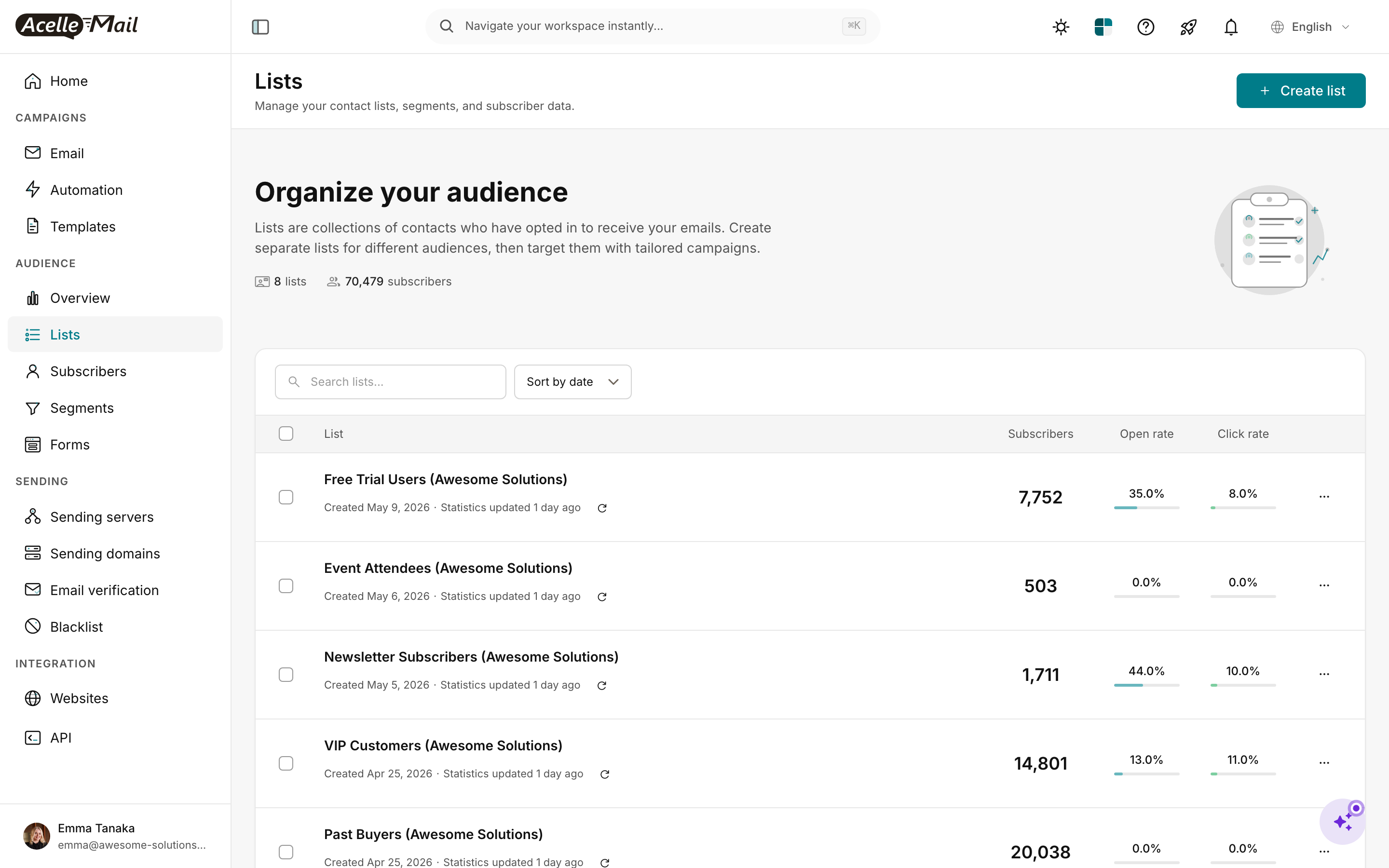
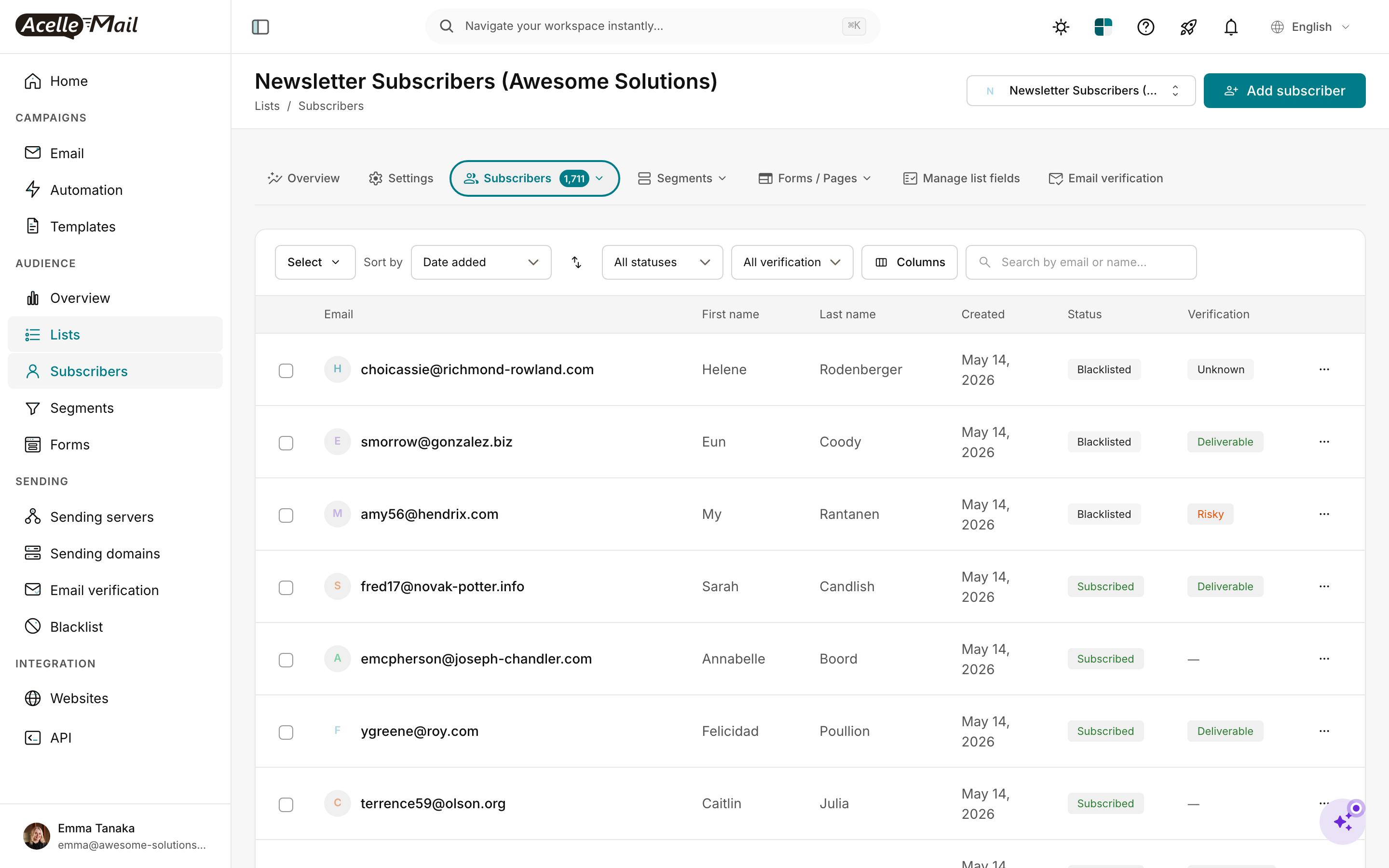
Create all custom List Fields per Step 4 mapping.
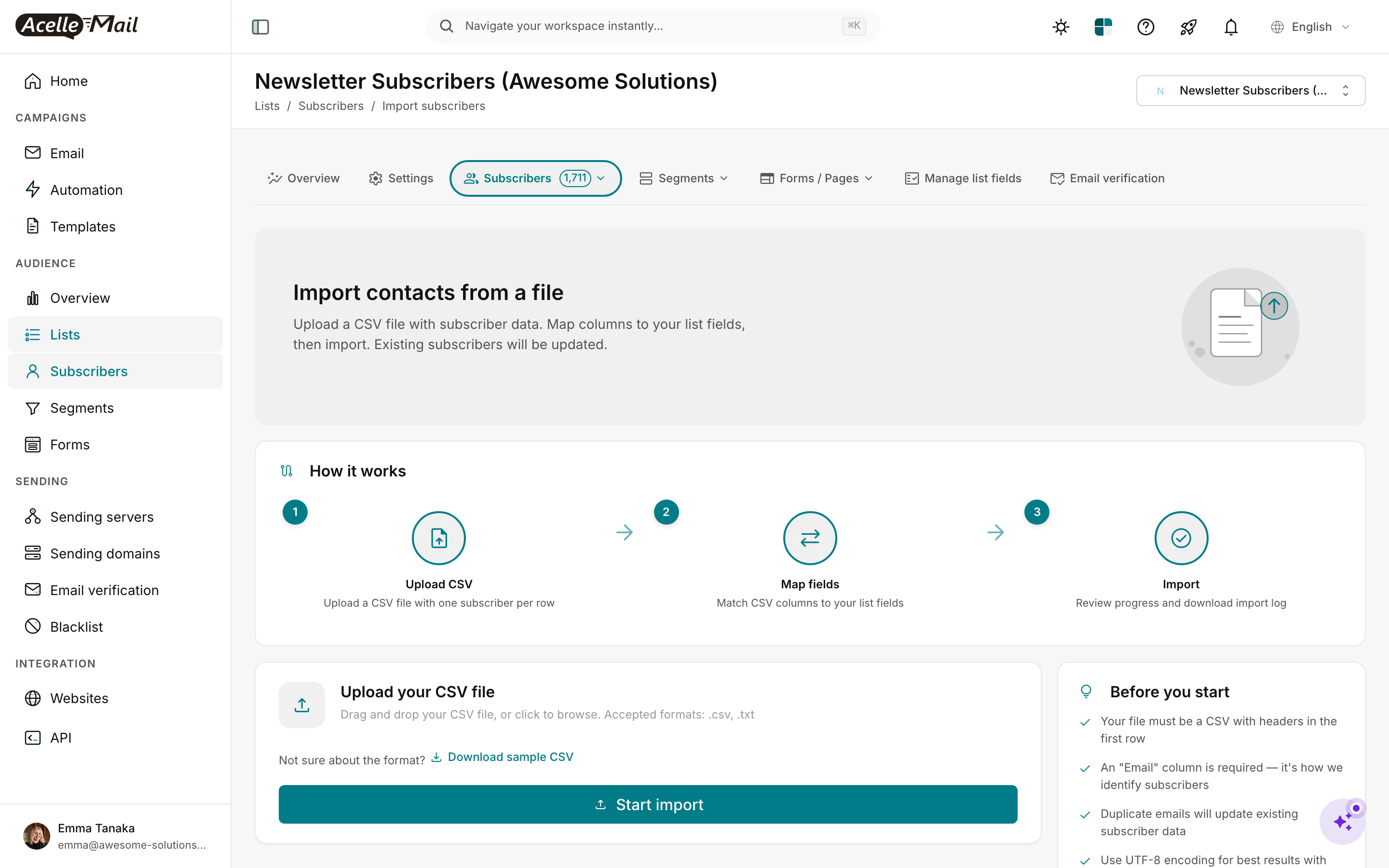
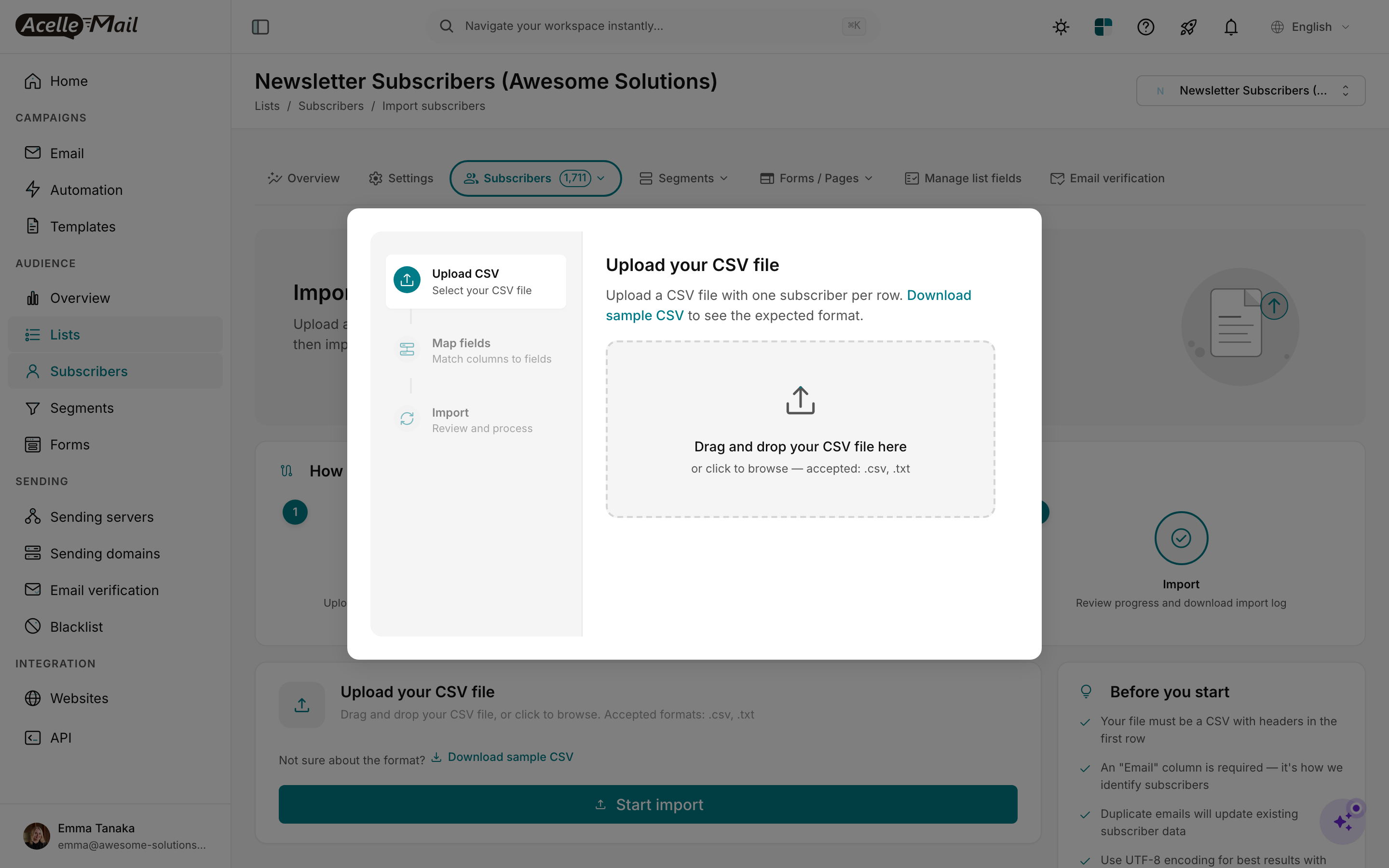
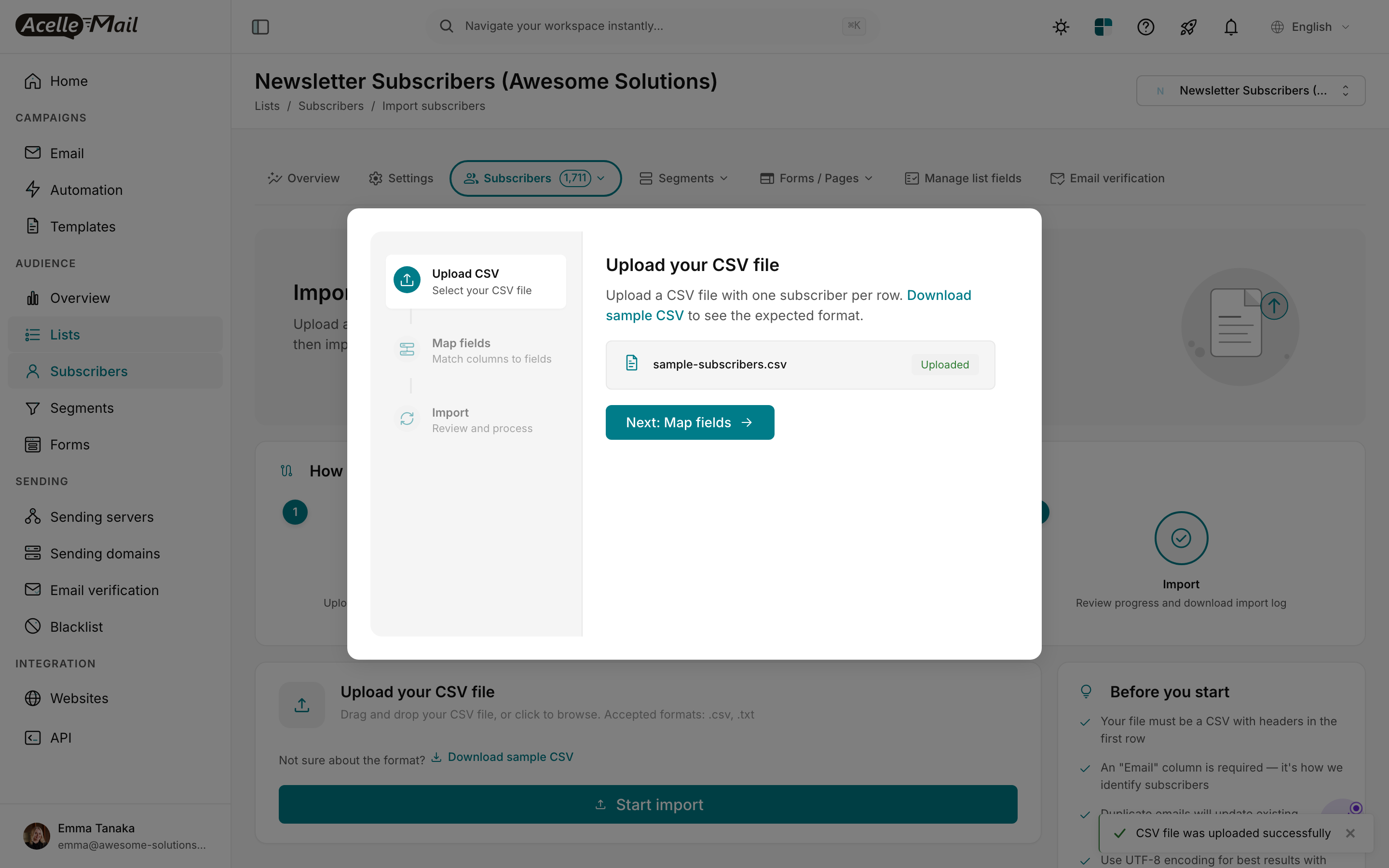
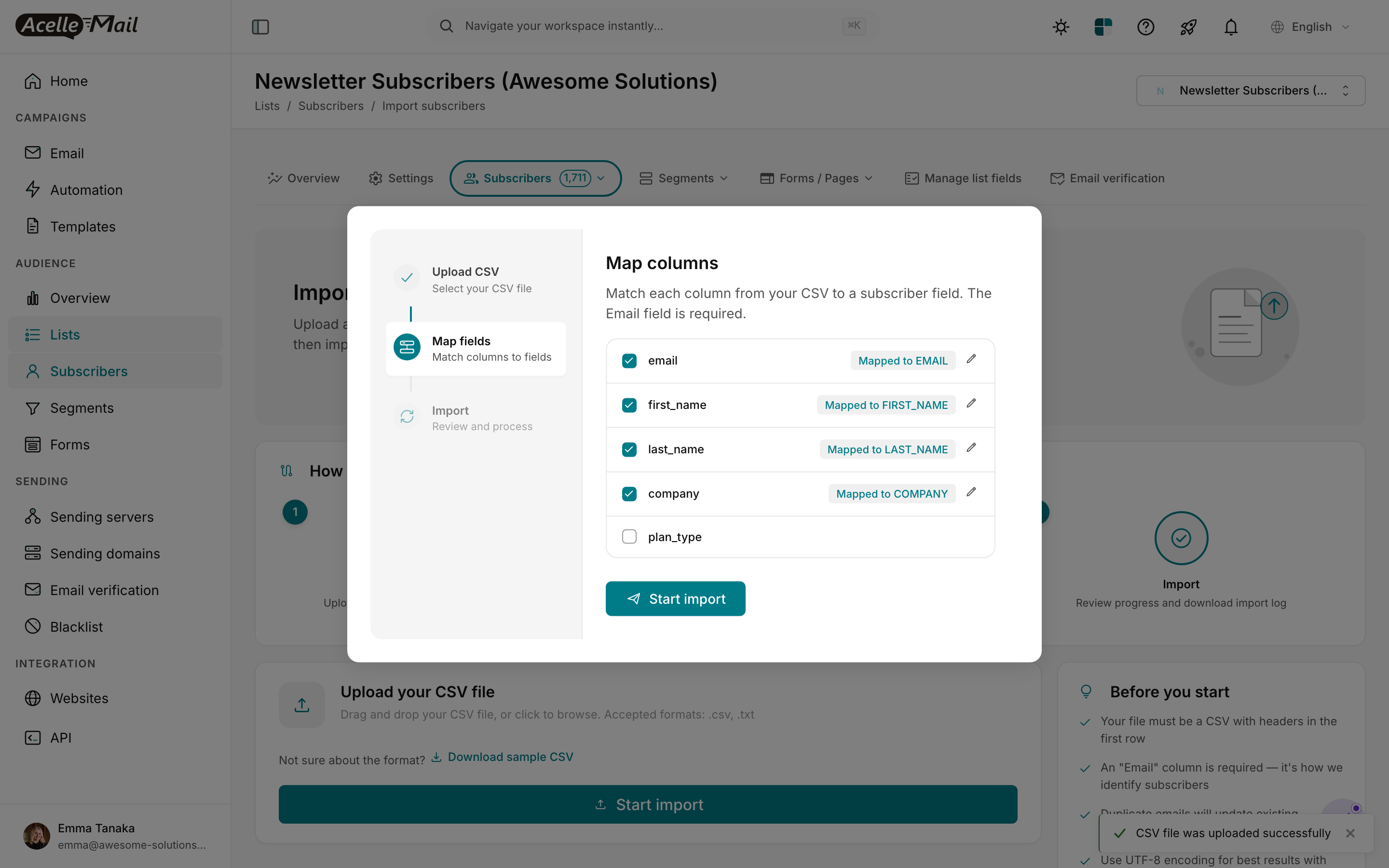
Map columns to fields. Drop the Tags, Lists, and Deal Stage columns at this step — handle separately.
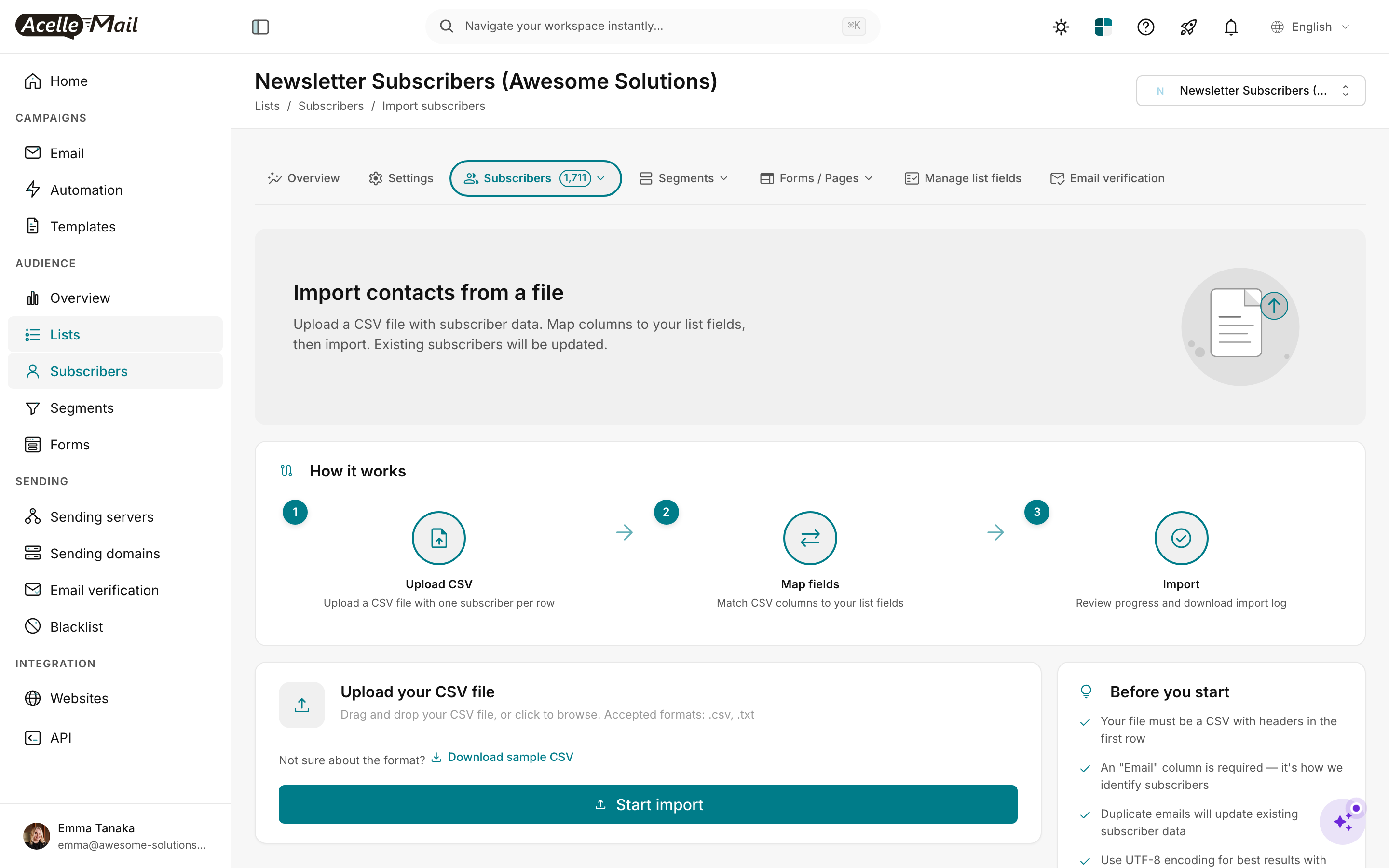
Verify count + sample 5 random contact data points.
Apply tags#
sudo -u www-data php artisan tinker --execute='
  $csv = fopen("/tmp/ac-contacts.csv", "r");
  $headers = fgetcsv($csv);
  $emailIdx = array_search("Email", $headers);
  $tagsIdx = array_search("Tags", $headers);
  $count = 0;
  while (($row = fgetcsv($csv)) !== false) {
    $email = $row[$emailIdx];
    $tagsStr = $row[$tagsIdx];
    if (!$email || !$tagsStr) continue;
    $tags = array_filter(array_map("trim", explode(";", $tagsStr)));
    $sub = App\Model\Subscriber::where("email", $email)->first();
    if (!$sub) continue;
    foreach ($tags as $tagName) {
      $tag = App\Model\Tag::firstOrCreate([
        "name" => $tagName,
        "customer_id" => $sub->mailList->customer_id,
      ]);
      $sub->tags()->syncWithoutDetaching([$tag->id]);
    }
    $count++;
  }
  fclose($csv);
  echo "tagged $count contacts\n";
'
Import suppression#
Settings → Suppression list → Import → upload the Unsubscribed/Bounced/Spam contacts CSV.
Migrate Deals to your replacement CRM#
This happens outside AcelleMail. Per your replacement-tool choice:
- HubSpot Free: Import deals via Settings → Import → Deal records. Match on email to existing contacts.
- Pipedrive: Use the CSV import wizard with deal-stage mapping.
- Folk: Direct CSV import; map Deal fields to Folk's deal model.
This step is the most tool-specific. Budget a day per CRM.
Step 6 — Port templates + rebuild automations (Weeks 3-4)#
Templates#
For each AC template HTML file:
- AcelleMail: Templates → New → Custom HTML.
- Paste HTML.
- Search-replace AC merge tags:
| AC tag |
AcelleMail tag |
%FIRSTNAME% |
{FIRST_NAME} |
%LASTNAME% |
{LAST_NAME} |
%EMAIL% |
{EMAIL} |
%FIELDS[<id>]% or %<CUSTOM_TAG>% |
{<CUSTOM>} |
%UNSUBSCRIBE% |
{UNSUBSCRIBE_URL} |
%LINK_FOR_WEB% |
{VIEW_AS_WEBPAGE_URL} |
AC's {% if %} conditional blocks |
Simplify; AcelleMail doesn't support conditional content in templates |
The conditional-content limitation is the biggest AC-specific template friction. Common patterns:
- AC:
{% if contact.field == "Premium" %}Premium content{% else %}Free tier content{% endif %}
- AcelleMail: Split into two separate templates; segment subscribers by field value; send the appropriate template to each segment.
Many AC migrants reduce template count from "1 template with 10 conditional sections" to "5 simpler templates with audience-targeted sends." Usually a quality improvement; sometimes an organizational hassle.
Automations rebuild#
Each AC automation → one AcelleMail Automation 2. Node-by-node mapping:
| AC node |
AcelleMail node |
| Trigger: Subscribes to list |
Subscriber added to list |
| Trigger: Tag added |
Tag added |
| Trigger: Field changed |
Subscriber field changed |
| Trigger: Submits form |
Subscriber added (via form-bridge) |
| Trigger: Visits page (Site tracking) |
Webhook received |
| Trigger: Sends a message reply |
Skipped (no equivalent in AcelleMail) |
| Send email |
Send Email node (pick template) |
| Send SMS |
Skipped — send via your SMS provider's API instead |
| Wait |
Wait node |
| If/else |
Condition node |
| Update contact field |
Operation: update field |
| Add tag / Remove tag |
Operation: add/remove tag |
| Adjust score |
Operation: update LEAD_SCORE field (subtraction = negative arithmetic) |
| Add to/Remove from list |
Operation: move subscriber between lists (limited; usually skipped) |
| Add deal |
Skipped in AcelleMail; handle via CRM webhook (CRM watches AcelleMail's webhook → creates deal) |
| Move deal stage |
Same — CRM-side |
| Webhook |
Operation: send webhook |
| Goal |
Wait + Condition node combo |
For complex flows with Deal triggers (e.g. "When deal moves to 'Won', tag contact + send congrats email"), the workflow shifts:
- AC: All in one automation canvas.
- AcelleMail: Two halves:
- The AcelleMail automation handles the email side (triggered by webhook).
- The CRM (HubSpot/Pipedrive) handles deal-stage transitions and calls AcelleMail's trigger endpoint via webhook.
See Using API Triggers for Custom Automation Workflows for the webhook pattern.
Plan effort per automation:
- Simple welcome / nurture (5-7 emails, no branching): 30-60 min
- Branching welcome (with if/else for engagement): 1-2 hrs
- Lead-score-trigger flows: 2-4 hrs (rebuild scoring logic via tag/field arithmetic)
- Deal-trigger flows: 3-6 hrs (CRM webhook integration)
- SMS-included flows: skip SMS nodes; send via separate SMS tool
Total: budget 2 weeks for a typical AC power user with 20-30 automations.
Step 7 — Configure sending server (Week 4)#
| Provider |
Cost @ 25k contacts |
Notes |
| Amazon SES |
$15-25/mo |
Cheapest; production-access required |
| SendGrid |
$35-50/mo |
Easier signup |
| Postmark |
$50+/mo |
Premium reputation |
| Mailgun |
$35+/mo |
Generous trial |
For most AC migrants, SES wins on cost. Above 50k contacts, consider dedicated IP add-on — see Dedicated vs Shared IP Address.
Step 8 — DNS migration (Week 5)#
| DNS record |
AC value |
AcelleMail addition |
Approach |
| SPF |
v=spf1 include:_spf.activehosted.com ?all |
Append: include:amazonses.com |
Add in parallel; remove AC at cutover |
| DKIM |
dk._domainkey.<yourdomain> (TXT) |
New selector |
Coexist |
| DMARC |
(unchanged) |
(unchanged) |
Stay |
| Branded tracking |
AC-hosted tracking subdomain |
Configure AcelleMail tracking domain |
Switch CNAME at cutover |
References: Complete DNS Setup for Email Sending, How to Set Up SPF, DKIM, and DMARC Records, DMARC Enforcement Migration.
Step 9 — IP warmup (Week 6)#
If using shared SMTP pool — skip.
If dedicated — full warmup at IP Warmup Schedule for New Sending Servers.
Step 10 — Parallel period (Weeks 7-8)#
Random recipient split:
| Phase |
AC share |
AcelleMail share |
| Week 7 day 1-3 |
90% |
10% |
| Week 7 day 4-7 |
75% |
25% |
| Week 8 day 1-3 |
50% |
50% |
| Week 8 day 4-7 |
25% |
75% |
| Week 9 day 1 |
0% |
100% (cutover) |
Daily monitoring (AC migrants are often sales/marketing teams who watch metrics closely):
- Open rate — within 10% of AC baseline post-warmup.
- Click rate — within 10%.
- Bounce rate — <2%.
- Unsubscribe rate — should match AC (slight changes from new footer normal).
- Spam complaints — <0.1%.
- Sales pipeline movement (if applicable) — verify deal-stage automations still fire via CRM-AcelleMail webhook integration.
- Postmaster Tools, FBL, Sender Reputation — see Sender Reputation Monitoring and Feedback Loops (FBL) Setup.
If any major metric drops >15%, pause AcelleMail share, debug, fix, then resume.
Step 11 — Cutover + AC cleanup (Week 9)#
- Update SPF — remove AC include.
- Verify
spf=pass dkim=pass dmarc=pass.
- Switch branded tracking CNAME.
- Verify CRM-AcelleMail webhook integration is firing. Move a test deal stage in HubSpot/Pipedrive; confirm AcelleMail receives the trigger.
- Update external integrations (Zapier, custom webhooks, partner platforms).
- Downgrade AC to lowest tier — keep historical access.
- Cancel AC SMS, Conversations, or other paid add-ons separately.
- 30 days later: confirm steady-state, cancel AC entirely (or keep at lowest tier for archive).
Common pitfalls#
Underestimating CRM replacement effort. AC users who rely on Deals daily may need 3-4 weeks for full CRM setup + data migration + team training. Don't skip this in week 1.
Forgetting conditional content templates. AC's {% if %} blocks let one template serve multiple audiences. Splitting into multiple templates is more work but easier to maintain long-term. Don't try to hack conditionals into AcelleMail.
Losing predictive sending insights. AC Pro's best-time-to-send doesn't migrate. Most operators don't notice the ~5% engagement loss after a month; some power users do. A/B test send times to recover most of the edge.
Forgetting site tracking. If your automations trigger on page visits, those triggers stop firing post-migration unless you build a custom site-tracking → AcelleMail-webhook bridge. Many AC migrants drop this and accept simpler automations.
Trying to rebuild AC's CRM features in AcelleMail. AcelleMail isn't a CRM. Don't try to track deals or pipelines in subscriber custom fields — use a real CRM. The two-tool pattern (AcelleMail for email + CRM for deals) is the correct architecture.
Underestimating automation rebuild time for complex flows. AC power users have 30+ automations with deep conditional logic. Plan a focused 2-week block; don't try to ship migration in 6 weeks if you're in this bucket.
Cancelling AC too fast. The 30-day buffer gives fallback. Cancel only after every CRM webhook, every automation, and every integration has fired successfully at least once in production.
FAQ#
How long does an AC migration really take?
Realistic: 8-10 weeks for a 25k-contact AC power user with 20+ automations and active Deal pipelines. Faster (5-6 weeks) for AC users who mainly use email and have light CRM usage.
Should I migrate if I'm on AC Lite (no automations, no Deals)?
The cost savings still favor AcelleMail at any tier ≥1k contacts. The migration is much simpler without automations + Deals — maybe 3-4 weeks. Yes, migrate.
What about ActiveCampaign Conversations (live chat)?
Doesn't migrate to AcelleMail. Replace with Crisp, Intercom, or similar. Plan the replacement before cutover.
Can I keep AC's CRM and use AcelleMail just for email?
Theoretically yes — AC has a CRM-only tier. Practically rare; the cost split rarely makes sense vs. HubSpot Free or Pipedrive. Better path: full migration with HubSpot CRM.
What about my lead-scoring history?
Migrate the current score as a custom field (LEAD_SCORE). The historical score-change events don't migrate; only the snapshot. Rebuild scoring logic via automation update field operations.
Does AcelleMail support deal-triggered automations?
Not natively. Use webhook bridges from your replacement CRM. The CRM watches deal-stage changes and calls AcelleMail's API trigger endpoint when conditions match.
Will my AC automation reports / analytics migrate?
No. Engagement history is per-platform. Export AC reports CSV for archive; AcelleMail starts fresh.
Can I migrate AC forms in-place?
Two options: rebuild in AcelleMail Forms (lose AC's specific form designs) OR keep AC forms running with a webhook bridge that forwards submissions to AcelleMail (extra ops, but seamless to users). Most migrants pick rebuild for cleanliness.
Related articles#
